Business associates need their own HIPAA Security Rule review; the client's compliance program does not cover them. Any company that creates, receives, maintains, or transmits protected health information for a covered entity needs a documented review of the risks and weak spots affecting ePHI in its systems, as required under 45 CFR 164.308(a)(1)(ii)(A).
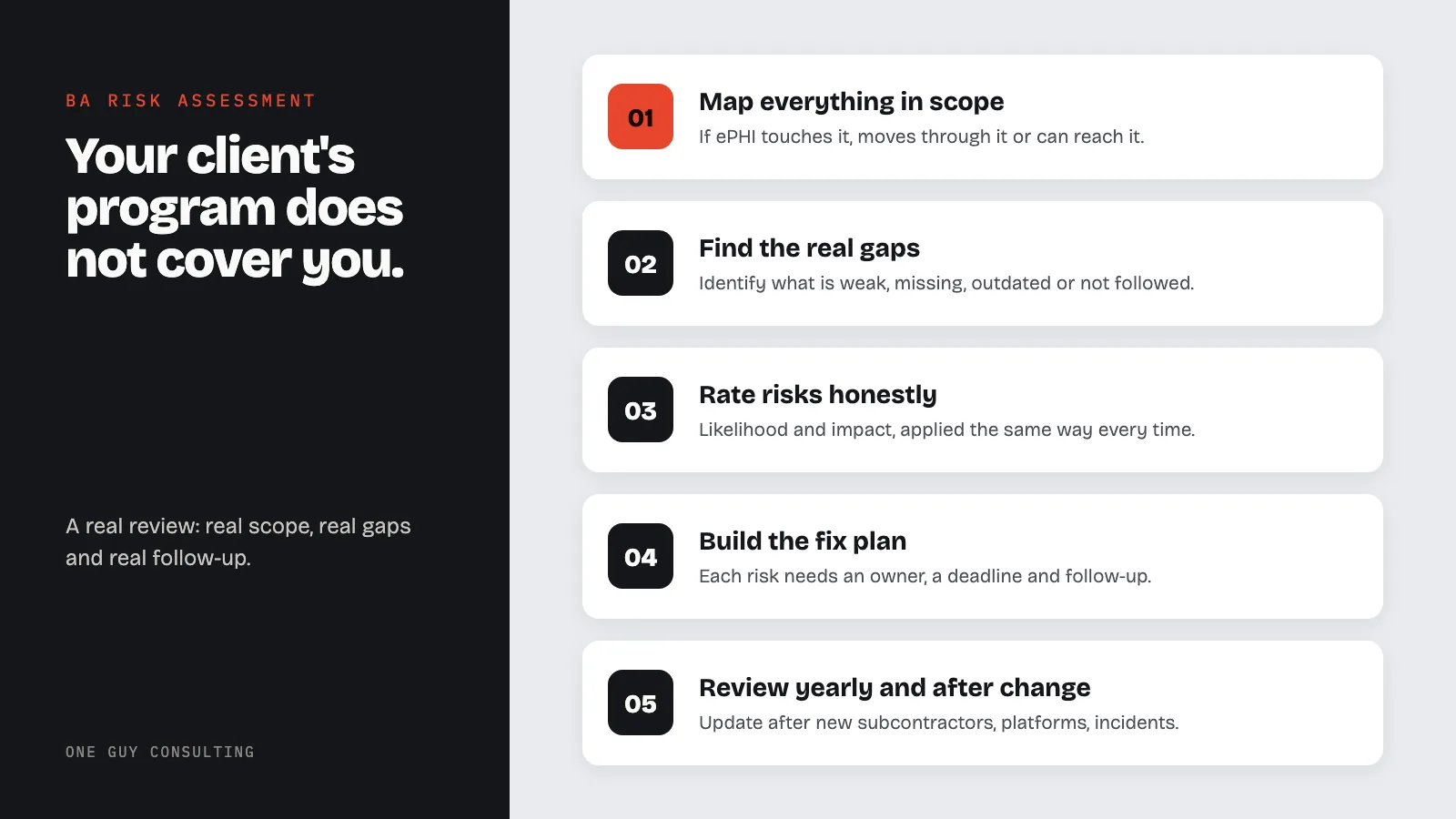
Many business associates think their client's compliance program covers them too.
It does not.
If your company creates, receives, maintains, or transmits protected health information for a covered entity, you need your own HIPAA Security Rule review. Not a copy of the client's. Not their questionnaire. Not a generic checklist. Not a one-page statement about best practices.
You need a documented review of the risks and weak spots affecting ePHI in your systems. That means privacy, integrity, and availability.
This is required under 45 CFR 164.308(a)(1)(ii)(A) " review how to conduct a HIPAA risk assessment for the full methodology. It matters just as much for business associates as for covered entities.
Why Business Associates Need a Separate Risk Assessment
Business associates usually sit in the most exposed part of the data flow.
They host systems, process claims, manage billing, handle backups, store files, or maintain cloud platforms. Many also support IT systems and analyze data. This means they often have broad access to ePHI from multiple clients at once.
When a business associate fails, the damage usually affects more than one provider.
This is why a BA risk analysis cannot copy a provider assessment. The risk profile is different:
- more client environments
- more vendor dependencies
- more subcontractors (track them with BAA management tools and review our complete BAA guide)
- more remote admin access
- more data concentration
- more contractual reporting duties
A business associate that skips risk analysis creates internal compliance risk. It also creates contract risk across every client relationship.
What Should Be in Scope for a BA Risk Assessment
The most common failure is incomplete scope.
Business associates often review only the main production platform. They skip the rest of the environment where ePHI can still live or move.
A solid BA risk analysis should include:
Systems That Store or Process ePHI
- production applications
- databases
- file storage
- backup repositories
- document management systems
- support ticket systems if PHI can get into tickets
Access Paths
- VPN
- remote desktop or remote admin tools
- privileged admin access
- identity provider integrations
- contractor access paths
Workforce and Operations
- onboarding and offboarding
- role-based access
- access reviews
- training and awareness
- incident response responsibilities
Devices and Infrastructure
- laptops and workstations
- servers
- cloud resources
- firewalls
- endpoint protection
- logging and monitoring systems
Vendors and Subcontractors
- cloud hosting providers
- managed service providers
- outsourced support vendors
- subcontractors with any PHI access
- backup and disaster recovery vendors
If ePHI touches it, stores on it, moves through it, or can be reached from it, it is in scope.
The BA-Specific Threats That Get Missed
A good risk analysis connects threats, weak spots, and actual business operations. The HIPAA Security Rule organizes required safeguards into administrative, physical, and technical categories.
Business associates commonly miss these BA-specific risk areas.
Shared Administrative Access Across Clients
Many service providers use central admin tools to manage multiple customers. This is efficient, but it creates concentration risk. A breached admin account can expose data across multiple covered entities.
The risk analysis should evaluate:
- privileged access design
- MFA coverage
- segmentation between clients
- logging on admin actions
- emergency access controls
Support and Troubleshooting Workflows
PHI often leaks into support operations. Staff copy screenshots into tickets, paste patient IDs into chats, or move files into temp folders.
If your risk analysis ignores your ticketing and support process, it is incomplete.
Subcontractor Exposure
Business associates must manage downstream risk. Signing one BAA and moving on is not enough.
If your subcontractor hosts backups, provides cloud storage, or supports production systems, their controls affect your risk level directly.
Your review should ask:
- which subcontractors can access ePHI?
- what data do they touch?
- how is access controlled?
- how is their security reviewed?
- what happens if they have an incident?
Client Data Segregation
A BA environment often contains PHI for multiple customers. Logical separation and tenant isolation are key.
If your team cannot clearly explain how one client's data stays apart from another's, that is a major risk. Logical separation must be clear and documented.
Incident Notification Timelines
Covered entities expect short notice windows after an incident. Your risk analysis should check whether your team can detect, probe, and escalate fast enough to meet contractual deadlines.
If your contracts say 24 or 72 hours, your logging and staffing must support that timeline. If they cannot, document the gap in the review.
What OCR and Clients Want to See
A useful BA risk analysis is specific. It should show:
- what systems are in scope
- where ePHI lives
- what threats are likely
- what weak spots exist
- what safeguards are already in place
- how each risk is rated
- what fixes are planned
- who owns the fixes
- when follow-up review will happen
The point is not to claim everything is low risk. The point is to show a real decision process tied to real controls.
A business associate that documents no meaningful risks usually looks less mature, not more so.
The Risk Rating Problem
Many teams rate risk in a way that makes every issue look low on paper.
That is a mistake.
Likelihood and impact should reflect the actual BA environment. For instance:
- no MFA on admin access is not low risk
- no written offboarding process is not low risk
- no tested backup restore process is not low risk
- no review of subcontractor controls is not low risk
If the scoring never produces high-priority items, the review probably is not honest enough to be useful.
Common BA Risk Assessment Failures
These patterns show up again and again:
1. Treating the Assessment as a Sales Document
Some BAs write risk analysiss like marketing copy. They talk about security culture, top-grade systems, and best-in-class controls without documenting specific threats, gaps, or evidence.
That is not a risk assessment.
2. Reusing the Same Template Every Year
If your environment changed, your review must change too.
New cloud vendors, new clients, new admin tools, remote workforce changes, product expansion, acquisitions, and incident learnings should all affect the next review.
3. Ignoring Subcontractors
Subcontractor dependence is one of the biggest BA-specific risks. If it is not clearly addressed, the review is incomplete.
4. No Connection to Fixes
A list of risks without owners, deadlines, and follow-up actions is incomplete. The review must feed a risk management plan.
5. No Evidence Behind the Conclusions
If you say backups are tested, show test evidence somewhere. If you say access is reviewed quarterly, maintain a review process and records. If you say all remote access uses MFA, verify it and document it.
A Practical BA Risk Assessment Workflow
For most business associates, the process should look like this:
Step 1: Build the Asset and Data Flow Inventory
Map:
- applications
- databases
- storage
- integrations
- admin paths
- workforce roles
- vendors and subcontractors
Step 2: Identify Reasonably Anticipated Threats
Examples:
- phishing and credential theft
- ransomware
- unauthorized admin access
- client data crossover
- accidental disclosure through support operations
- cloud misconfiguration
- failed offboarding
- backup failure
- vendor compromise
Step 3: Document Existing Controls
Examples:
- MFA
- encryption
- audit logging
- endpoint protection
- segmentation
- access reviews
- training
- incident response steps
- vendor review processes
Step 4: Identify Gaps and Vulnerabilities
This is where the real value is. Identify what is weak, missing, outdated, or not always followed.
Step 5: Rate the Risks
Use a consistent method based on likelihood and impact. Use it honestly and the same way every time. Our HIPAA risk assessment template guide walks through risk rating frameworks and what a defensible methodology looks like.
Step 6: Build the Fix Plan
Every meaningful gap should have:
- an owner
- an action
- a target date
- a follow-up review point
Step 7: Review at Least Annually and After Major Change
If you add a major subcontractor, expand to a new platform, merge environments, have a security incident, or change data flows, update the review.
Questions Covered Entities Will Ask
Even before OCR scrutiny, your clients may ask for evidence that your risk analysis process is real.
Expect due diligence questions like:
- When was your last risk assessment completed?
- Who performed it?
- What methodology did you use?
- What were the high-risk findings?
- What fixes are still open?
- How do you assess subcontractor risk?
- How often do you review privileged access?
- Do you maintain a current system inventory and data flow map?
If your team cannot answer those questions clearly, your risk analysis process needs work.
A Short BA Risk Assessment Checklist
- Do we have a current documented risk analysis?
- Does it cover all systems and workflows involving ePHI?
- Does it address support operations and admin access?
- Does it include subcontractors and cloud dependencies?
- Does it evaluate segmentation between client environments?
- Does it document current controls and real gaps?
- Does it produce a fix plan with owners and deadlines?
- Is it reviewed at least once a year and after major change?
If not, fix the process before the next client due diligence check or incident forces the issue.
Final Takeaway
A HIPAA risk analysis for business associates is not optional background paperwork. It is one of the main documents that shows your team understands its actual exposure.
Covered entities want to know whether you can protect their data. OCR will want to know whether you reviewed your own risks in a documented, defensible way. And if a breach leads to a patient complaint, knowing how to respond to a HIPAA complaint depends heavily on having this documentation ready before the investigation starts. Both questions point to the same thing:
you need a real review, with real scope, real gaps, and real follow-up.
If your current review is generic, outdated, or limited to a surface-level checklist, fix it. Do not wait for a client to ask or an incident to test it.
Need help tightening BA risk analysis docs, vendor oversight, and fix planning? One Guy Consulting helps business associates build practical HIPAA programs that hold up under due diligence and operational pressure. See what happens after you sign up or visit One Guy Consulting
Related Reading
- What Is a HIPAA Business Associate Agreement?
- 7 BAA Mistakes That Lead to HIPAA Fines
- The HIPAA Compliance Checklist for Small Practices
- HIPAA Compliance Officer Guide
- Should You Start With a HIPAA Security Risk Assessment?
- HIPAA Risk Assessment Template Guide
- HIPAA Gap Analysis Remediation
- What Is a HIPAA Gap Analysis?
- Should You Start With a HIPAA Security Risk Assessment?
- HIPAA Risk Assessment Template Guide
- HIPAA Gap Analysis Remediation
- What Is a HIPAA Gap Analysis?
- Should You Start With a HIPAA Security Risk Assessment?
- HIPAA Risk Assessment Template Guide
- HIPAA Gap Analysis Remediation
- What Is a HIPAA Gap Analysis?
Business Associate Risk Assessment Scope
Business associate risk assessments must address the same Security Rule requirements as covered entities, plus additional factors specific to the BA relationship.
| Assessment Area | CE Focus | BA Additional Focus |
|---|---|---|
| ePHI scope | All ePHI the CE creates or maintains | Only ePHI received from or created on behalf of each CE client |
| BAA obligations | Ensuring all vendors have signed BAAs | Meeting specific security commitments in each CE's BAA |
| Subcontractors | Oversight of direct BAs | BAAs with all downstream subcontractors who touch ePHI |
| Breach notification | Notify individuals and HHS | Notify CE within BAA-specified timeframe (often shorter than 60 days) |
| Return/destruction | Verify BA compliance at termination | Document ePHI return or destruction procedures for each CE |
| Multi-client isolation | N/A | Demonstrate logical or physical separation of different CE data |
Key stat: Business associates are directly liable for HIPAA Security Rule compliance under the HITECH Act. In 2025, business associate breaches accounted for over 30% of all reported incidents. Under 45 CFR 164.308(a)(1), BAs must conduct their own independent risk assessments - relying on a covered entity's assessment does not satisfy this requirement.
Sources
Try three of our 3D staff training courses free →
Frequently Asked Questions
Do business associates have to conduct their own HIPAA risk assessments?
Yes. The HIPAA Security Rule applies directly to business associates under the 2013 Omnibus Rule. Business associates must conduct their own risk analysis under 45 CFR 164.308(a)(1) and cannot rely on the covered entity's risk assessment.
What should a business associate risk assessment include?
It must identify all ePHI the organization creates, receives, maintains, or transmits; identify potential threats and vulnerabilities; evaluate likelihood and impact; assess current safeguard effectiveness; and document residual risk with a remediation plan.
How often should a business associate conduct a risk assessment?
HIPAA requires risk assessments to be conducted regularly. The 2026 Security Rule update specifies at least every 12 months. Business associates should also reassess when adding new systems, changing vendors, or experiencing security incidents.
What happens if a business associate does not have a risk assessment?
A missing or outdated risk assessment is one of the most commonly cited findings in OCR enforcement actions against business associates. OCR has levied fines specifically for this gap.