Ex-Employees With Active System Logins Are a Common HIPAA Gap
Direct answer: The HIPAA Security Rule at 45 CFR 164.308(a)(3)(ii)(C) requires covered entities and business associates (practices like yours, and the vendors who handle patient data for them) to have steps for cutting off access to ePHI. Access must end when a job ends or when the person is no longer allowed in.
This rule sits under the Workforce Security standard, and it is "addressable." Addressable does not mean optional.
If the step is reasonable and appropriate for your practice, you must do it. If it is not, write down why. Then use another step that does the same job, if that is reasonable and appropriate.
Key Definitions
ePHI (Electronic Protected Health Information): Any individually identifiable health information that is created, received, maintained, or transmitted in electronic form. Defined at 45 CFR 160.103.
EHR (Electronic Health Record): A digital version of a patient's medical chart. EHR systems are the primary repositories of ePHI in most healthcare practices.
Workforce Member (HIPAA definition): Any employee, volunteer, trainee, or other person whose conduct is under the direct control of a covered entity or business associate, whether or not they are paid. This is broader than "employee." It also covers volunteers and trainees, such as interns. It can cover a contractor too, if you directly control their work.
Administrative Safeguard: The policies, procedures, and management steps you use to choose, build, put in place, and keep up security measures that protect ePHI. They also guide how your staff protects that information. Defined at 45 CFR 164.304.
That employee who left your practice last month: can they still log into your EHR? Your email? Your scheduling system? If you are not completely sure the answer is no, you have a problem.
Former employees retaining system access after departure is a common gap in HIPAA compliance. It is also one of the easiest gaps to prevent. The HIPAA Security Rule (45 CFR 164.308(a)(3)) requires workforce security procedures, including processes that govern the authorization and termination of access to electronic protected health information (ePHI).
Watch: HIPAA Termination Procedures in 60 Seconds
Watch on YouTube ShortsWhat a Former Employee Can Do With Active Credentials
Consider what a disgruntled former employee could do if their login still works. They could access patient records. They could download sensitive data. They could modify or delete information. And your organization could be held responsible for not shutting off their access when they left.
This is not a hypothetical scenario. The HHS Office for Civil Rights has brought enforcement cases where a former employee could still get into patient records after leaving.
The Fix: A Written Termination Checklist
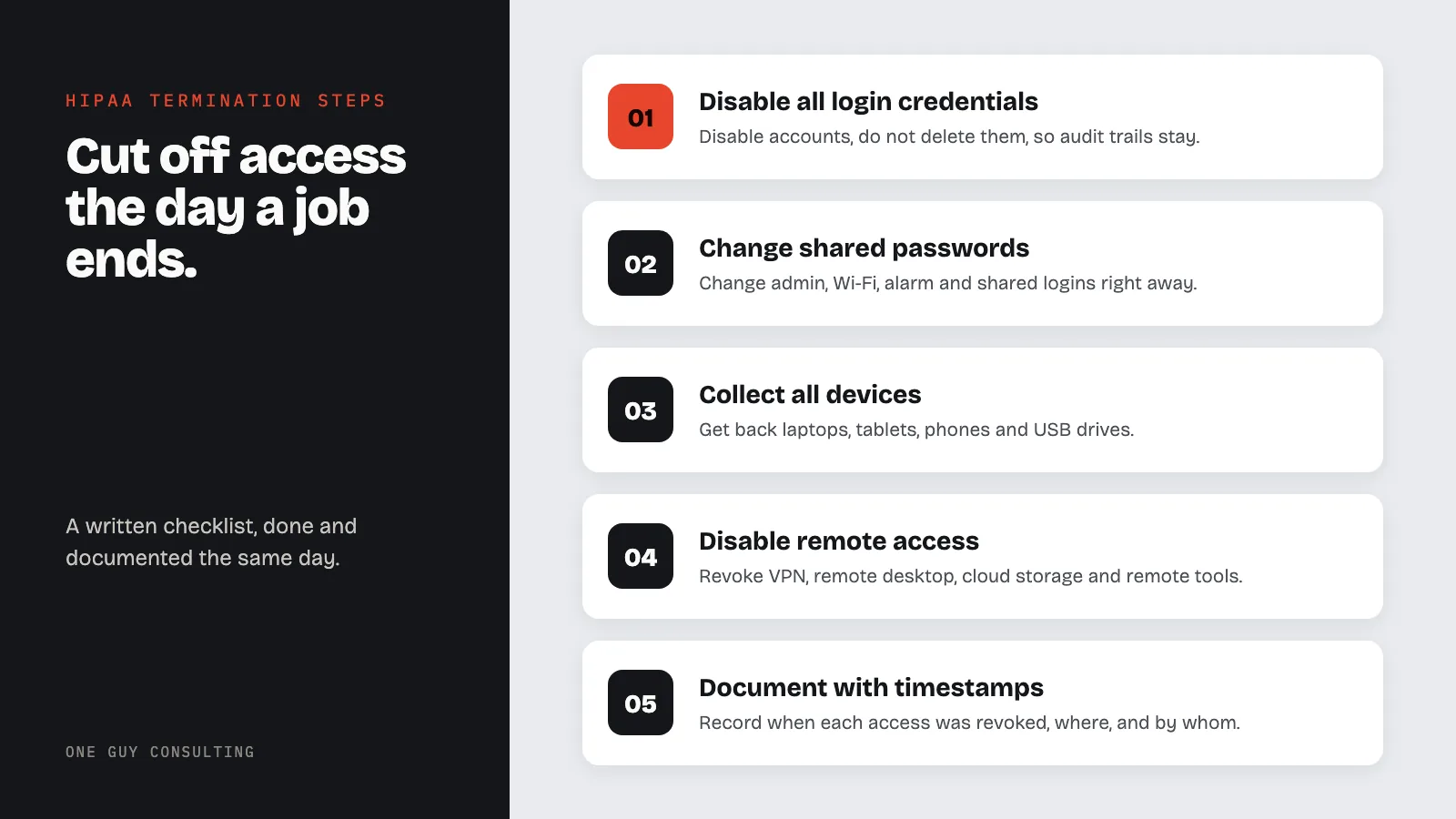
The solution is not a mental note. It is not "I will get to it Monday." It is a written, documented checklist that gets executed the same day someone's employment ends.
Termination Day Checklist
Execute every step on the same day employment ends. Each step should be completed, documented, and timestamped by the person responsible for the process.
- Disable all login credentials. Deactivate the departing workforce member's accounts in the EHR, practice management system, billing platform, scheduling system, and any other application that accesses ePHI. Do not delete accounts. Disable them so audit trails remain intact.
- Revoke email access. Disable the workforce member's email account. Set up forwarding to a supervisor if needed for continuity, but the departed individual must not retain access.
- Change all shared passwords. If the departing workforce member had access to any shared credentials (admin accounts, Wi-Fi passwords, alarm codes, shared logins), change those passwords immediately. This step is easy to skip.
- Collect physical access cards, keys, and badges. Retrieve building keys, key cards, ID badges, parking passes, and any other physical access tokens. Deactivate electronic badges in the access control system.
- Collect all devices. Retrieve laptops, tablets, mobile phones, USB drives, and any other organization-owned devices. If the workforce member used a personal device to access ePHI, confirm that organizational data has been wiped from that device.
- Disable remote access. Revoke VPN credentials, remote desktop connections, cloud storage permissions (Google Drive, Dropbox, OneDrive), and any remote management tools.
- Remove from all systems and distribution lists. Remove the workforce member from email distribution lists, shared calendars, team messaging platforms (Slack, Teams), and any other communication channels that may contain ePHI.
- Document everything with timestamps. Record the date and time each access point was revoked, the systems affected, and the name of the person who executed each step. This documentation is what you produce when OCR asks for evidence of your termination procedures.
Common Termination Procedure Failures
These are common gaps in workforce termination practices:
- No formal written procedure exists. The practice relies on memory or informal steps. When the person who usually handles terminations is absent, steps get skipped.
- IT is not notified on the same day. HR processes the termination but does not alert IT to disable accounts until days or weeks later. During that window, the former workforce member retains full system access.
- Shared credentials are not changed. The departing workforce member knew the shared admin password, but no one changes it. This is an easy one to miss in a small practice.
- Remote access is not disabled. VPN access, cloud storage, and remote desktop connections are overlooked because they are not visible in the office.
- No documentation of access revocation. Even when access is revoked properly, there is no written record. Without documentation, you cannot demonstrate compliance during an audit or investigation.
Same-Day vs. Delayed Termination
HIPAA does not set an exact deadline for shutting off access. The rule (45 CFR 164.308(a)(3)(ii)(C)) ties ending access to when the job ends. Shutting it off the same day is the safest way to meet that. Here is why timing matters:
Same-day termination (safest): Access is revoked on the workforce member's last day, ideally before or at the time they are notified. This closes the window of risk. For involuntary terminations, same-day revocation is essential because a disgruntled former employee with active credentials poses the highest risk to ePHI.
Delayed termination (higher risk): Some practices delay revocation for days or weeks, especially for voluntary departures. Every day of delay is a day where a former workforce member can access, copy, or modify patient records. If a breach occurs during that window, you may have to explain to OCR why access was not revoked sooner, and "we were going to get to it" is not a defensible answer.
For planned departures (resignations with notice periods), the best practice is to modify access during the notice period so the departing workforce member retains only the minimum access needed for their remaining duties, then revoke all access on the final day.
Role Changes Matter Too
Termination is not the only time access should be reviewed. When employees change roles within your practice, their access should change with them. If someone moves from billing to the front desk, they should no longer have billing system access. Access permissions should always match the employee's current job responsibilities. Follow access control best practices for ePHI to keep permissions properly scoped.
This matches HIPAA's minimum necessary standard (45 CFR 164.502(b)). It comes from the Privacy Rule. The idea is simple: people should use only the patient information they need to do their job. The Security Rule backs this up. Under 45 CFR 164.308(a)(4), you need policies for giving, reviewing, and changing each person's access.
Assign Ownership and Keep Records
Someone in your organization should own this process. Make it part of your HR workflow so it happens automatically, not as an afterthought. A well-designed HIPAA training program should include termination procedures as a covered topic for all staff. And keep a record of every access revocation: the date, the systems affected, and who executed the checklist. If an auditor or OCR asks, you need to show the paper trail.
Exit time is also a good moment to make sure your training records for that person are complete, including bloodborne pathogen training.
FAQs
Q: Does HIPAA require revoking system access when an employee leaves?
Yes. The HIPAA Security Rule requires covered entities and business associates to implement procedures for terminating access to ePHI when an employee leaves or changes roles. This falls under the Information Access Management standard (45 CFR 164.308(a)(4)) and the Workforce Security standard (45 CFR 164.308(a)(3)).
Q: How quickly should access be revoked after termination?
Access should be revoked the same day employment ends. Any delay creates a window where former employees can access patient records, download data, or modify information. All of these expose your organization to liability and potential HIPAA violations.
Q: What systems should a HIPAA termination checklist cover?
A HIPAA termination checklist should cover EHR login credentials, email accounts, VPN and remote access, cloud storage permissions, physical keys and badges, building alarm codes, scheduling systems, and any other platform where patient data is accessible.
Q: Do I need to update access when an employee changes roles?
Yes. If an employee moves from billing to the front desk, for example, they should no longer have billing system access. The Security Rule calls for policies to give, review, and change each person's access (45 CFR 164.308(a)(4)). So access should match the person's current job. Review and adjust it whenever roles change.
Revoking system access on the day an employee leaves is one of the simplest, lowest-cost safeguards a practice can implement. It directly prevents a common HIPAA violation. A written termination checklist, combined with role-based access reviews, protects your patients and your organization from preventable HIPAA violations. One Guy Consulting helps small practices build practical HIPAA compliance programs. Book a HIPAA chat to get started.
Sources
- HIPAA Security Rule: Administrative Safeguards (45 CFR 164.308)
- HIPAA Security Rule: Technical Safeguards (45 CFR 164.312)
- HHS Guidance on Risk Analysis Requirements
- HHS Office for Civil Rights: Compliance and Enforcement
- HHS Breach Notification Rule
Key stat: Under 45 CFR 164.308(a)(3)(ii)(C), covered entities and business associates need steps for ending access to ePHI when a job ends. In practice, that means shutting off logins, getting devices back, and writing down what you did. Do it on or before the employee's last day so there is no gap. Former employees who keep their access are a common HIPAA gap.
Related Articles
Related Reading
Frequently Asked Questions
What HIPAA requirements apply when a workforce member is terminated?
HIPAA requires covered entities and business associates to have procedures for ending a person's access to ePHI when their job ends (45 CFR 164.308(a)(3)(ii)(C)). In practice, that means disabling system accounts, getting back devices, keys and badges, and keeping a written record of what was done.
How quickly should system access be revoked when an employee is terminated?
Access should be revoked at the time of termination or before, particularly for involuntary separations. HIPAA does not set an exact deadline, but every day of delay leaves a former employee a way into patient records.
What devices and assets should be collected during HIPAA workforce termination?
Organizations should collect all employer-issued devices including laptops, mobile phones, tablets, and physical access credentials such as keycards. Any portable storage devices should also be retrieved.