HIPAA Device and IT Audits
Every device that touches ePHI needs a record. It also needs encryption and the right settings. The platform's IT audit walks you through each device, system, and technical control covered by 45 CFR §164.312.
Built on 45 CFR 164.312 and 164.310(d)
What Is a HIPAA Device and IT Audit?
What is a HIPAA Device and IT Audit? A record of every system that stores, processes, or transmits ePHI, organized by the five technical safeguard standards in 45 CFR Section 164.312.
A device and IT audit reviews each system that stores, uses, or sends electronic protected health information. It checks your controls against the five HIPAA technical safeguard standards.
Five HIPAA Technical Safeguard Standards
- Access Control: 45 CFR §164.312(a). Implement technical policies and procedures for systems that maintain ePHI, allowing access only to authorized persons and software programs.
- Audit Controls: 45 CFR §164.312(b). Implement hardware, software, and procedural mechanisms to record and examine activity in systems that contain or use ePHI.
- Integrity: 45 CFR §164.312(c). Implement policies and procedures to protect ePHI from improper alteration or destruction.
- Person or Entity Authentication: 45 CFR §164.312(d). Implement procedures to verify that a person or entity seeking access to ePHI is who they claim to be.
- Transmission Security: 45 CFR §164.312(e). Implement technical security measures to guard against unauthorized access to ePHI being transmitted over an electronic network.
The majority of breaches reported to the HHS Breach Portal involve electronic records. Hacking and IT incidents account for the largest share of reported breaches by both volume and individuals affected. A device and IT audit identifies these vulnerabilities before they become reportable incidents.
Who Needs a HIPAA IT Audit?
A device and IT audit applies to any covered entity or business associate that handles ePHI. If your organization matches any of the following, a structured IT audit is indicated:
- Organizations without a formal HIPAA device inventory
- Practices that use personal devices, cloud services, and office systems
- Growing teams that add devices or software without a clear approval process
- Groups that failed, or almost failed, technical safeguard reviews
- Business associates that handle ePHI across several systems
Device & IT Compliance Benchmarks
Typical findings from organizations before a structured IT audit. Your actual results will reflect your specific environment.
IT Audit Gap Distribution
Where most organizations have incomplete technical controls
- Access Control30%
- Encryption Gaps25%
- Audit Logging20%
- Authentication15%
- Transmission Security10%
Technical Control Maturity
Average maturity score by control area (0–100)
Technical Safeguard Compliance: Before vs. After
Typical improvement after structured IT audit and fixes
- Before35%
- After84%
Typical post-audit improvement, delivered in weeks, not months
Five-Step IT Audit Process
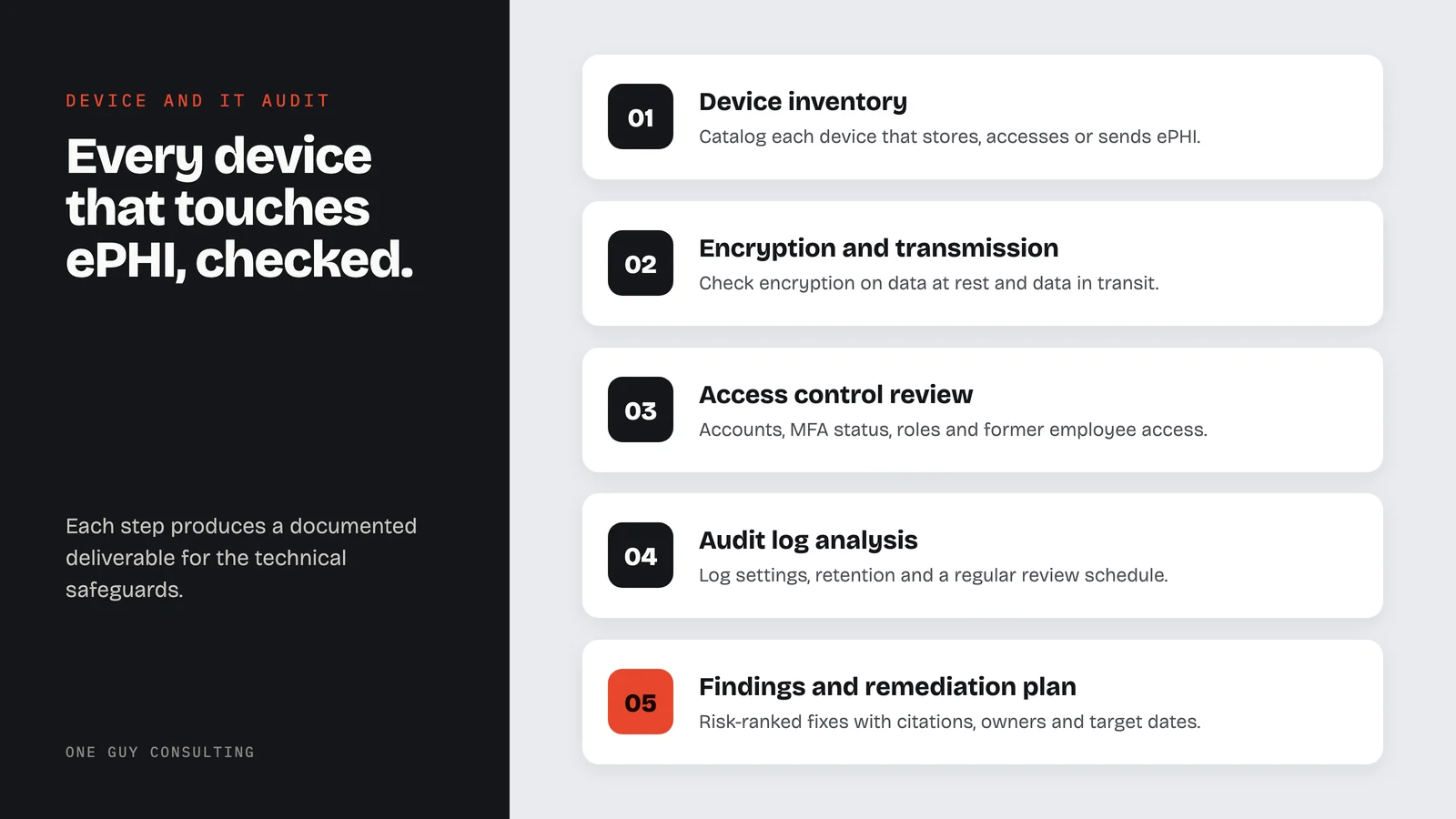
Each step produces a documented deliverable that maps to specific HIPAA technical safeguard requirements under 45 CFR §164.312.
- 01
Device Inventory
Catalog each device that stores, accesses, sends, or touches ePHI. This includes workstations, laptops, phones, servers, and network equipment. This step supports the device and media controls standard under 45 CFR §164.310(d).
Need the device catalog handled on its own? See our IoT device inventory service.
DeliverableComplete device inventory with encryption status, OS version, and ePHI exposure level for each device. - 02
Encryption and Transmission Security Assessment
Check encryption on stored data (data at rest) and transmitted data (data in transit). List every device and channel that handles ePHI and record how each one protects data in transit, per 45 CFR §164.312(e).
DeliverableEncryption status report showing each device's at-rest and in-transit encryption state, with fix steps for unencrypted endpoints. - 03
Access Control Review
Review how users sign in. Record role-based access, automatic logoff, emergency access procedures, and unique user identification, per 45 CFR §164.312(a).
DeliverableAccess control audit documenting user accounts, MFA status, role assignments, and any stale or former employee accounts still active. - 04
Audit Log Analysis
Check log settings, log retention periods, and whether your team reviews audit logs on a regular schedule. Audit controls under 45 CFR §164.312(b) require mechanisms to record and examine activity in systems that contain ePHI.
DeliverableAudit log assessment showing which systems have logging enabled, retention periods, and the review schedule your team has set. - 05
Findings Report and Remediation Plan
Provide a clear report with device findings, risk ratings, and technical fix steps. Each gap is mapped to the applicable regulatory standard, including §164.310(d), §164.312(a), §164.312(b), §164.312(c), and §164.312(e).
DeliverableWritten findings report with risk-ranked corrective actions, regulatory citations, owner assignments, and target dates.
IT Audit Case Study
A 15-person medical practice had grown from 5 to 15 staff in two years. New laptops, tablets, and cloud services were added as needed with no formal tracking. The practice had no device inventory and was unsure which devices had encryption enabled.
Four laptops had no disk encryption. Three cloud services lacked MFA. Audit logs were enabled but never reviewed. Two former employee accounts were still active. Patient data was being transmitted over unencrypted email.
Complete device inventory established with 23 devices cataloged. All devices encrypted within 30 days. MFA enabled on all cloud services. Former employee access revoked. Encrypted email solution implemented. Quarterly audit log reviews scheduled.
Implementation Timeline
Most IT audits are finished in weeks, not months. Larger teams or groups with several cloud platforms may need more time for a full inventory.
- Device inventory
- Cloud service list
- Encryption and access control testing
- Authentication review
- Audit log settings check
- Findings summary
- Risk ratings
- Technical fix steps
- Draft report review
- Final report
- Fix priority list
IT Audit Patterns by Healthcare Specialty
Audit findings differ by specialty. The review follows how your practice uses technology. These are six common practice types. Each one has its own device, software, and access control risks.
Medical Practices
EHR system access, multi-device workflows, lab system integrations, and referral platform security.
Behavioral Health
Telehealth platform security, session recording controls, and heightened patient data sensitivity.
Dental Practices
Imaging system encryption, practice management software access, and operatory workstation security.
Pharmacies
POS system security, medication management software, and controlled substance tracking system access.
Business Associates
Multi-client data segregation, cloud infrastructure security, and remote access controls.
Telehealth Providers
Video platform encryption, mobile device management, and home network security verification.
What Your IT Audit Includes
Every engagement gives you a written record of your technical safeguard posture. These five deliverables create a clear evidence package. You can use it for internal fixes and during a HIPAA compliance review.
Complete Device Inventory
Each device is listed with its encryption status, OS version, access controls, and ePHI exposure level.
Technical Safeguard Assessment
Review of access controls, audit logs, integrity controls, authentication, and transmission security.
Encryption Status Report
Check encryption device by device. List fix steps for any unencrypted endpoint.
Access Control Audit
Review user accounts, MFA status, role-based access, and former employee access.
Remediation Action Plan
Rank technical fixes by risk. Include setup guidance and target dates.
Part of both plans
Device and IT audit tools come with Self-Guided and Full-Scope. Full-Scope adds 4 hours a month of 1:1 implementation calls with Chuck.
Compare plans →Device and IT audits are included in both plans.
Two plans, six ways to pay. No per-user fees. Pick the level of help you want from Chuck.
- The platform on its own, no consulting time
- SRA, gap analysis, remediation plans
- Policy templates and staff training
- Vendor and BAA management
- Everything in Self-Guided
- 4 hours a month of 1:1 implementation calls with Chuck
- Incident response guidance
- CMS audit response support
One payment, two full years of coverage.
Secure checkout by Stripe. Your payment details go straight to Stripe and never touch our servers.
Why This Approach Delivers Better Outcomes
Technology changes faster than policies. New devices, cloud services, and integrations get added between reviews, creating gaps in your technical safeguard documentation.
An IT audit identifies specific control deficiencies against the five technical safeguard standards in 45 CFR §164.312. It produces a current, documented view of your ePHI environment.
Many findings have same-day remediation paths. Enabling encryption on a laptop, turning on MFA for a cloud service, or deactivating a former employee's account are common corrective actions that close gaps immediately.
Under 45 CFR §164.308(a)(8), covered entities and business associates must "Perform a periodic technical and nontechnical evaluation" of how well their security policies and procedures meet the Security Rule. Reviewing technology periodically, and after changes, helps find and fix gaps before they lead to a breach that requires notification under §164.404.
Common Pitfalls We Help You Avoid
- Incomplete inventory: You cannot secure devices you do not know about. Shadow IT is the leading technical audit gap.
- Encryption assumptions: Many organizations assume encryption is enabled when it is not, especially on older devices
- Audit log neglect: Having logs enabled but never reviewing them does not satisfy the audit control requirement
- Stale access: Former employees and role changes create access rights that persist long after they should have been revoked
- Personal device blindspot: BYOD policies without technical controls create unmanaged ePHI exposure on personal phones and tablets
Tracking Progress After Your IT Audit
Track a small set of technical metrics each month so findings turn into results.
Measure the percent of devices inventoried, percent of devices encrypted, MFA adoption across cloud services, and stale accounts removed.
Keep a leadership view that shows the trend, not just one point in time. Technical controls drift quickly as new devices and services are added.
Technical controls drift quickly. New devices get added, employees change roles, and software updates change settings. Periodic IT audits, and a review after each major change, keep your inventory accurate and your controls current.
Frequently Asked Questions
What devices need to be included in an IT audit?+
Is encryption required by HIPAA?+
How often should we conduct IT audits?+
What if we use personal devices for work?+
Do cloud services need to be included?+
Ready to Audit Your Devices and Systems?
The platform's technical audit walks your team through the device inventory and the technical controls, so you know where you stand and what needs to change.
Deep-Dive Resources
Use these guides to align IT audit findings to realistic implementation plans:
Explore our other HIPAA services
Questions About Device and IT Audits?
Tell us about your situation or question.
Or email us at hello@oneguyconsulting.com
Book Your Free 30-Minute Intro Call