HIPAA Policy Templates & Documentation Services
HIPAA requires covered entities and business associates to keep written rules for privacy, security, and breach notification. This page explains what those rules should include and how to create a set that fits your practice.
Required under 45 CFR 164.316 and 45 CFR 164.530
Free Sample Policy
See a real policy from the library, free
Get our Privacy and Security Officer Designation policy, which every practice needs under 45 CFR 164.308(a)(2) and 164.530(a). It arrives by email as an editable Word file, in the same format as every policy in the library.
No spam. Unsubscribe anytime.
HIPAA Policy Essentials
What Is a HIPAA Policy?
A HIPAA policy is a written rule that tells your team how to protect patient data. It covers who can access health records, how data is stored, and what to do if something goes wrong. The law requires covered entities and business associates to keep these rules in place.
Who Needs HIPAA Policies?
Two groups must follow HIPAA: covered entities (doctors, clinics, hospitals, health plans, and clearinghouses) and business associates (vendors who handle patient data on their behalf). If you touch PHI, you need written policies.
What Does HIPAA Require?
HIPAA has three main rules. The Privacy Rule controls who can see patient data. The Security Rule sets safeguards for electronic records. The Breach Notification Rule says you must report data leaks within 60 days. Each rule requires written policies.
How Many Policies Do You Need?
Most practices need between 20 and 40 rules. They fall into three groups: administrative (48%), technical (35%), and physical (17%). Small clinics can start with fewer. Large groups or BAs may need more.
Key fact: OCR fined providers over $6.6 million in HIPAA penalties in 2025. Missing or outdated policies were a factor in most cases. Having clear, current policies is the single best way to reduce your audit risk.
Why Most HIPAA Policy Sets Fall Short
Common Reasons Policies Fail Audits
These are the most common documentation gaps found during HIPAA gap analysis reviews and OCR investigations.
- Never documented: Teams use informal habits but have no written rules.
- Outdated templates: Policies were copied years ago and never updated.
- No workflow alignment: The language does not match how the team handles PHI.
- Missing required elements: No owner, no review date, no sanctions clause.
Templates alone don't meet HIPAA standards. Each rule must show the organization's actual systems, roles, and data flows to succeed in an audit.
Who Needs This Service
- Organizations with outdated policy sets that no longer match current systems or workflows.
- Teams using generic templates that were never tailored or put to work.
- Practices preparing for audits, payer reviews, security questionnaires, or contract diligence.
- Growing organizations onboarding new staff and vendors without clear policy governance
- Business associates that need stronger records to meet client expectations.
If your staff don't know what's in your policies, this is a high priority for you.
How It Works
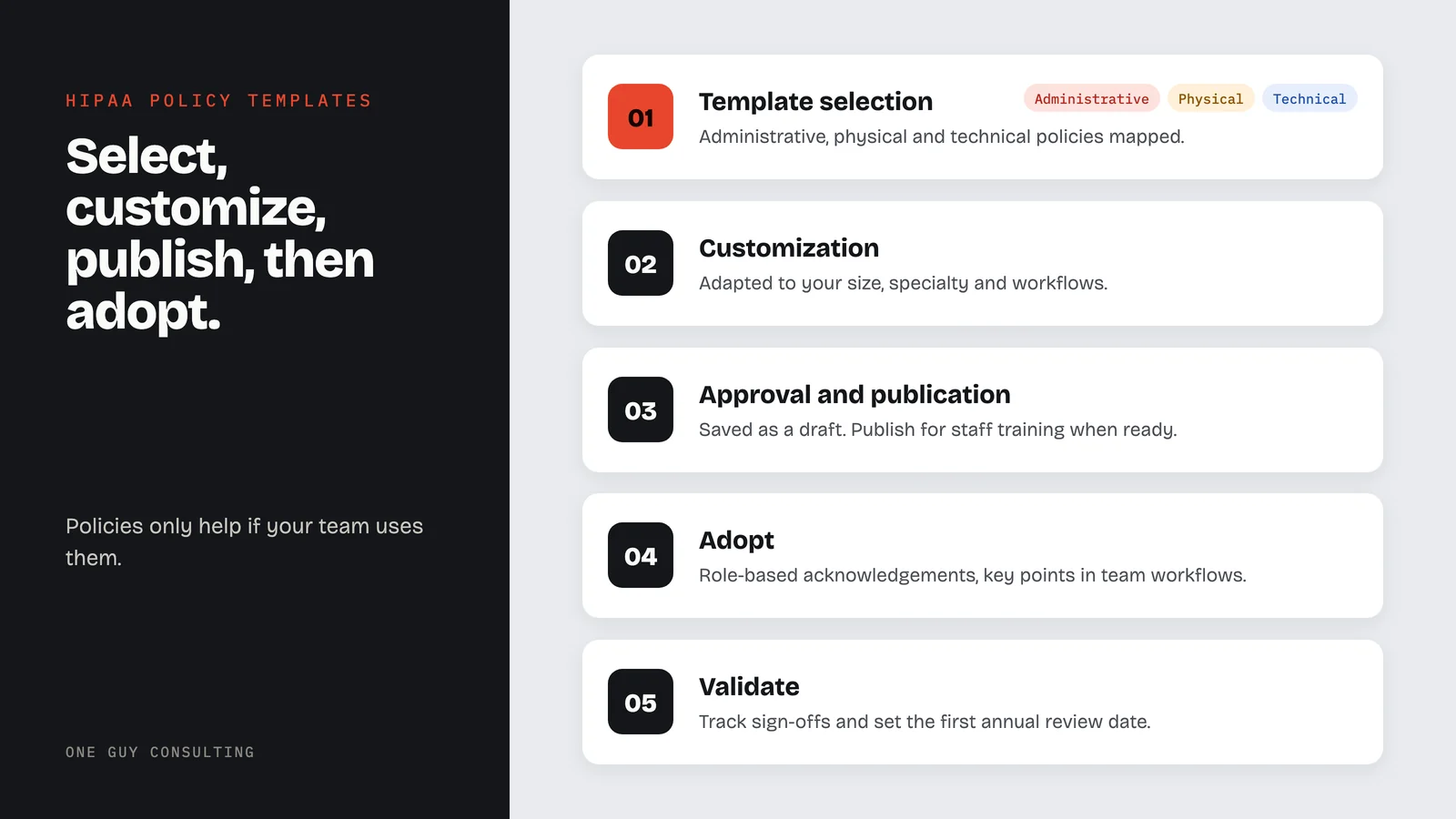
HIPAA policy development follows three stages: selecting the required policies, customizing them to the organization, and publishing them with staff acknowledgement tracking.
- 01
Template Selection
Administrative, physical, and technical policies are mapped to the regulation.
- 02
Customization
Each template is mapped to specific CFR sections and adapted to reflect the organization's size, specialty, and workflows.
- 03
Approval and Publication
Everything saves as a draft document. Publish for staff training when ready.
Policy Coverage by Category
How a complete HIPAA documentation program distributes across the three regulatory safeguard domains.
Safeguard Distribution
Policy allocation across HIPAA's three safeguard domains
- Administrative48%
- Technical35%
- Physical17%
Documentation Maturity Stages
Typical organization distribution across four maturity levels
Average Documentation Health at Engagement Start
Score based on completeness, currency, and use
Most organizations arrive in the 20–45% range. Target: 80%+
HIPAA Policy Library: Full Title Index
All policies in the One Guy Consulting library, grouped by rule area. Each is kept current against 45 CFR Parts 160 and 164. Titles are shown here; the full policy text is delivered inside your compliance program.
Privacy Rule (14)
- Accounting of Disclosures
- Amendment of PHI
- Authorization Requirements for Uses and Disclosures of PHI
- Complaints, Non-Retaliation, Waiver of Rights and Documentation
- Confidential Communications
- De-Identification and Re-Identification
- Individual Access Rights
- Minimum Necessary
- Mitigation
- Notice of Privacy Practices
- Personal Representatives
- Restriction Requests
- Uses and Disclosures of PHI
- Verification Requirements
Security Rule (13)
- Acceptable Use, Information Access Management and Restricted Internal Access to PHI
- Antivirus, Malware and Automatic System Updates
- Audit Controls, System Activity Review and Authentication Controls
- Automatic Logoff
- Data Backup and Storage
- Data Integrity
- Device and Media Controls
- Disaster Recovery, Contingency Planning and Emergency Operations
- Encryption, Decryption and Transmission Security
- Facility Access Controls
- Password and Authentication Management
- Security Risk Assessment and Evaluation
- Workstation Use and Security
Breach Notification, Administrative and Organizational (8)
- Breach Notification, Security Incident Response and Reporting
- Business Associate Agreement and Vendor Management
- Documentation and Records Retention
- Privacy and Security Officer Designation
- Sanctions
- Termination Procedures
- Workforce Security
- Workforce Training, Security Awareness and Privacy Training
What Good Governance Looks Like in Practice
What Every Policy Must Include
Every HIPAA policy should include these elements to support audit evidence under 45 CFR §164.316(b).
- Policy owner: A named person responsible for updates and enforcement.
- Review date: When the policy was last reviewed and when the next review is due.
- Approval record: Who approved the current version and when.
- Change log: A record of what changed and why.
How to Manage Ongoing Updates
A simple plan works best: a policy calendar, a change form, and a way to notify staff. The goal is to track updates and reflect them in training.
Trigger-based reviews: A new vendor, system move, workforce change, or security incident should prompt a policy review. Do not wait for the annual cycle. When an incident exposes a gap, those findings should feed into remediation plans and update the affected policy.
Common Documentation Pitfalls
Policies may sound compliant, but they do not match real workflows.
Teams cannot identify who owns updates or exceptions.
Different structures reduce readability and increase confusion.
Policies are published but not reflected in training and procedures.
Unclear which version is active or when changes were approved.
Policy Rationalization in Practice
A provider group had over 40 rules from different sources. The terms didn't match, and the dates were unclear. Team leads used workarounds no one approved. When a payer asked for proof, leaders could not show which policies were current or that staff had read them.
The duplicates were removed, a standard format was applied, and language was matched to real job roles. An approval flow and review schedule were added based on each policy's risk level.
The group went from scrambling to having a real system. Staff knew their policies. Manager issues dropped. Outside reviewers got a clean set with clear owners and version history.
Policy Structure by Healthcare Specialty
Your policies should match how your practice works. Generic templates miss the details that matter most.
The six specialty types below cover common documentation needs. Each has distinct workflows, roles, and regulatory focus areas. If you are unsure where your organization fits, a gap analysis can find the policy gaps for your setting.
Medical Practices
Covers front office, clinical staff, and shared systems. Role separation and access controls are the top focus.
Behavioral Health
Covers sensitive communication and record controls. Extra focus on confidentiality and record sensitivity.
Dental Practices
Covers operatory access and imaging workflows. Front-desk roles and patient flow docs are the most common gaps.
Pharmacies
Covers technical access and high-volume workflows. Integration oversight is a key focus.
Business Associates
Covers contractual duties and vendor controls. Subcontractor terms and client-facing evidence are key areas.
Telehealth / Digital Health
Covers platform access and remote session safeguards. Tech changes and vendor updates need clear docs.
Policy Rollout Checklist
Policies only help if your team uses them. How you roll them out matters.
The three phases below cover publication, staff adoption, and long-term upkeep. Each phase builds on the last, and most practices work through them in weeks, not months. If you skip ahead before collecting acknowledgements, your evidence record will have gaps. Pair this rollout with HIPAA staff training so staff understand the policies, not just sign them.
Publish
- Confirm policy owners and sign-off routes.
- Publish controlled versions with version numbers.
- Align staff communication to launch.
- Set acknowledgement deadline and tracking method.
Adopt
- Complete role-based acknowledgements.
- Add key policy points to team workflows.
- Update manager prompts and onboarding materials.
- Identify and resolve early adoption questions.
Validate
- Validate adoption through incident handling records.
- Check exception reviews against updated policies.
- Track acknowledgement completion rates.
- Schedule the first annual review date.
Publishing is just step one. What matters is whether your team follows it. Track sign-offs and set a regular review schedule.
Deliverables and Outcomes
Every policy documentation engagement includes the deliverables below. Each item supports daily staff use and OCR audit review.
Customized Policy Templates
Each template cites a specific CFR section, such as §164.308 for administrative safeguards. Each one is adapted to the organization's size, specialty, and EHR environment.
Implementation Guidance
Rollout plan with owners, sign-off tracking, and adoption goals.
Governance Recommendations
Version tracking, review schedule, and approval workflow docs.
Audit-Ready Documentation Structure
Evidence controls and revision formats that hold up under audits and contract reviews.
Specialty-Aware Policy Language
Details specific to your setting that close gaps and reduce risk.
Long-Term Maintenance Model
Update triggers and a yearly review plan so policies stay current as you grow.
Policy templates are included in both plans.
Two plans, six ways to pay. No per-user fees. Pick the level of help you want from Chuck.
- The platform on its own, no consulting time
- SRA, gap analysis, remediation plans
- Policy templates and staff training
- Vendor and BAA management
- Everything in Self-Guided
- 4 hours a month of 1:1 implementation calls with Chuck
- Incident response guidance
- CMS audit response support
One payment, two full years of coverage.
Secure checkout by Stripe. Your payment details go straight to Stripe and never touch our servers.
HIPAA Policy Templates: Frequently Asked Questions
Can we use your templates if we already have policies?+
How detailed should policies be?+
Do managers need separate guidance?+
How do we prove policy adoption?+
How often should policies be reviewed?+
How do we evaluate policy quality before buying?+
Where HIPAA Policy Requirements Come From
HIPAA policy requirements are set by federal law and enforced by the HHS Office for Civil Rights (OCR). The six regulations below are the main CFR citations for written policies. Each one connects to one or more required policy documents.
- 45 CFR §164.308: Administrative safeguards. Requires policies for risk analysis, workforce training, access management, incident response, and contingency planning.
- 45 CFR §164.310: Physical safeguards. Requires policies for facility access, workstation use, and device disposal.
- 45 CFR §164.312: Technical safeguards. Requires policies for access controls, audit controls, data integrity, and transmission security.
- 45 CFR §164.316: Documentation requirements. Policies must be written, kept for six years, and made available to staff. This section also covers review and update duties.
- 45 CFR §164.530: Privacy Rule administrative requirements. Requires privacy policies, staff training, a complaint process, and sanctions for violations. It pairs with HIPAA staff training requirements.
- 45 CFR §164.404-408: Breach notification. Requires a written plan for notifying people, HHS, and media when needed within 60 days.
These are not optional. OCR checks for written policies during every audit and investigation. Not having them is one of the most common reasons for fines. A security risk assessment identifies which of these areas carry the highest exposure for your organization and should be documented first.
Not Sure Where to Start?
A 30-minute call can help you figure out which policies you're missing and which ones need updates.
Deep-Dive Resources
These articles explain evidence expectations and practical policy rollout:
Explore our other HIPAA services
Questions About Policy Templates?
Tell us about your situation or question.
Or email us at hello@oneguyconsulting.com
Book Your Free 30-Minute Intro Call