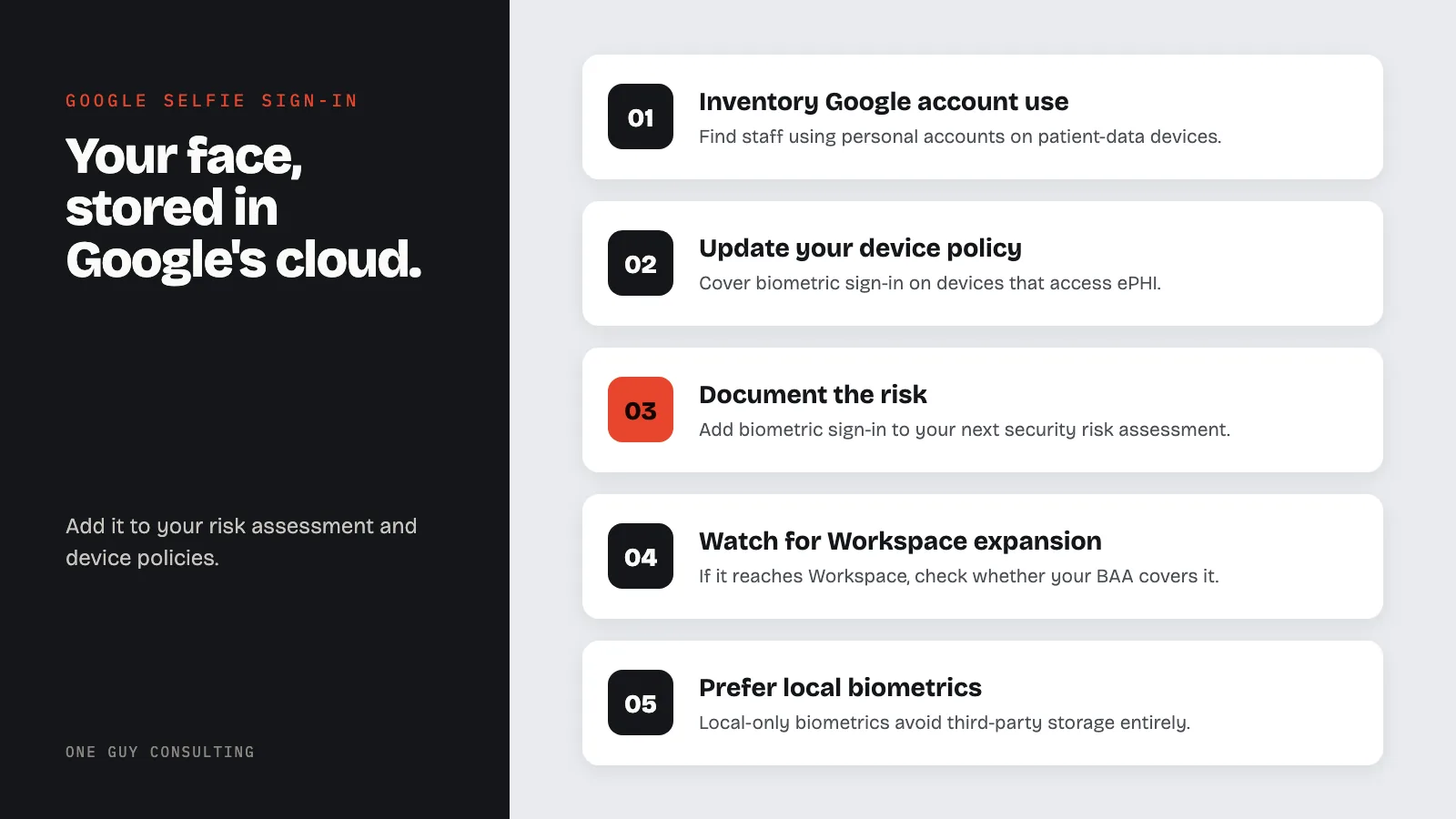
For healthcare teams, Google's selfie sign-in stores a video of your face in Google's cloud. That video can end up linked to devices that touch patient data. The feature only works on personal Google accounts, not Workspace. It is meant for getting back into a locked account. Add it to your risk assessment and device policies.
On July 23, 2026, Google announced a new way to access your account: record a short selfie video, and use your face instead of a password to prove who you are. Google calls it selfie for sign-in, and it is available now for personal Google accounts.
The feature is designed for account recovery: the moment you lose your phone, forget your password, or try to sign in from a borrowed device. Instead of answering security questions or waiting for a recovery email, you look into the camera, follow a few guided head movements, and Google compares the live video to one you recorded earlier.
For healthcare organizations that run on Google Workspace or use personal Google accounts for anything that touches patient information, this announcement raises questions that go well beyond convenience. When a major platform starts storing facial video for authentication, compliance teams need to understand what data is being collected, where it lives, and whether it creates risk under HIPAA or state biometric privacy laws.
How Google's Selfie Sign-In Actually Works
The setup is straightforward. You go to g.co/signin-selfie, look into your device camera, and complete a few guided head movements that capture your face from multiple angles. Google saves the encrypted video to your account.
Later, if you get locked out, you record a fresh selfie video on any device. Google compares the new video to the one you saved. The system runs liveness checks. Those head movements are designed to reject still photos, pre-recorded clips, and AI-generated deepfakes. Google also runs its standard checks for suspicious sign-in activity alongside the facial comparison.
According to MacRumors, the video is encrypted at rest, stored only with your consent, and can be deleted at any time from your Google Account settings. Google states the video is "used only for helping you sign in, unless you opt to share it for additional purposes."
There are important limitations:
- Not available for Google Workspace accounts: enterprise and organizational accounts cannot use this feature
- Not available for child accounts or accounts enrolled in Google's Advanced Protection Program
- Not available during lockout: you must set up the selfie video before you need it
- Regional restrictions: not yet available in all regions or on all devices
- Appearance changes: if your facial appearance changes significantly, you need to re-record
This Is Account Recovery, Not a Login Replacement
An important distinction: selfie sign-in is a recovery mechanism, not a daily login method. It sits alongside passkeys, two-factor authentication, and recovery contacts as one more option for getting back into a locked account. In 2024, Google said passkeys had been used to sign in more than 1 billion times. Passkeys are still the main sign-in method Google promotes.
Think of it as a fallback for the three scenarios most likely to lock someone out: a lost phone, a forgotten password, or a sign-in attempt on an unfamiliar device.
How Secure Is Facial Video Authentication?
The security picture is mixed. On one hand, liveness detection with guided head movements is harder to spoof than a static photo check. On the other hand, security researchers have been raising concerns about cloud-stored biometric data for years.
Amit Jaju, a cybersecurity expert quoted by Business Standard, put the core problem clearly: "A password can be reset after compromise; a face cannot be changed. If a facial template, selfie video or associated identity data is stolen, it can create a persistent fraud and privacy risk."
Purshottam Bhatia from Kaspersky echoed the concern, noting that while casual fraud attempts would likely fail against Google's liveness checks, "targeted attacks on high-value accounts remained a concern." He also pointed out that fraudulent websites already routinely request camera access under false pretenses, a tactic that could be adapted to steal facial data.
The deepfake threat is not theoretical. According to the Business Standard report, deepfake content has risen 900% in recent years, with over 5,000 face-swapping applications and 1,000+ voice-cloning tools now publicly available.
Cloud Storage vs. Local Processing: The Apple Comparison
The architectural difference between Google's approach and Apple's Face ID is significant. Apple's Face ID processes facial data entirely on-device using the Secure Enclave. The biometric template never leaves your phone and never touches Apple's servers. Microsoft's Windows Hello takes a similar device-local approach.
Google's selfie sign-in stores encrypted video in the cloud. This is a fundamentally different security model. Cloud storage means the data exists on Google's servers, subject to Google's data retention policies, potential legal requests, and the security of Google's infrastructure. Google says it uses the video only to help you sign in. It is used for anything else only if you choose to allow it.
For healthcare organizations evaluating authentication methods, this distinction matters. Local-only biometric processing keeps sensitive data within a known perimeter. Cloud-stored biometric data introduces third-party risk that needs to be assessed and documented.
What This Means for HIPAA-Covered Organizations
The immediate compliance question: does this feature create ePHI risk?
Under HIPAA, biometric identifiers (like finger and voice prints) and full-face photos are both on the list of 18 HIPAA identifiers that can make data individually identifiable. Facial video stored by Google becomes a compliance concern when it is used to access systems that contain protected health information.
Here is where the current limitation actually helps: selfie sign-in is not available for Google Workspace accounts. Many healthcare organizations that use Google run on Workspace, which means their staff cannot enable this feature on their organizational accounts today.
Three Risk Scenarios for Healthcare Organizations
The risk is not zero. Consider these scenarios:
- A staff member uses a personal Google account on a device that also accesses the practice's EHR or email
- A small practice uses personal Gmail accounts for business communication that includes patient information (a HIPAA risk on its own)
- Google eventually extends selfie sign-in to Workspace accounts
In each case, a facial video stored by Google is now linked to a device or account that touches patient data. Under 45 CFR 164.312, covered entities and their business associates must put technical safeguards in place. Covered entities are the health care providers, health plans and clearinghouses HIPAA applies to. These safeguards include access controls and audit controls (a way to record and review activity in systems with patient data). They also include a way to confirm that the person signing in is who they say they are. If biometric sign-in is part of how staff reach patient data, the biometric data itself may need to be treated with the same protections as ePHI.
Practical Steps for Compliance Officers
- Inventory your Google account usage. Know which staff members use personal Google accounts on devices that access patient data
- Update your device policy. Your acceptable use policy should address biometric authentication features on devices that access ePHI
- Document the risk. Add biometric authentication to your next security risk assessment as an emerging technology to evaluate
- Watch for Workspace expansion. If Google extends selfie sign-in to Workspace, you will need to find out whether your Business Associate Agreement with Google covers the feature and the facial video it stores
- Prefer local biometrics. When choosing authentication methods for systems that access ePHI, local-only biometric processing (Face ID, Windows Hello) avoids the third-party storage question entirely
State Biometric Privacy Laws Add Another Layer
Beyond HIPAA, healthcare organizations operating in certain states face additional biometric privacy obligations. Illinois BIPA (Biometric Information Privacy Act) is the most consequential. It requires written consent before anyone collects biometric identifiers. It also lets people sue directly (a private right of action) for damages of $1,000 per negligent violation and $5,000 per intentional or reckless violation.
Texas, Washington, Colorado, and a few other states have their own biometric privacy laws with varying requirements. If your practice operates in any of these states, the use of facial video authentication by staff on work-related devices may trigger compliance obligations that go beyond what HIPAA requires.
The key question is whether an employee voluntarily enabling Google's selfie sign-in on their own account creates organizational liability. The answer depends on your state, your policies, and whether the device is employer-owned or BYOD. This is exactly the kind of question that belongs in your risk assessment documentation.
The Practical Takeaway
Google's selfie sign-in is a legitimate security improvement for personal accounts. Account lockouts are a real problem, and facial video with liveness detection is harder to abuse than security questions or SMS codes. Google's announcement correctly frames it as a recovery tool, not a replacement for stronger authentication methods like passkeys.
But for healthcare organizations, any new biometric data collection by a major platform deserves a compliance check. The fact that Google stores facial video in the cloud (not locally on the device) means it creates a data footprint that needs to be accounted for in your security posture.
The feature is opt-in today and excluded from Workspace. That gives compliance teams time to prepare before it potentially becomes available for organizational accounts. Use that time to update your risk assessment, review your device policies, and make sure your staff understands the difference between personal and professional account security.
FAQ
Can healthcare workers use Google's selfie sign-in on work devices?
Currently, selfie sign-in is only available for personal Google accounts, not Google Workspace. However, if staff use personal Google accounts on devices that also access patient data, the facial video stored by Google may create compliance risk that should be addressed in your device and acceptable use policies.
Does Google's selfie video count as protected health information under HIPAA?
Full-face photos and biometric identifiers (like finger and voice prints) are on the list of 18 HIPAA identifiers. A selfie video Google stores for a personal account is not automatically PHI (protected health information). But it could become a compliance concern if it is linked to a device or account that reaches protected health information. It depends on context.
Information counts as PHI when three things are true. A covered entity or its business associate holds it. It can identify the person. And it relates to that person's health, their care, or payment for that care.
Is Google's selfie sign-in more secure than a password?
For account recovery specifically, yes. Passwords can be guessed, phished, or reused across breached sites. Facial video with liveness detection is significantly harder to forge. However, biometric data carries a unique risk: unlike a password, you cannot change your face if the data is compromised. For daily sign-in, passkeys remain the stronger choice.
What happens if Google's selfie video data is breached?
This is the core concern security experts raise. A password breach can be resolved by changing the password. A biometric breach cannot be undone because the biometric identifier is permanent. Google encrypts the video at rest, but the data still exists on their servers and could be subject to legal requests, targeted attacks, or policy changes in the future.
Should my practice block staff from enabling this feature?
If staff use personal Google accounts on employer-owned devices that access ePHI, your acceptable use policy should address biometric features. For practices in states with biometric privacy laws like Illinois BIPA, there may be additional reasons to restrict or require disclosure around facial recognition features on work devices. Consult legal counsel for state-specific requirements.
Google's selfie sign-in is a meaningful step forward in account recovery security, but it introduces biometric data handling questions that healthcare organizations need to take seriously. The feature stores facial video in the cloud, which is architecturally different from local-only biometrics like Apple's Face ID. For HIPAA-covered entities, that difference matters.
One Guy Consulting helps healthcare organizations keep up their HIPAA compliance as technology changes. If your team needs help updating your risk assessment or device policies to account for biometric authentication, Book Your Free 30-Minute Intro Call with Chuck Weiselberg.
Sources
- Google Blog: Introducing Selfie for Sign-In
- MacRumors: Recover Your Google Account With a Selfie Video
- Business Standard: Google Bets on Selfie Video, But Experts Urge Caution
- SiliconANGLE: Google Rolls Out Selfie Video Sign-In
- The Hacker News: Google Adds Selfie Video Recovery
- 45 CFR 164.312: Technical Safeguards
This content is for educational and informational purposes only and should not be construed as legal advice.