To do a HIPAA risk assessment, list every place your practice creates, receives, stores, or sends ePHI (electronic patient health information). For each one, find the threats and weak spots. Check the safeguards you already have. Rate each risk by likelihood and harm. Fix the biggest risks first. Keep written records for six years.
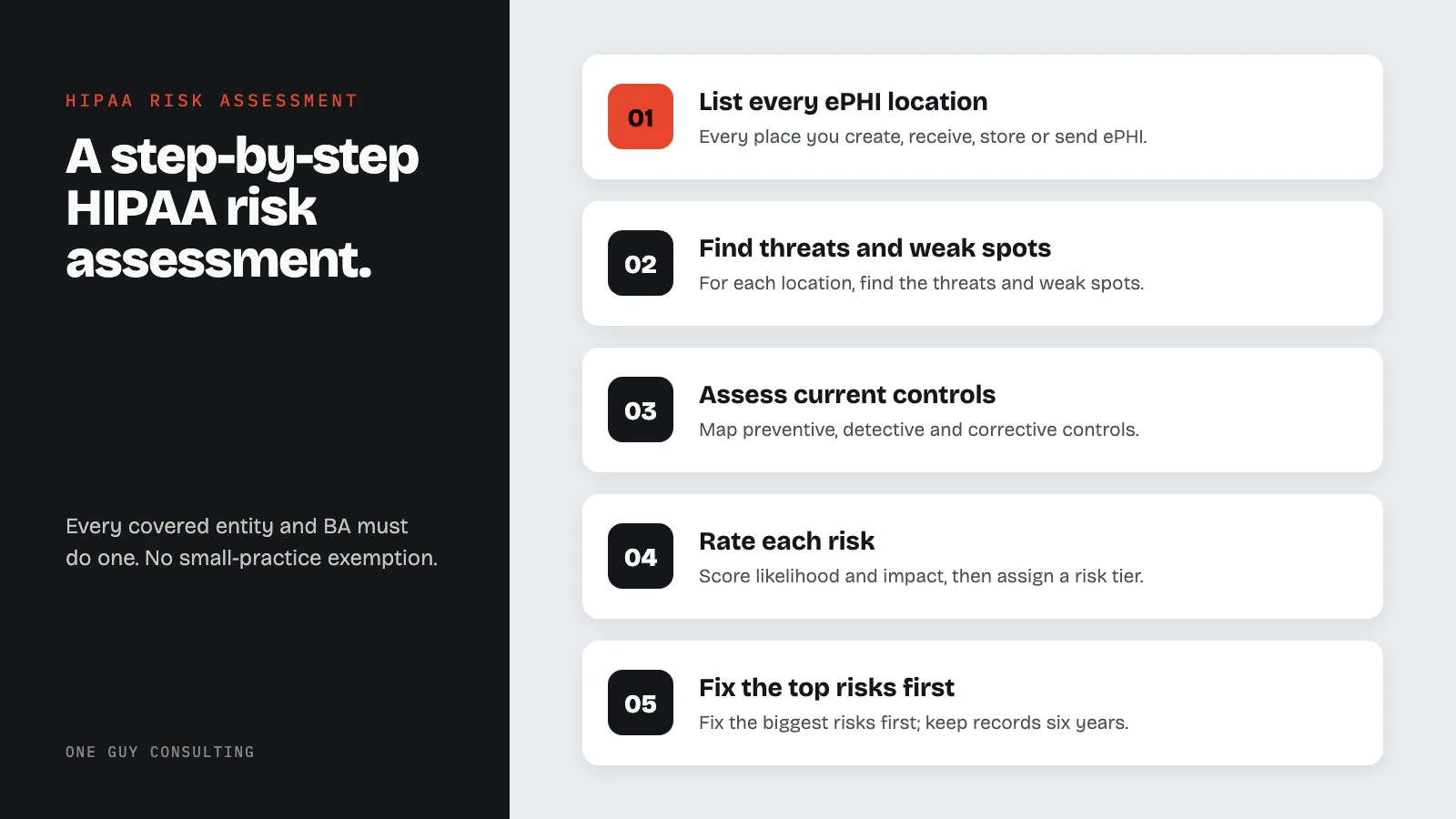
HIPAA Risk Analysis: Step-by-Step Process
Direct answer: A HIPAA Security Risk Assessment (SRA), required by 45 CFR 164.308(a)(1)(ii)(A), is a systematic evaluation of potential threats and vulnerabilities to electronic protected health information (ePHI). OCR (the Office for Civil Rights) enforces HIPAA. A missing or weak risk analysis is one of the most common problems OCR cites when it takes enforcement action. Every covered entity and business associate must conduct one. There is no exemption for small practices.
A HIPAA risk analysis (also called a security risk assessment) is one of the most important steps in any healthcare compliance program. The Office for Civil Rights (OCR) tracks HIPAA enforcement actions closely. One of the most common problems OCR finds is a practice that never did a full, practice-wide risk analysis. Practices that skip or shortcut the risk assessment open themselves up to some of the largest HIPAA penalties.
This guide provides a practical step-by-step process for a HIPAA Security Risk Assessment (SRA). It includes every phase. Start with scoping and finish with remediation and ongoing management. Use it whether this is your first assessment or an upgrade to an existing process. If you want to understand the legal foundation before diving into the steps, start with our overview of what a HIPAA security risk assessment is and why it matters.
The 10-Step HIPAA Risk Assessment Process
- Define scope and assemble your team: identify all ePHI locations and assign assessment roles
- Inventory all ePHI assets: document every system, device, and application that creates, receives, stores, or transmits ePHI
- Identify threats: catalog natural, human (intentional and unintentional), environmental, and technical threats
- Identify vulnerabilities: assess technical, administrative, and physical weaknesses through scanning, interviews, and walkthroughs
- Assess current controls: map existing preventive, detective, and corrective controls to each threat-vulnerability pair
- Rate risk levels: score each risk by likelihood and impact, then assign a risk tier (critical, high, medium, low)
- Develop the remediation plan: rank risks by tier and assign specific actions, responsible parties, and deadlines
- Document everything: produce written records of scope, method, findings, risk scores, and remediation decisions
- Obtain management sign-off: secure executive acknowledgment and approval of findings and the remediation plan
- Establish ongoing risk management: integrate the assessment into annual cycles, trigger reassessments after significant changes, and track remediation progress
Understand the SRA Requirement
Regulatory Foundation
The HIPAA Security Rule at 45 CFR 164.308(a)(1)(ii)(A) is unambiguous. Covered entities and business associates must “conduct an accurate and thorough assessment of the potential risks and vulnerabilities to the confidentiality, integrity, and availability of electronic protected health information.” This is a required specification. That means you must do it. There is no other way to meet it.
The rule does not require a specific method or tool. You can choose an approach that fits your size and setup. But OCR has published detailed guidance on what counts as a compliant risk analysis, and enforcement actions show the depth of analysis expected.
Risk Assessment vs. Risk Management
| Risk Assessment (Risk Analysis) | Risk Management | |
|---|---|---|
| CFR Citation | 45 CFR 164.308(a)(1)(ii)(A) | 45 CFR 164.308(a)(1)(ii)(B) |
| Purpose | Identify and evaluate threats and vulnerabilities to ePHI | Implement security measures to reduce identified risks to a reasonable level |
| Output | Risk register with scored threats, vulnerabilities, and current controls | Remediation plan with assigned actions, deadlines, and responsible parties |
| Frequency | HIPAA sets no fixed schedule. Many practices redo it every year and after big changes. | Ongoing and continuous |
| Status | Required implementation specification | Required implementation specification |
HIPAA requires both. Completing the analysis without acting on findings is itself a compliance failure. Implementing controls without first identifying what you are protecting against is equally inadequate.
Method framework: NIST Special Publication 800-30, "Guide for Conducting Risk Assessments," is the most widely referenced method for HIPAA risk analysis. OCR does not mandate a specific framework, but NIST SP 800-30 provides a structured, repeatable process that aligns with the Security Rule's requirements. The HHS SRA Tool is also built around NIST principles. Using a recognized framework strengthens your records and shows methodological rigor during an audit.
Key Regulatory Expectations
OCR expects a risk analysis to be:
- Complete: Covering all ePHI across the entire organization, not just selected systems or departments.
- Thorough: Identifying all reasonably anticipated threats and vulnerabilities.
- Accurate: Based on current conditions, not outdated assumptions or generic templates.
- Documented: Producing written records that show the process and findings.
- Ongoing: Updated regularly and whenever significant operational changes occur.
A checklist or short questionnaire will not meet these rules. The risk assessment must be a real analysis of specific threats to specific assets in your actual setting.
Step 1: Define Scope and Assemble Your Team
Scoping the Assessment
The scope must cover all ePHI your team creates, receives, stores, or sends, no matter the medium, location, or system. This includes:
- On-premises systems: Servers, workstations, medical devices, and network infrastructure.
- Cloud environments: Hosted applications, cloud storage, SaaS platforms, and hosted EHR systems.
- Remote and mobile: Laptops, tablets, smartphones, home offices, and telehealth platforms.
- Third-party systems: Business associate environments that store or process your ePHI.
- Paper-to-digital transitions: Scanning systems, fax servers, and digital records management.
A common mistake is limiting scope to the primary EHR system. Other systems (email, messaging platforms, billing software, and legacy apps) also hold ePHI. A dedicated HIPAA compliance tool can help you keep track of all of these systems.
Assembling the Team
Effective risk assessments require input from multiple stakeholders:
- Security Officer: Leads the assessment and coordinates remediation actions.
- IT staff: Provides technical knowledge of systems, networks, and security controls.
- Clinical staff: Identifies workflows involving ePHI and clinical system usage.
- Administrative staff: Covers billing, scheduling, and day-to-day operational processes.
- Compliance Officer: Ensures regulatory requirements are addressed.
- Facilities management: Addresses physical security considerations.
- Privacy Officer: Provides insight on Privacy Rule implications.
In small practices, some of these roles may overlap. The key is covering technical, operational, and clinical viewpoints. Outside consultants can fill skill gaps, especially for a first full assessment.
Step 2: Inventory ePHI Assets
Creating the Asset Inventory
A complete ePHI asset inventory is the foundation of the risk assessment. For each asset, document:
- Asset name and description: What the system or device is and what it does.
- Location: Physical and logical location (building, room, network segment, cloud region).
- ePHI types: What categories of protected health information the asset stores, processes, or transmits.
- Data volume: Approximate number of patient records or volume of ePHI the asset holds.
- Users: Who accesses the system and in what roles.
- Owner: The person or department responsible for the asset.
- Criticality: How important the asset is to operations and patient care.
Common Asset Categories
Organize your inventory into these categories:
- Applications: EHR, practice management, billing, lab systems, imaging, telehealth platforms, patient portals.
- Infrastructure: Servers, databases, network devices, firewalls, wireless access points.
- Endpoints: Workstations, laptops, tablets, mobile devices, medical devices that store ePHI.
- Storage: File servers, network-attached storage, cloud storage, backup media, removable drives.
- Communications: Email systems, fax servers, secure messaging, VoIP, video conferencing.
- Physical: Server rooms, data closets, file cabinets containing digital media, workstation locations.
Map how ePHI flows between these assets. Data flow diagrams help spot paths that need encryption and access points that need login controls.
Step 3: Identify Threats
Threat Categories
A threat is any event or action that could exploit a vulnerability and harm ePHI. Organize threats into these categories:
Natural threats:
- Floods, earthquakes, hurricanes, tornadoes.
- Power outages from severe weather.
- Fire (natural or accidental).
Human threats (intentional):
- External cyberattacks (ransomware including real-world hospital attacks, phishing, malware, denial-of-service).
- Insider threats from disgruntled employees.
- Social engineering attacks.
- Theft of devices or media.
- Unauthorized physical access.
Human threats (unintentional):
- Accidental data exposure through misconfigured systems.
- Misdirected emails or faxes containing ePHI.
- Improper disposal of devices or media.
- Failure to follow security procedures.
- Lost devices.
Environmental and technical threats:
- Hardware failures.
- Software bugs and vulnerabilities.
- Network outages.
- Power surges or electrical failures.
- HVAC failures affecting server environments.
Documenting Threats
For each threat, record:
- Threat source: Who or what could initiate the threat event.
- Threat action: How the threat event would unfold.
- Affected assets: Which ePHI assets could be impacted.
- Historical data: Whether your organization or similar ones have experienced this threat.
- Threat likelihood: An initial estimate of probability (refined in later steps).
Use industry sources to build your threat list: the HHS Breach Portal, FBI Internet Crime Reports, and healthcare-specific threat data. Pay close attention to threats that have hit similar practices in your region and specialty.
Step 4: Identify Vulnerabilities
What Constitutes a Vulnerability
A vulnerability is a weakness in a system, process, policy, or control that a threat can use to harm ePHI. They exist at every level of a healthcare practice.
Technical vulnerabilities:
- Unpatched software and operating systems.
- Weak or default passwords.
- Missing or misconfigured encryption.
- Inadequate access controls.
- Open network ports and unnecessary services.
- Lack of multi-factor authentication.
- Missing or inadequate audit logging.
Administrative vulnerabilities:
- Absent or outdated security policies.
- Inadequate workforce training.
- No incident response plan.
- Incomplete business associate agreements.
- Lack of documented procedures.
- No regular security reviews.
Physical vulnerabilities (review the complete physical safeguard vulnerabilities to assess):
- Unsecured server rooms or data closets.
- Missing visitor controls.
- Inadequate surveillance.
- Unlocked workstations in public areas.
- Missing disposal procedures for media and devices.
How to Find Vulnerabilities
Use multiple methods to surface vulnerabilities:
- Technical scanning: Automated vulnerability scanners, penetration testing, and network assessments.
- Policy review: Compare existing policies against Security Rule requirements and industry frameworks.
- Interviews: Speak with staff about actual workflows, workarounds, and observed security gaps.
- Physical walkthroughs: Inspect facilities for physical security weaknesses.
- Audit log review: Examine system logs for evidence of unauthorized access or anomalies.
- Prior assessments: Review findings from previous risk assessments, audits, and incident reports.
Step 5: Assess Current Controls
Mapping Controls to Risks
For each threat and weakness pair, document the security controls now in place. Controls fall into three groups:
- Preventive controls: Measures that stop threats from exploiting vulnerabilities (firewalls, access controls, encryption, training).
- Detective controls: Measures that identify when a threat has exploited a vulnerability (audit logs, intrusion detection, monitoring).
- Corrective controls: Measures that respond to and recover from security incidents (incident response plans, backup systems, disaster recovery).
Reviewing Control Effectiveness
Rate each control honestly:
- Fully effective: The control is properly configured, regularly maintained, and tested.
- Partially effective: The control exists but has gaps in configuration, coverage, or maintenance.
- Not effective: The control exists on paper only, is severely outdated, or is not functioning.
- Absent: No control exists for this risk.
Honesty matters. If you overrate how well your controls work, you weaken the entire risk analysis and create a false sense of safety. Judge controls as they run in practice, not as they appear on paper.
Step 6: Rate Risk Levels
Risk Scoring Method
Risk equals threat likelihood times impact severity. For each combination of threat, weakness, and asset, rate both factors on a consistent scale.
Likelihood ratings:
| Level | Score | Description |
|---|---|---|
| High | 3 | Threat source is highly motivated and capable; controls are ineffective or absent. |
| Medium | 2 | Threat source is motivated and capable, but controls may impede exploitation. |
| Low | 1 | Threat source lacks motivation or capability, or strong controls are in place. |
Impact ratings:
| Level | Score | Description |
|---|---|---|
| High | 3 | Major harm: large-scale breach, significant financial loss, patient harm, or loss of critical systems. |
| Medium | 2 | Moderate harm: limited breach, moderate financial impact, temporary system disruption. |
| Low | 1 | Minor harm: minimal data exposure, negligible financial impact, brief disruption. |
Calculating Overall Risk
Multiply Likelihood Score × Impact Score to produce a numeric risk rating, then map to a risk tier:
| Likelihood × Impact | Score Range | Risk Tier | Response Priority |
|---|---|---|---|
| High (3) × High (3) | 9 | Critical | Immediate action required |
| High (3) × Medium (2) | 6 | High | Address within 30 to 90 days |
| Medium (2) × High (3) | 6 | High | Address within 30 to 90 days |
| High (3) × Low (1) | 3 | Medium | Address within 6 to 12 months |
| Medium (2) × Medium (2) | 4 | Medium | Address within 6 to 12 months |
| Low (1) × High (3) | 3 | Medium | Address within 6 to 12 months |
| Medium (2) × Low (1) | 2 | Low | Monitor; address in maintenance cycles |
| Low (1) × Medium (2) | 2 | Low | Monitor; address in maintenance cycles |
| Low (1) × Low (1) | 1 | Low | Accept with documented justification |
Write down the reasons for each rating. OCR auditors want to understand why a specific rating was given. Include solid evidence from your threat and vulnerability work to back up each call.
Step 7: Develop the Remediation Plan
Prioritizing Risks
You cannot remediate all risks simultaneously. For a detailed walkthrough of the next phase, see our gap analysis remediation guide. Rank based on risk tier:
- Critical risks: Address right away. These carry the highest probability of a significant breach.
- High risks: Address within 30 to 90 days. These represent substantial exposure.
- Medium risks: Address within 6 to 12 months as part of planned security improvements.
- Low risks: Monitor and address during routine maintenance cycles, or formally accept with written records.
Building a Fix List
For each risk requiring remediation, document:
- Risk description: The specific threat, vulnerability, and asset combination.
- Current risk score: The assessed likelihood × impact rating.
- Remediation action: The specific control or measure to implement.
- Target risk score: The expected rating after remediation.
- Responsible party: Who is accountable for completion.
- Target completion date: When the remediation must be finished.
- Resource requirements: Budget, staff time, and technology needed.
- Status tracking: A mechanism for monitoring progress.
Risk Response Options
For each identified risk, organizations have four response options:
- Mitigate: Implement controls to reduce the risk to an acceptable level.
- Transfer: Shift the risk to another party (cyber insurance, outsourcing to a qualified vendor).
- Accept: Acknowledge the risk and document the decision not to act further. Right only for low risks with written justification and management approval.
- Avoid: Eliminate the risk by removing the activity, system, or process that creates it.
Most risks in a healthcare setting call for mitigation. Use risk acceptance sparingly and always get documented management approval.
Step 8: Document Everything
Required Records
The risk assessment must produce full written records including:
- Scope statement: What was assessed, including all systems, locations, and ePHI types.
- Method description: How the assessment was conducted, including tools and frameworks used.
- Asset inventory: A complete list of ePHI assets with classifications.
- Threat analysis: Identified threats with likelihood ratings and supporting evidence.
- Vulnerability analysis: Identified vulnerabilities with assessment method and evidence.
- Control assessment: Current controls mapped to risks with effectiveness ratings.
- Risk register: All identified risks with likelihood, impact, and overall risk scores.
- Remediation plan: Ranked actions with responsible parties, timelines, and resource requirements.
- Management sign-off: Executive acknowledgment and approval of findings and remediation plan.
Retention and Maintenance
Keep all risk assessment records for at least six years. Count from the date each record was created or the date it was last in effect, whichever is later. The Security Rule requires this (45 CFR 164.316(b)(2)(i)).
That six-year clock covers compliance documentation, not patient charts; medical record retention runs on state law. Store records safely with version control to track changes over time. Do not throw out prior assessments. They provide history and show your team’s ongoing commitment to security gains.
Using the HHS/ONC Security Risk Assessment (SRA) Tool
What the SRA Tool Covers
HHS and ONC offer a free Security Risk Assessment (SRA) Tool designed to help small and medium-sized healthcare practices conduct risk assessments. The current version is 3.7. It comes as a Windows desktop application and as an Excel workbook, both at healthit.gov.
The SRA Tool walks users through the risk assessment process organized around the HIPAA Security Rule requirements. It covers:
- Asset and data type identification
- Threat and vulnerability identification across administrative, physical, and technical safeguards
- Current control assessment with guided prompts
- Likelihood and impact rating for each identified risk
- Automatic risk score calculation
- Remediation planning and tracking
- Reports you can save and print for your records
How to Download and Navigate the Tool
To get started with the SRA Tool:
- Visit healthit.gov/privacy-security/security-risk-assessment-tool/
- Download the Windows installer, or the Excel workbook version if you do not use Windows
- Install and launch the application. Your answers are stored on your own computer, not sent to HHS.
- Create a new assessment and follow the guided question sequence
- Save or print the report from your completed assessment for your records
Give the SRA Tool real time. Spread the work over several focused sessions. Do not try to rush through it in one sitting.
Limitations of the SRA Tool
The SRA Tool is a strong starting point, but it has important limitations to understand:
- Windows desktop app: The desktop application runs on Windows. On a Mac, use the Excel workbook version instead.
- Small-practice focus: The tool works best for practices with simple IT setups. Large groups with complex systems, multiple sites, or special medical devices may find it lacking without added assessments.
- No continuous monitoring: The SRA Tool produces a point-in-time assessment. It does not provide ongoing risk monitoring or alerts when your environment changes.
- Expert help still useful: The tool guides you through questions, but someone still has to read the results and turn them into a fix plan. HHS notes on the tool page that it may not be right for larger organizations.
If you need more than just risk assessment (such as policy management, training tracking, and BAA management), see our list of top HIPAA compliance tools.
Ongoing Risk Management
Annual Reassessment
HIPAA does not set a fixed schedule. Many practices do a full risk assessment at least once a year. Between full assessments, update your risk analysis whenever:
- New systems or technology are implemented.
- Significant operational changes occur.
- Security incidents or breaches are identified.
- New threats emerge in the healthcare sector.
- Regulatory requirements change.
- Business associate relationships change materially.
Integrating Risk Assessment Into Operations
The risk assessment should not be an isolated compliance task. It should drive security choices across your whole team. Use what you find to shape:
- Budget planning: Justify and allocate security spending based on risk priorities.
- Vendor management: Evaluate and monitor business associates using risk findings.
- Training programs: Target training topics based on identified workforce-related risks.
- Policy development: Update policies to address newly identified vulnerabilities.
- Incident response: Use threat analysis to inform incident response planning and tabletop exercises.
- Executive reporting: Communicate risk posture and remediation progress to leadership.
Teams that treat risk assessment as a living process build stronger security programs and show the proactive compliance posture that regulators value.
2025 OCR Enforcement: What’s at Stake
The OCR Risk Assessment Enforcement Initiative
In late 2024, the Office for Civil Rights announced its Risk Analysis Initiative. This enforcement push targets organizations that have not done proper security risk assessments. It fits a pattern that goes back years. Skipping the risk analysis is one of the most common HIPAA violations in OCR enforcement actions.
The financial stakes are high. HIPAA fines (civil money penalties) come in four tiers, based on how much the organization was at fault. The amounts below are the 2025 figures from 45 CFR 102.3, adjusted for inflation. They are the latest published:
| Tier | Fault Level | Penalty Per Violation | Yearly Cap (Same Violation Type) |
|---|---|---|---|
| Tier 1 | Did not know (and could not have known) | $145 to $73,011 | $2,190,294 |
| Tier 2 | Reasonable cause (not willful neglect) | $1,461 to $73,011 | $2,190,294 |
| Tier 3 | Willful neglect (knowingly or recklessly ignoring the rule), fixed within 30 days | $14,602 to $73,011 | $2,190,294 |
| Tier 4 | Willful neglect, not fixed within 30 days | $73,011 to $2,190,294 | $2,190,294 |
Skipping the risk assessment can land a practice in Tier 3 or Tier 4, especially if it knew about the rule. Real cases show the stakes. OCR has settled many cases where a missing or weak risk analysis was part of the problem. Some of those settlements ran into the millions of dollars.
In January 2025, HHS proposed changes to the Security Rule. The formal name is a notice of proposed rulemaking, or NPRM. These changes are proposed, not law. If they become final, risk assessments would need more detail. Examples include a written inventory of your technology assets and a map of your network. Practices that do thorough assessments now will be better prepared if these proposals become final.
Key Lessons from OCR Enforcement Actions
Patterns in OCR enforcement actions show what investigators look for, and what many teams get wrong:
- Scope gaps are a common finding. Organizations that assess only their EHR and ignore email, medical devices, or cloud storage fail the completeness standard right away.
- Generic templates are not enough, though a good starting point can help (see our HIPAA risk assessment template guide). HHS guidance says no single method guarantees compliance. Filling in a ready-made questionnaire without looking at your own setup is unlikely to meet the “accurate and thorough” standard.
- Assessments that sit on a shelf do little good. If you cannot show that findings were acted upon in a remediation plan, the assessment itself offers little protection.
- Records quality matters as much as the analysis. Investigators review your written records. Vague findings, undated documents, and missing sign-offs are red flags. For small practices especially, completing the risk assessment is one of the most important steps toward HIPAA audit readiness. It is often among the first documents OCR asks to see.
HIPAA Risk Assessment by Practice Type
Solo Practices and Small Clinics (1 to 10 Staff)
Small practices face unique hurdles: limited IT staff, tight budgets, and a tendency to treat compliance as a part-time task. The small-clinic risk assessment guide walks this size of practice through it. The good news is that the HHS SRA Tool was built for this setting. Key focus areas for small practices include:
- Cloud-based EHR security settings: vendor BAA status, encryption in transit and at rest, access controls.
- Mobile device use: personal phones used for patient contact, telehealth apps, and email.
- Remote work environments if staff work from home even occasionally.
- Reception area risks: screen visibility, verbal PHI disclosures, visitor access.
For a solo practitioner or small group, plan a first assessment around the SRA Tool plus a physical walkthrough of the office. The HIPAA compliance checklist for small practices pairs well with your risk assessment to ensure policy gaps are addressed alongside technical findings.
Dental Offices
Dental practices handle a dense mix of ePHI types: clinical charting, X-rays, treatment photos, billing data, and patient details. Common high-risk findings in dental offices include:
- Older practice management software that may not support modern encryption or MFA (multi-factor authentication, a second login step).
- Digital radiograph systems on isolated workstations without patch management.
- Patient photos stored in shared folders without access controls.
- Front-desk workstations visible to waiting room patients.
- Vendor relationships (imaging services, billing companies, patient contact platforms) without current BAAs.
See our guide to HIPAA compliance for dental offices for a full look at dental-specific rules and common violation patterns.
Behavioral Health Providers
Behavioral health practices carry heightened risk. The Okanogan Behavioral Healthcare breach settlement, a patient class action, shows how quickly gaps become costly. These practices also carry heightened sensitivity obligations.
Substance use disorder treatment records have extra federal protection under 42 CFR Part 2, on top of HIPAA. Psychotherapy notes get extra protection under HIPAA itself. And the consequences of a breach can be especially harmful to patients. Risk assessment priorities for behavioral health include:
- Strict access controls on session notes and treatment records, limiting who within the organization can view sensitive records.
- Telehealth platform security, especially for video sessions conducted on consumer platforms.
- Patient portal access and contact security.
- Staff training on the distinction between HIPAA requirements and the stricter Part 2 protections for substance use disorder records.
- Physical privacy in shared office buildings or multi-tenant suites.
Business Associates
Business associates must conduct their own HIPAA risk assessments. A covered entity’s assessment does not cover its business associates’ systems. If you are a business associate (a billing service, IT vendor, transcription company, cloud storage provider, or consulting firm that handles ePHI), your HIPAA duties under the Security Rule are the same as a covered entity’s.
Business associates should pay particular attention to:
- The specific ePHI they receive from each covered entity client and how it is segregated.
- Sub-contractor (downstream business associate) relationships and whether sub-BAAs are in place.
- Breach notification obligations to covered entities and the contractual timelines in BAAs.
Our guide to HIPAA risk assessments for business associates covers the key rules and common gaps in BA assessment programs.
How Much Does a HIPAA Risk Assessment Cost?
Cost varies based on organization size, number of ePHI systems, and whether you use internal staff, a consultant, or software. Here is how the main options compare:
| Approach | Typical Cost | Best For |
|---|---|---|
| HHS SRA Tool (DIY) | Free | Small practices with 1-2 locations and basic ePHI systems |
| Compliance Software Platform | Yearly subscription; varies by vendor | Practices that want guided templates and ongoing tracking |
| Consultant-Led Assessment | Varies with size and scope | Multi-location organizations or those preparing for OCR audit |
| Full Compliance Program (Assessment + Remediation) | Varies with size and scope | Hospitals, health systems, and large business associates |
The cost of not conducting a risk assessment is substantially higher. Some OCR settlements involving missing or inadequate risk analysis have run into the millions. Premera Blue Cross paid $6.85 million. Anthem paid $16 million. The assessment itself is one of the least expensive components of a HIPAA compliance program.
Top 10 Most Common SRA Findings
Based on OCR enforcement actions, audit findings, and common patterns across healthcare risk assessments, these are 10 findings that come up often:
- No risk assessment conducted at all. One of the most cited violations in OCR enforcement. Many small practices have never completed a formal risk analysis.
- Risk assessment is outdated. A risk assessment from three or more years ago that has not been updated does not reflect current threats, systems, or operational changes.
- Scope is too narrow. The assessment covers only the EHR system and ignores email, cloud storage, mobile devices, medical devices, paper-to-digital workflows, and business associate systems.
- No encryption on portable devices. Laptops, tablets, USB drives, and smartphones that store or access ePHI without full-disk encryption.
- Missing or incomplete BAAs. Vendors that handle ePHI without signed Business Associate Agreements, or BAAs that do not meet current regulatory requirements.
- Weak or shared passwords. Shared login credentials, default passwords on systems and devices, or no password complexity requirements.
- No multi-factor authentication. Single-factor authentication (only one login step) on EHR systems, patient portals, email, and remote access. The Security Rule changes proposed in January 2025 would require MFA. They are proposed, not law.
- Not enough access controls. Users with access to ePHI beyond what their job function requires, or no process for reviewing and adjusting access permissions.
- No documented incident response plan. No written procedures for finding, responding to, and reporting security incidents and breaches.
- No workforce training records. Security awareness training either not conducted or not documented with records of who completed it and when.
Required Records: What OCR Expects to See
When OCR investigates a covered entity or business associate, the risk assessment file is often among the first items requested. Here is exactly what a complete risk assessment file should contain:
| Document | Purpose | Retention |
|---|---|---|
| Scope statement | Defines what was assessed: all systems, locations, ePHI types, and workforce roles included | 6 years minimum |
| Method description | Explains how the assessment was conducted. This includes frameworks used (e.g., NIST SP 800-30), tools, and data sources | 6 years minimum |
| ePHI asset inventory | Complete list of systems, devices, and applications that create, receive, store, or transmit ePHI | 6 years minimum |
| Data flow diagrams | Maps showing how ePHI moves between systems, locations, and business associates | 6 years minimum |
| Threat analysis | Identified threats with likelihood ratings, evidence, and historical context | 6 years minimum |
| Vulnerability analysis | Identified vulnerabilities with assessment methods and supporting evidence | 6 years minimum |
| Control assessment | Current controls mapped to each threat-vulnerability pair with effectiveness ratings | 6 years minimum |
| Risk register | All identified risks with likelihood, impact, and overall risk scores | 6 years minimum |
| Remediation plan | Ranked actions with responsible parties, deadlines, and resource requirements | 6 years minimum |
| Management sign-off | Executive acknowledgment and approval of findings and remediation plan | 6 years minimum |
| Prior assessment records | Previous risk assessments showing the history of compliance efforts and security improvements over time | 6 years minimum |
The six-year rule for keeping these records comes from 45 CFR 164.316(b)(2)(i). Keep all versions. Do not overwrite or throw away old assessments. OCR values evidence of ongoing improvement.
Common Risk Assessment Mistakes
These are common errors in risk assessments that organizations thought were compliant:
- Treating it as a one-time event. HIPAA requires ongoing risk management. A risk assessment conducted three years ago with no updates does not satisfy the standard. Reassess at least annually and after any significant change.
- Not documenting the method. OCR expects to see how you conducted the assessment, not just the results. Document your scope, data sources, threat identification process, and risk rating criteria.
- Scoping too narrowly. Many assessments focus only on EHR systems and miss paper records, verbal disclosures, fax machines, mobile devices, and home office setups used for remote work.
- Ignoring business associate risks. Your risk environment includes every vendor that handles ePHI. If your business associates are not part of your assessment, you have a major gap.
- Using a generic template without customization. A template is a starting point. An assessment that lists the same generic threats for every organization without reflecting your specific environment, systems, and workflows will not hold up during an investigation.
- Confusing a compliance checklist with a risk assessment. A checklist tells you whether a control exists. A risk assessment evaluates whether that control is effective against the threats your organization actually faces. Both are useful. They are not the same thing.
- Not assigning risk levels. Every identified risk must be rated for likelihood and impact. Without risk levels, you cannot rank remediation, and OCR cannot see that you made informed decisions about resource allocation.
Security Rule Safeguards Reference Table
Use this table to check that your risk assessment covers the main Security Rule standards. “Required” means you must do it. “Addressable” is explained below the table.
| Standard | CFR Citation | Status |
|---|---|---|
| Security Management Process (Risk Analysis) | 164.308(a)(1) | Required |
| Security Management Process (Risk Management) | 164.308(a)(1) | Required |
| Workforce Security (Authorization/Supervision) | 164.308(a)(3) | Addressable |
| Workforce Security (Termination Procedures) | 164.308(a)(3) | Addressable |
| Information Access Management (Access Authorization) | 164.308(a)(4) | Addressable |
| Security Awareness and Training | 164.308(a)(5) | Addressable |
| Security Incident Procedures | 164.308(a)(6) | Required |
| Contingency Plan (Backup, Disaster Recovery, Emergency Mode) | 164.308(a)(7) | Required |
| Evaluation | 164.308(a)(8) | Required |
| BA Contracts and Arrangements | 164.308(b)(1) | Required |
| Facility Access Controls | 164.310(a)(1) | Addressable |
| Workstation Use and Security | 164.310(b)-(c) | Required |
| Device and Media Controls (Disposal, Media Re-use) | 164.310(d)(1) | Required |
| Access Control (Unique User ID) | 164.312(a)(1) | Required |
| Access Control (Encryption/Decryption) | 164.312(a)(1) | Addressable |
| Audit Controls | 164.312(b) | Required |
| Integrity (Mechanism to Authenticate ePHI) | 164.312(c)(1) | Addressable |
| Transmission Security (Encryption) | 164.312(e)(1) | Addressable |
Important: “Addressable” does not mean optional. It means you must judge whether the specification is reasonable and appropriate for your setup. In plain terms: does it make sense for your size, systems and risks? If it is, implement it. If not, document your rationale and implement an equivalent alternative measure.
Frequently Asked Questions
How often should HIPAA security rule risk assessments be conducted?
HIPAA does not set an exact schedule. Update your risk assessment on a regular cycle and whenever significant changes occur in your organization. Many practices redo it at least once a year. Significant changes include new EHR systems, office relocations, staff turnover in key roles, new vendors accessing ePHI, or security incidents.
What is a HIPAA security compliance assessment?
A HIPAA security compliance assessment evaluates whether an organization meets all requirements of the HIPAA Security Rule under 45 CFR Part 164, Subpart C. It examines administrative safeguards like risk analysis and workforce training, physical safeguards like facility access controls, and technical safeguards like encryption and access management. The assessment produces a documented report finding gaps and a remediation plan with assigned responsibilities and deadlines.
What is the difference between a HIPAA risk analysis and risk management?
They are two different steps. The risk analysis, also called a risk assessment (45 CFR 164.308(a)(1)(ii)(A)), is finding and rating threats and weaknesses to ePHI. Risk management (45 CFR 164.308(a)(1)(ii)(B)) is the broader process of putting security measures in place to lower those risks to a reasonable level. HIPAA requires both. Doing only the analysis without acting on findings in a remediation plan does not meet the Security Rule.
How long does a HIPAA risk assessment take?
It depends on the size of your practice and how many systems hold ePHI. A small practice using the HHS SRA Tool should plan for several focused work sessions, not one sitting. Larger groups with many systems and locations need longer. Thoroughness matters more than speed. Rushing through an assessment to meet a deadline undermines its value.
Can I use the free HHS SRA Tool for my risk assessment?
Yes. HHS and ONC offer a free Security Risk Assessment Tool (current version 3.7). It walks covered entities and business associates through the process required under 45 CFR 164.308. It produces reports you can save and print for your records. Download it free at healthit.gov as a Windows app or an Excel workbook. The tool is aimed at small and medium-sized practices. HHS says it may not be appropriate for larger organizations.
What happens if I don’t conduct a HIPAA risk assessment?
Skipping the risk assessment is one of the violations OCR cites most often. Penalties start at $145 per violation. For willful neglect (knowingly or recklessly ignoring the rule) that is not fixed, they can reach $2,190,294 per violation. The yearly cap for identical violations is also $2,190,294. These are the 2025 amounts in 45 CFR 102.3.
In late 2024, OCR announced a Risk Analysis Initiative focused on this problem. Beyond fines, an organization without a written risk assessment has no way to defend the security decisions it has or has not made. Review our OCR audit program guide for a full overview of what investigators examine.
How often is a HIPAA risk assessment required?
HIPAA does not specify a fixed interval. Many practices redo the assessment every year. Update it whenever there is a significant operational change: implementing a new EHR system, opening a new location, experiencing a security incident, changing key business associate relationships, or onboarding major new technology. Build risk assessment into your annual compliance calendar rather than treating it as a one-time task.
Do business associates need to conduct their own risk assessments?
Yes. Business associates must conduct their own HIPAA security risk assessments under 45 CFR 164.308(a)(1). A covered entity’s risk assessment does not cover the BA’s own systems. Covered entities should check as part of BAA oversight that their business associates run regular risk assessments. See our guide to HIPAA risk assessments for business associates for the full details.
Risk Analysis Takeaways
A thorough HIPAA risk analysis is the base for every other compliance action your team takes. Without knowing where ePHI exists, what threatens it, and how well your controls work, you cannot make smart security choices. Spending, policy work, and incident response all depend on what a rigorous assessment reveals.
The step-by-step process in this guide gives you a method you can repeat. It runs from scoping and listing your assets, through finding threats and scoring risks, to fixing them. It follows the Security Rule’s risk analysis steps and truly improves your security. Practices that do honest, thorough risk assessments and act on what they find lower their breach risk. They are better prepared for OCR scrutiny, and they earn the trust of patients and partners.
One Guy Consulting guides healthcare practices through their HIPAA security risk assessment. Our founder, Chuck Weiselberg, is a Certified HIPAA Professional (C.H.P.) with 10 years of HIPAA compliance experience. He has guided more than 3,500 organizations through HIPAA compliance with zero clients fined and zero failed audits. Start your security risk assessment with One Guy Consulting or explore our complete HIPAA compliance guide for the broader regulatory context.
Key point: Risk analysis failure is one of the most common problems cited in OCR enforcement actions. A documented, current risk assessment is the first thing to have in place.
Have more questions about the assessment process? Our HIPAA compliance FAQ covers the most common concerns.
Sources
- HHS OCR: HIPAA Security Rule Guidance (45 CFR 164.308)
- ONC: Security Risk Assessment Tool (v3.7)
- HHS OCR: Final Guidance on Risk Analysis Requirements
- HHS OCR: Resolution Agreements and Civil Money Penalties
Related Reading: HIPAA risk assessment requirements for business associates | What is a HIPAA gap analysis and how does it differ from a risk assessment? | Complete HIPAA compliance guide for 2026