Google Gemini is HIPAA compliant only in some versions. Gemini in Workspace, the Gemini app, and the Gemini Mac App are covered on a Workspace account. Your admin must first accept Google's Business Associate Amendment. Gemini in Chrome is not covered. On a personal Google account, the Gemini app has no BAA, so keep patient data out of it.
A nurse practitioner opens a browser tab, types gemini.google.com, and pastes a discharge summary with the instruction "make this easier to read." The summary has a name, a date of birth, a medication list, and a diagnosis. The account is her personal Google account, because that is the one the browser was already signed into. Nothing about the interaction looks different from the version that would have been fine.
That is the whole difficulty with the question. Is Google Gemini HIPAA compliant? Some of it, on some accounts, after an administrator has done one thing.
Google's HIPAA Included Functionality list for Google Workspace, as of August 31, 2026, names "Gemini app (excluding Gemini in Chrome), Gemini Mac App, Gemini in Workspace" among the services covered by Google's Business Associate Amendment. The consumer Gemini app on a personal Google account is not on that list, and Google's own privacy notice for it warns that human reviewers may read what you type. This guide sorts the Geminis, explains the BAA (Business Associate Agreement, which Google calls a Business Associate Amendment) that makes the difference, and lists the setup steps.
Is Google Gemini HIPAA Compliant: Sorting the Four Geminis
When the Google BAA Covers Gemini
Yes, for Google Workspace customers. Google's HIPAA page states that "Google Workspace and Cloud Identity customers who are subject to HIPAA and wish to use certain Google Workspace or Cloud Identity services listed on the HIPAA Included Functionality list must enter a Business Associate Amendment (BAA) with Google," and that "customers who have not signed a BAA with Google must not use PHI in Google Workspace or Cloud Identity services." A super administrator accepts it in the Admin console under Account settings and Legal and compliance, and Google says a screenshot of that acceptance is how a customer demonstrates it. The mechanics for the rest of Workspace are in the Google Workspace HIPAA guide; the point here is that Gemini rides on that same amendment.
The regulation behind the click is 45 CFR 164.502(e)(1)(i): a covered entity may let a business associate "create, receive, maintain, or transmit protected health information on its behalf" only with "satisfactory assurance that the business associate will appropriately safeguard the information," documented in a written contract. A prompt containing PHI (Protected Health Information) is a disclosure to Google. Without the amendment, it is an impermissible one.
Which Gemini Is Which
| What people call "Gemini" | Account it runs under | On Google's HIPAA list? | Use with PHI? |
|---|---|---|---|
| Gemini in Workspace (in Gmail, Docs, Sheets, Meet, and the side panels) | Workspace account with the BAA accepted | Yes | Yes, subject to your configuration |
| Gemini app and Gemini Mac App | Workspace account with the BAA accepted | Yes | Yes, subject to your configuration |
| Gemini in Chrome | Any | No, excluded by name | No |
| Consumer Gemini at gemini.google.com | Personal Google account | No, and no BAA exists for personal accounts | No |
| Gemini models through Google Cloud | Google Cloud project with the Google Cloud BAA | Separate agreement, separate covered-products list | Only for products on the Cloud list |
Google's FAQ makes the Workspace coverage concrete for email: "the help me write, contextual smart replies, and side-panel features are covered as part of Google Workspace with Gemini in HIPAA Included Functionality." What is not covered is anything from outside Google. "Third-party applications including add-ons are not included in the Included Functionality covered by the BAA."
What the Consumer Version Says About Itself
Google's Gemini Apps privacy notice is worth reading once, slowly. "Human reviewers (including trained reviewers from our service providers) review some of the data we collect," it says, followed by: "Please don't enter confidential information that you wouldn't want a reviewer to see or Google to use to improve our services." It also notes that chats reviewed by humans "are not deleted when you delete your activity," and that the default auto-delete period for activity is 18 months. None of that is hidden. It is simply a description of a consumer product, and a patient's discharge summary has no business in one. The same logic that the ChatGPT analysis applies to free and Plus accounts applies here.
Gemini Through Google Cloud Is a Different Contract
Developers and larger organizations may reach Gemini models through Google Cloud rather than Workspace. That path runs under the Google Cloud BAA, not the Workspace amendment. Google's Cloud HIPAA page says "Google enters into Business Associate Agreements as necessary under HIPAA." It says the Cloud BAA "includes Google Cloud's entire infrastructure" plus a list of specific covered products.
It tells customers to "disable unsupported Google Cloud services when working with PHI." It also says not to use pre-general-availability offerings with PHI. Those are products Google has not fully released yet. If a vendor tells you their app is "built on Gemini," the question is which contract their Gemini runs under, and whether they hold a BAA with you.
What the Google BAA Does Not Cover
- Personal accounts. No Admin console, no amendment, no coverage. The nurse practitioner's tab is the classic example of this mistake.
- Gemini in Chrome. Excluded by name on the Included Functionality list, even on a managed Workspace account.
- Add-ons and third-party apps. A Marketplace add-on that reads a Doc and sends it somewhere is a separate vendor.
- What you paste. The BAA covers Google's conduct. 45 CFR 164.502(b)(1) still requires you to "limit protected health information to the minimum necessary to accomplish the intended purpose." A prompt does not need the patient's name to rewrite the instructions. What counts as PHI in an AI prompt covers the identifiers people forget.
- Outputs. Generated text that a clinician signs becomes part of the record. Review before signing is a workflow rule that no BAA replaces.
How to Set Up Gemini for HIPAA in a Practice
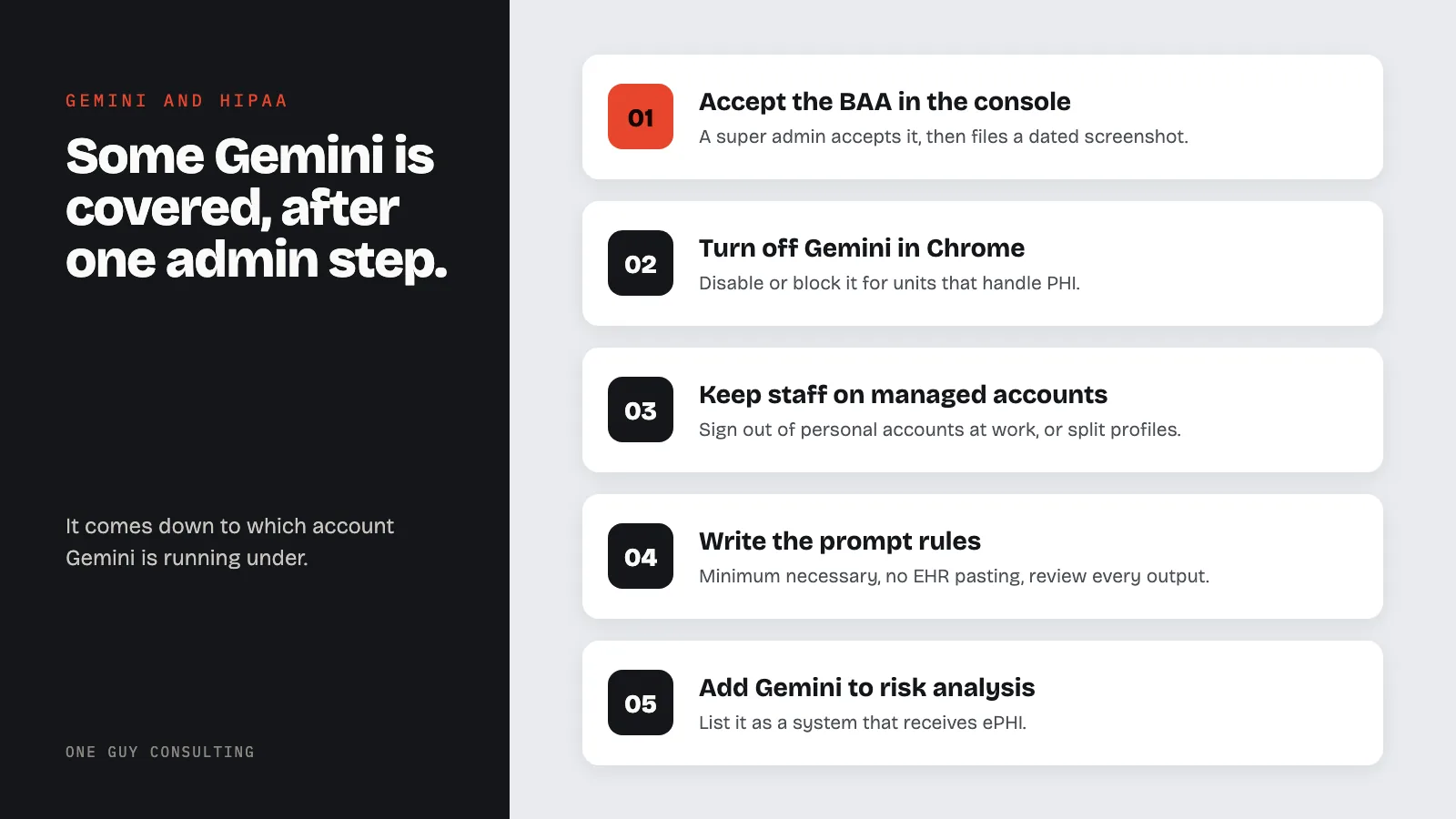
- Accept the Business Associate Amendment in the Admin console as a super administrator, take a screenshot of the acceptance, and file it with the date. Google says that screenshot is how you show it was accepted.
- Confirm your Workspace plan includes the Gemini features you intend to use. The Included Functionality list is about coverage; whether a feature is licensed is a plan question.
- Turn off Gemini in Chrome for organizational units that handle PHI, or block it by policy and say so in training.
- Force work through the managed account. Require staff to sign out of personal Google accounts on work browsers, or use separate browser profiles.
- Review Marketplace add-ons and Gemini extensions. Remove anything that moves data to a third party without a BAA.
- Write the prompt rules. Minimum necessary, no pasting from the EHR, de-identify where the task allows, and review every output before it enters the chart.
- Enforce two-step verification for every user, since a phished Workspace password now exposes prompts and outputs as well as email.
- Add Gemini to the risk analysis as a system that receives ePHI, per 45 CFR 164.308(a)(1)(ii)(A).
- Train with examples. Show the personal-account tab and the Workspace side panel side by side. The difference is the account, and staff cannot see it unless someone points.
Common Gemini HIPAA Mistakes
The wrong account in the same browser. One person, two Google identities, one covered.
Assuming the amendment was accepted. It may not have been. Someone has to check the Legal and compliance page.
"It is Google, so it is fine." Google says otherwise in two places: personal accounts have no amendment, and Gemini in Chrome is excluded.
Using Gmail on a personal account "just for this one patient." Same account problem, older tool. The Gmail comparison is the same story.
Alternatives and Comparisons
| Tool | BAA path | Notes |
|---|---|---|
| Google Gemini | Workspace amendment (Gemini app, Mac app, Gemini in Workspace) or Google Cloud BAA | Gemini in Chrome and personal accounts excluded |
| Microsoft 365 Copilot | In-scope under the Microsoft 365 BAA on commercial plans | Consumer Copilot excluded; see the Microsoft 365 guide |
| ChatGPT | Enterprise or Edu plans bought through OpenAI sales, the API, and ChatGPT for Clinicians (which has its own BAA) | Free, Plus, and Business have no BAA |
| Claude | Enterprise after the Primary Owner enables HIPAA, or HIPAA-ready API | Individual and Team plans cannot enable HIPAA |
Gemini inside a Workspace account with the amendment accepted is a covered tool with a published list behind it. Gemini in a personal tab is a consumer product that tells you not to type anything confidential. Same name, same model, different contract. The practice's job is to make sure staff only ever see the first one.
FAQ
Is the free Gemini app HIPAA compliant?
No. Consumer Gemini on a personal Google account has no Business Associate Amendment, and Google's privacy notice says human reviewers may read some chats. Only the Gemini app, the Gemini Mac App, and Gemini in Workspace under a Workspace account with the amendment accepted are on Google's HIPAA Included Functionality list.
Does Google sign a BAA for Gemini?
Google offers a Business Associate Amendment to Google Workspace and Cloud Identity customers, accepted by a super administrator in the Admin console. As of August 31, 2026, the covered list includes the Gemini app (excluding Gemini in Chrome), the Gemini Mac App, and Gemini in Workspace.
Is Gemini in Chrome covered by the Google BAA?
No. Google's Included Functionality list names the Gemini app 'excluding Gemini in Chrome.' It should be disabled or prohibited for staff who handle PHI.
Can I use Gemini through Google Cloud with patient data?
Only under the Google Cloud BAA, which is a separate agreement with its own covered-products list. Google says customers must not use Cloud products outside that list, or pre-general-availability offerings, with PHI.
What do I still have to do after accepting the amendment?
Confirm the features are licensed on your plan, turn off Gemini in Chrome and uncovered add-ons, keep staff on managed accounts, apply the minimum necessary standard to prompts, review outputs before they enter the chart, and add Gemini to the risk analysis.
The AI question in a practice is rarely about the model. It is about which account the model is running under. One Guy Consulting's Full-Scope plan includes vendor management with digital BAAs, policy and procedure templates, and 4 hours a month of 1:1 implementation calls with Chuck. Start with a free 30-minute intro call. No obligation, no pressure.
Sources
- Google Workspace Admin Help: HIPAA Compliance with Google Workspace and Cloud Identity (vendor page)
- Google Workspace: HIPAA Included Functionality (vendor page)
- Google Cloud: HIPAA Compliance on Google Cloud (vendor page)
- Google: Gemini Apps Privacy Hub (vendor page)
- 45 CFR 164.502 (uses and disclosures; minimum necessary at (b), business associates at (e))
- 45 CFR 164.308 (administrative safeguards)
Related Reading