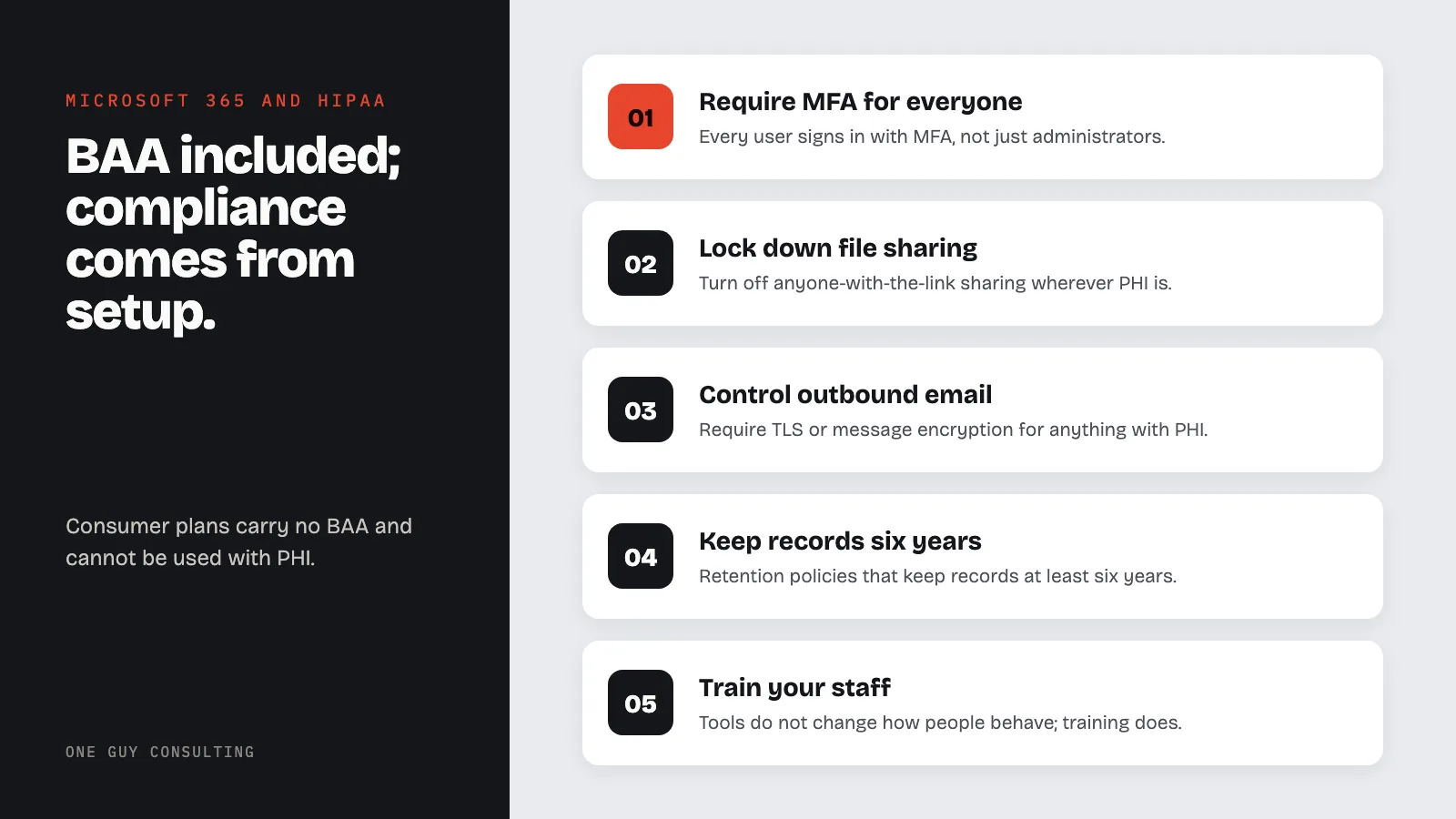
Yes, Microsoft 365 can be HIPAA compliant. Every business and enterprise plan comes with a Business Associate Agreement (BAA) by default. A BAA is the contract HIPAA requires with vendors that handle patient data. Consumer plans like Outlook.com get none. A BAA alone does not make you compliant. Your setup does: multi-factor authentication, sharing limits, encryption, retention, and staff training.
In early 2025, Solara Medical Supplies paid $3 million to settle with the HHS Office for Civil Rights (OCR). The cause was not exotic. Eight employee email accounts were phished between April and June 2019, and the electronic Protected Health Information (ePHI) of 114,007 people went with them.
OCR's central finding: Solara had never completed an accurate risk analysis. Microsoft 365 has tools that make this kind of phishing attack harder. One is multi-factor authentication (MFA), a second login step on top of the password. These tools only help if someone turns them on.
That is the whole story of Microsoft 365 and HIPAA in one paragraph. Yes, Microsoft 365 can be HIPAA compliant. Microsoft will sign a Business Associate Agreement (BAA) with you, and on a business or enterprise plan that agreement is already in force. But the BAA is the easy part. Whether your tenant is actually compliant comes down to how you configure it, and that is where practices slip.
Microsoft 365 HIPAA Compliance: BAA, Plans, and Configuration
Does Microsoft Sign a BAA for Microsoft 365?
Yes. Microsoft offers a Business Associate Agreement to its covered entity and business associate customers, and you do not have to hunt for it or negotiate it. Microsoft includes the BAA automatically through the Microsoft Online Services Data Protection Addendum, "by default to all customers who are covered entities or business associates under HIPAA."
In plain terms: if you have a commercial or enterprise Microsoft 365 subscription, the BAA already applies to the in-scope services. There is no separate form to sign for most customers. For your audit file, download the Microsoft HIPAA Business Associate Agreement from the Service Trust Portal and record it in your business associate management records alongside your other vendor BAAs.
Read this line twice, because it comes straight from Microsoft: "using Microsoft services doesn't on its own achieve HIPAA compliance. Your organization is responsible for ensuring that you have an adequate compliance program and internal processes in place." The BAA is a contract. It is not a configuration.
One hard limit: consumer plans do not qualify. Microsoft 365 Personal, Microsoft 365 Family, and free Outlook.com accounts are not offered under the Data Protection Addendum and carry no BAA. They cannot be used with PHI. Not once, not "just this email."
Which Microsoft 365 Plans Are HIPAA-Eligible?
Every commercial Microsoft 365 plan is BAA-eligible. The difference between plans is not whether you can sign the BAA. It is which compliance tools you get to enforce it.
| Plan | BAA Available? | Key Compliance Features |
|---|---|---|
| Business Basic | Yes | Exchange Online, Teams, OneDrive, SharePoint, TLS encryption, MFA via Entra ID |
| Business Standard | Yes | Adds desktop Office apps; same core security controls |
| Business Premium | Yes | Adds Microsoft Purview basics, Intune device management, Defender for Office 365, information protection |
| Enterprise E3 | Yes | Adds Purview data loss prevention, retention, and eDiscovery |
| Enterprise E5 | Yes | Adds advanced DLP, insider risk, Customer Key, top-tier audit |
Business Premium is the practical minimum for most small practices. It is the first tier that bundles device management (Intune), Defender for Office 365, and information-protection tools instead of making you buy them a la carte. If you need full data loss prevention (DLP), long-term retention, and eDiscovery, that lives in Enterprise E3 or E5 through Microsoft Purview. Basic and Standard can carry the BAA, but you will be enforcing compliance with fewer guardrails. Prices change often, so check current pricing with Microsoft before you buy.
Which Microsoft 365 Services Are Covered by the BAA?
The BAA covers a defined list of in-scope services. Anything outside that list should not touch PHI. On the commercial cloud, the covered services include:
- Exchange Online (email)
- SharePoint Online
- OneDrive for Business
- Microsoft Teams
- Microsoft Forms
- Microsoft Purview portal (compliance and information protection)
- Microsoft Defender for Office 365
- Microsoft Entra ID (identity and access)
- Microsoft Copilot and Microsoft Copilot Chat
- Power Apps, Power Automate, and Power BI
- Stream, and Service Encryption with Customer Key
- Office Online and Office Pro Plus (the Word, Excel, Outlook, and other Office apps)
Not covered: consumer services and personal accounts, and any third-party add-in from the marketplace. Every add-in that can read your mail or files is a separate business associate. It needs its own BAA, or it needs to come off.
Microsoft 365 Encryption and Security
In transit. Microsoft 365 encrypts data between you and its servers with TLS. For email, TLS only protects the message if the receiving mail server also supports it. If it does not, the message can fall back to plain text. Configure a mail-flow rule that requires TLS, or use Microsoft Purview Message Encryption so a secure message does not depend on the other side's setup.
At rest. Data stored in Microsoft 365 is encrypted with AES-256 through BitLocker and service encryption. On E5, Customer Key lets you supply and control the root keys yourself.
Certifications. The in-scope services are independently audited for ISO/IEC 27001 and the HITRUST Common Security Framework, and Office 365 U.S. Government holds a FedRAMP authorization. That is Microsoft's half of a shared responsibility. Your half is the configuration below.
How to Configure Microsoft 365 for HIPAA
The BAA is in force the day you buy the plan. Everything below is the work that has to happen on your side.
1. Confirm the BAA applies. Verify your subscription is a commercial or enterprise plan, then download the HIPAA Business Associate Agreement from the Service Trust Portal for your records. Consumer plans do not count.
2. Enforce multi-factor authentication for everyone. The proposed HIPAA Security Rule update would make MFA required. It was published in January 2025 and is not final yet. Today's rule already says you must check that the person logging in is who they say they are (45 CFR 164.312(d)). In Microsoft Entra ID (Microsoft's sign-in service), use a Conditional Access policy to require MFA for every user, not just administrators. MFA makes a stolen password far less useful, and phishing is how the Solara breach started.
3. Lock down OneDrive and SharePoint sharing. Turn off "Anyone with the link" sharing for any site or user that handles PHI. That link is the front door left open. Anyone who gets it, from a forwarded email or a browser history, can open the file.
4. Control email. Require TLS for outbound mail, or use Purview Message Encryption for anything containing PHI. Then block auto-forwarding rules to external addresses. That is a quiet, common way PHI walks out the door.
5. Set retention to six years. HIPAA says you must keep your required HIPAA documentation (policies, procedures, and records of required actions) for six years (45 CFR 164.316(b)(2)). The six years start from when a document was created or was last in effect. If that documentation lives in email or files, keep it that long too. In Microsoft Purview, create retention policies for Exchange, SharePoint, OneDrive, and Teams that keep records for at least six years.
6. Turn on data loss prevention. On Business Premium and up, build Purview DLP rules that detect PHI patterns in email, SharePoint, and OneDrive and block risky external sharing. Full DLP is an E3 or E5 capability.
7. Review third-party add-ins. In the admin center, list the add-ins that can access mail, files, and calendars. Remove the ones nobody approved, and stop users from installing new ones on their own.
8. Manage devices with Intune. Require device encryption, a screen lock, and remote wipe for lost or stolen devices. On Business Premium and Enterprise, this is included.
9. Train your staff. Most Microsoft 365 HIPAA violations are behavioral, not technical: sharing a file with the wrong link, emailing a diagnosis without checking encryption, or discussing a patient in a Teams channel that includes someone who should not be in it. Tools do not change how people behave. Training does.
Is Microsoft 365 Copilot HIPAA Compliant?
Yes, with a caveat. Microsoft has added Microsoft Copilot and Microsoft Copilot Chat to the list of in-scope services. On a commercial plan with the BAA in force, Copilot working inside Word, Outlook, Teams, and your SharePoint content is covered, and it respects the permissions each user already has.
The risk is not the licensed Copilot. It is a staff member opening consumer Copilot in a browser through a personal Microsoft account, which is outside your BAA. Most "Copilot and HIPAA" incidents are that scenario, not the enterprise version. Keep AI use inside managed accounts.
Common Microsoft 365 HIPAA Mistakes
Personal and consumer accounts. A provider using a personal Outlook.com address to email a patient is outside the BAA entirely. Consumer accounts cannot be made compliant. Force all work through the managed tenant.
"Anyone with the link" sharing. The fastest way to expose a file in OneDrive or SharePoint. Restrict sharing to named people inside your organization.
No multi-factor authentication. This is the Solara lesson. Phishing got into eight email accounts, and 114,007 people's records went with them. With MFA, a stolen password on its own is far less useful.
External auto-forwarding rules. A single mailbox rule that forwards to a personal Gmail address sends PHI out every day, silently. Block external auto-forwarding tenant-wide.
No retention or DLP. Without a retention policy, HIPAA documentation kept in email or files can be deleted before the six years are up. Without DLP you are trusting every employee to never attach the wrong file.
Unmanaged add-ins. Each marketplace add-in that reads mail or files is a potential business associate. Audit them, and remove what you do not need.
Microsoft 365 vs Google Workspace for Healthcare
The Google side gets its own full treatment in the Google Workspace HIPAA guide.
| Platform | BAA Available? | Best For | Key Limitation |
|---|---|---|---|
| Microsoft 365 | Yes (all commercial plans) | Organizations in the Microsoft ecosystem; deep compliance tooling through Purview | Full DLP and eDiscovery require Business Premium or E3 and up |
| Google Workspace | Yes (all paid plans) | Organizations in the Google ecosystem; simple self-service BAA | Native DLP is Enterprise-only |
The decision usually comes down to where your practice already lives. If your team runs on Outlook and Office, Microsoft 365 Business Premium gives you the BAA plus Purview and Intune in one place. If you are already in Gmail and Drive, Google Workspace can be configured to the same standard. Both can be HIPAA compliant. Neither is compliant out of the box.
Frequently Asked Questions
Is Outlook.com HIPAA compliant?
No. Outlook.com is a free consumer service with no Business Associate Agreement. Only commercial and enterprise Microsoft 365 or Office 365 plans include the BAA and can be used with PHI.
Does Microsoft 365 Business Basic include a BAA?
Yes. Every commercial Microsoft 365 plan, including Business Basic, is covered by the BAA through the Data Protection Addendum. The catch is that the Microsoft Purview compliance tools you need for DLP, retention, and eDiscovery start at Business Premium and Enterprise plans.
Is Microsoft Teams HIPAA compliant?
Yes. Microsoft Teams is an in-scope service covered by the BAA on commercial plans. As always, coverage depends on configuration. For the Teams specifics, see our guide on whether Microsoft Teams is HIPAA compliant.
Do I need Microsoft 365 E3 or E5 for HIPAA?
Not for the BAA. Every commercial plan is BAA-eligible. You move up to Business Premium, E3, or E5 for the compliance tooling: data loss prevention, retention, and eDiscovery, with advanced audit on E5. Business Premium is the practical floor for most small practices.
Does Microsoft 365 encrypt email automatically?
Microsoft 365 uses TLS to encrypt email in transit, but only when the receiving server also supports TLS. If it does not, the message can be sent unencrypted. Require TLS with a mail-flow rule, or use Microsoft Purview Message Encryption so protection does not depend on the recipient.
Microsoft 365 can be a HIPAA-compliant platform for email, files, and collaboration. The BAA comes with the plan. The compliance comes from the setup. Business Premium is the right floor for most practices, and E3 or E5 is the answer when you need full DLP and eDiscovery. Everything that separates a technically covered tenant from an actually compliant one, MFA, sharing controls, encryption, retention, and staff training, is configuration work you own.
OCR found that Solara had never completed an accurate risk analysis. That gap ended in a $3 million settlement.
Not sure whether your Microsoft 365 setup would hold up to an audit? Book Your Free 30-Minute Intro Call with One Guy Consulting and we will walk your configuration and find the gaps.
This content is for educational and informational purposes only and should not be construed as legal advice.
Sources
- Microsoft: HIPAA and HITECH Act Compliance Offering
- Microsoft HIPAA Business Associate Agreement (Service Trust Portal)
- HHS OCR: Solara Medical Supplies Resolution Agreement and Corrective Action Plan
- HHS: HIPAA Security Rule
- 45 CFR 164.312: Technical Safeguards
Related Reading:
- Is Microsoft Teams HIPAA Compliant? What Healthcare Practices Need to Know
- Is Google Workspace HIPAA Compliant? BAA, Covered Services, and Configuration Guide
- Is Gmail HIPAA Compliant? Free vs. Workspace Explained
- Is Dropbox HIPAA Compliant? What Healthcare Practices Need to Know
- Is Zoom HIPAA Compliant? What Healthcare Practices Need to Know