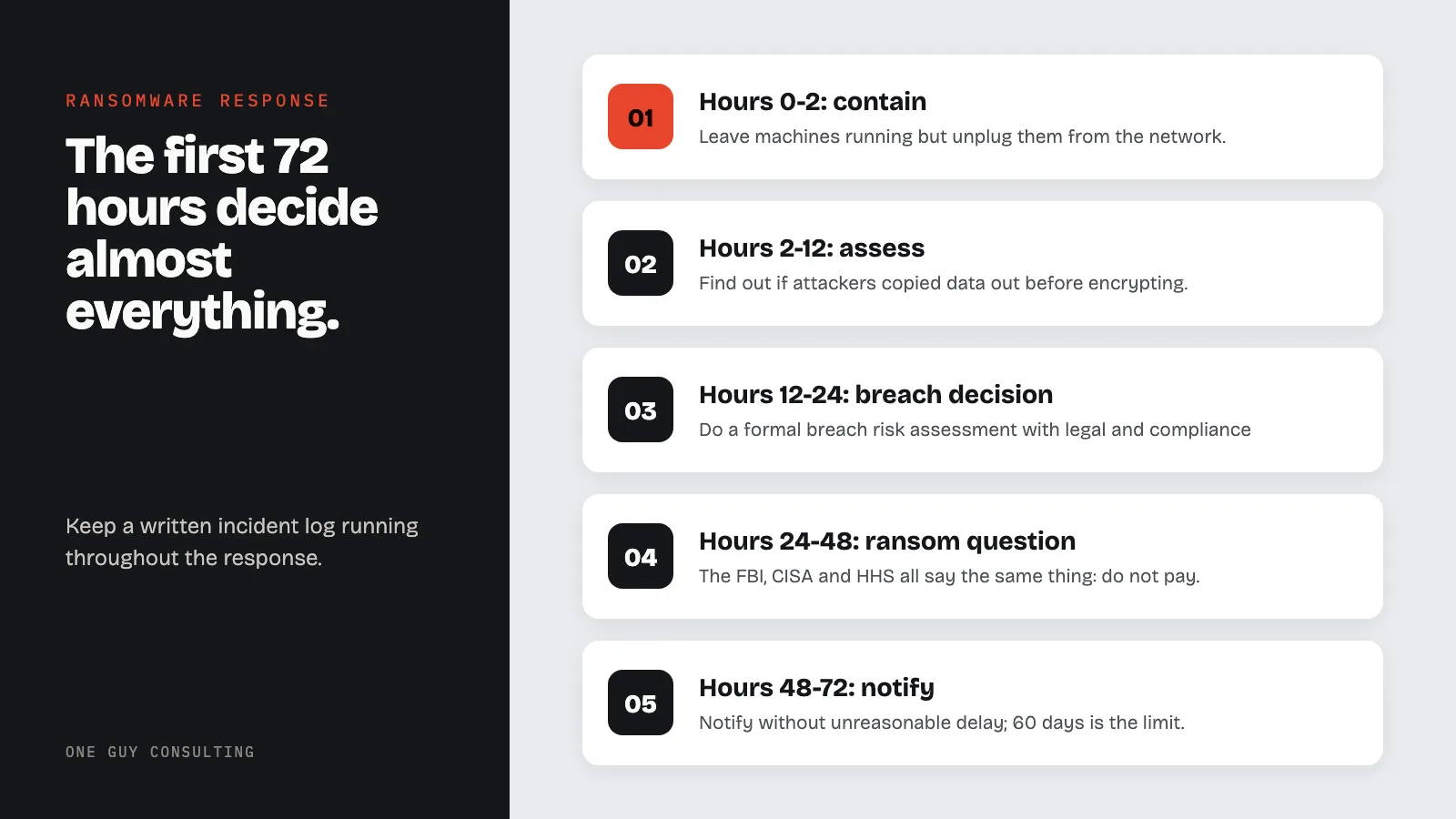
In the first 72 hours after ransomware hits, unplug infected machines from the network but leave them on. Check your backups. Call your IT provider and your cyber insurer. Then bring in a lawyer, report to the FBI and CISA, and plan your recovery. Breach notices are due no later than 60 days after discovery.
On February 19, 2026, staff at the University of Mississippi Medical Center showed up to work and found their computers useless. The Epic health record system was down. All 35 outpatient clinics closed statewide. Elective surgeries canceled. Doctors pulled out paper forms they hadn’t touched in years. Mississippi’s only academic medical center, serving one of the nation’s poorest and sickest populations, was brought to its knees by a ransomware attack that experts said could take weeks to months to fully recover from.
UMMC had a dedicated IT department, federal relationships, and an emergency operations plan ready to activate. They still lost access to their core systems for days.
This follows a pattern that keeps repeating. Scripps Health in 2021: four weeks of downtime, about $113 million in losses, and data on roughly 147,000 people exposed. CommonSpirit Health in 2022: facilities across the country disrupted, about $160 million in costs. Ardent Health on Thanksgiving 2023: hospitals across six states disrupted, emergency rooms diverting ambulances, the EHR offline for two weeks.
Ransomware attacks keep climbing. The broader healthcare data breach trends from 2025 show that attackers are shifting toward smaller targets with lower ransom demands and faster payouts. Healthcare remains one of the most targeted sectors. IBM’s 2025 Cost of a Data Breach report says the average healthcare data breach costs $7.42 million. The newer groups (Medusa, Interlock, Play, and Qilin) aren’t just encrypting your files anymore. They’re corrupting backups, damaging systems, and deliberately targeting clinical systems to maximize pressure to pay.
If it happens to your practice, the next 72 hours determine almost everything: how much damage gets done, whether you can recover without paying, what your legal exposure looks like, and whether OCR treats you as a victim who responded correctly or a negligent organization that made everything worse.
Print this page. Save it somewhere that isn’t on your network.
What Ransomware Actually Looks Like Before It Hits
Ransomware rarely announces itself dramatically. More often, it starts with something subtle: a workstation running slow, a file that won’t open, an unusual login at 2 a.m. that nobody noticed.
By the time you see the ransom note, the attackers have usually been inside your network for days or weeks. They’ve already mapped your systems, found your backups, and staged their payload. The encryption is the last step, not the first.
This matters because it affects how you respond. You’re not just dealing with an active attack: you’re dealing with the aftermath of a prolonged compromise. A solid risk analysis process can help identify weak spots before attackers do.
Key Terms Defined
- Electronic Protected Health Information (ePHI): Protected health information created, received, maintained, or transmitted in electronic form, such as the records in your EHR, billing system, email, and backups (45 CFR 160.103).
- Security incident: The attempted or successful unauthorized access, use, disclosure, modification, or destruction of information, or interference with system operations in an information system (45 CFR 164.304). A ransomware infection is a security incident by definition.
- Breach: The acquisition, access, use, or disclosure of PHI in a manner not permitted under the Privacy Rule which compromises its security or privacy. An impermissible use or disclosure is presumed to be a breach unless a documented risk assessment shows a low probability that the PHI was compromised (45 CFR 164.402). HHS treats ransomware encryption of ePHI as an acquisition of that data, so it is presumed a breach unless you can show otherwise (HHS ransomware fact sheet).
- Breach notification: After a breach of unsecured PHI is discovered, individual notices must go out without unreasonable delay and no later than 60 calendar days, and HHS must be notified, and breaches involving more than 500 residents of a state require media notice (45 CFR 164.400 to 164.414).
Hours 0-2: Discovery and Immediate Containment
The moment you realize something is wrong, start the clock and record everything.
1. First 15 Minutes: Isolate, Don’t Shut Down
- Do not turn off affected machines. Counterintuitive, but key: powering down destroys forensic evidence stored in RAM and, in some cases, makes recovery harder. Leave machines running but disconnect them from the network.
- Physically unplug network cables from affected workstations and servers. If you can’t identify which machines are affected, start disconnecting everything.
- Disable Wi-Fi at the router level if possible.
- Take photos of ransom notes and error screens with your phone before doing anything else.
2. Next 45 Minutes: Assess the Spread
- Network isolation is your goal. Every machine that’s still connected is a machine the ransomware can spread to.
- Identify your “patient zero” if you can: the first machine that showed symptoms. Don’t touch it. It’s evidence.
- Check your backups right away. Are they accessible? Are they on a separate, air-gapped system? Or are they on the same network that just got hit? This single answer determines what comes next. At Scripps Health, recovery took four weeks partly because the attack reached connected backup systems.
- Call your IT provider or managed security service provider (MSSP). If you don’t have one, find one now. This is not the time to troubleshoot yourself.
3. Who to Call in the First 2 Hours
- IT/MSSP: your first call, period
- Your cyber insurance carrier: call before you engage outside forensic firms; many policies require pre-approval, and many insurers have incident response teams on retainer
- Practice owner/leadership: they need to know right away
Hours 2-12: Assessment and Notification Decisions
Once you’ve contained the spread as much as possible, shift to assessment mode.
4. Understand What You’re Dealing With
Work with your IT team to answer these questions:
- Which systems are affected and which are clean?
- What data did those systems contain? Does it include ePHI?
- Are backups intact and recoverable?
- Can you identify the ransomware variant? (This matters: some variants have known decryption tools available for free)
- Is there evidence the attackers exfiltrated data before encrypting?
That last question is key. Under HIPAA, encryption of your own data by attackers is a security incident. HHS also treats it as a breach by default. That holds unless a written risk assessment shows a low chance the data was compromised. If attackers also exfiltrated patient data (copied it out before encrypting), that’s almost certainly a reportable breach under the breach notification requirements and the annual small breach reporting deadline.
Many healthcare ransomware attacks now include data theft. They steal first, encrypt second, then threaten to publish if you don’t pay. It’s called double extortion, and it’s the default playbook.
5. Document Everything: Your OCR Lifeline
Start a written incident log now and keep it running throughout the response. Date and timestamp every action, every decision, every person you spoke to. This log will matter enormously if OCR investigates. UMMC activated its Emergency Operations Plan and brought in the FBI, DHS, and CISA quickly. That is the kind of record you want to be able to show.
6. Get Legal Counsel on the Phone
By hour 6-8, you should have healthcare legal counsel on the phone. They help you navigate the notification decisions, communicate with regulators under attorney-client privilege, and avoid statements that could create extra liability. This is not optional if ePHI was involved.
Hours 12-24: The Breach Notification Decision
HIPAA’s Breach Notification Rule says you must tell affected people without unreasonable delay. That means as soon as you reasonably can, and no later than 60 days after discovering a breach. You must tell HHS too.
If more than 500 residents of one state are affected, you must also tell the media. OCR’s proposed 2025 Security Rule updates are still only proposed, not law. They include other deadlines, such as getting lost systems back within 72 hours. They would not change the 60-day deadline for breach notices.
The clock on that window starts at discovery, not at containment, not at investigation completion. At discovery.
So by hour 12-24, you need to be working through a formal breach risk assessment with your legal and compliance team:
- Was ePHI involved?
- Was it accessed or exfiltrated, or only encrypted on your own systems?
- Can you show the data was not actually acquired by the attackers?
You treat it as a breach unless a written risk assessment shows a low chance that the ePHI was compromised.
7. Federal Agencies to Contact
- FBI: Report to your local FBI field office or online at ic3.gov. The FBI has healthcare-specific resources and may have intelligence on the specific group that hit you. Reporting is free and can open doors to recovery resources.
- CISA: Report at cisa.gov or call 1-888-282-0870. CISA coordinates cross-sector threat intelligence and has published specific advisories on groups targeting healthcare in 2025-2026.
- State attorneys general: Many states have separate breach notification laws with their own timelines (some as short as 30 days). Your legal counsel handles this, but make sure they’re on it. If a patient also files a complaint with OCR as part of the fallout, know how to respond to a HIPAA complaint before the investigation begins.
Hours 24-48: Recovery Planning and the Ransom Question
By now you have a clearer picture of the damage. This is when you make the hardest decisions.
8. Should You Pay the Ransom?
The FBI, CISA, and HHS all say the same thing: do not pay. Payment doesn’t guarantee you’ll get working decryption keys. It funds criminal operations. It marks you as willing to pay, which invites follow-on attacks.
But healthcare is complicated. When patient care systems are down (when you can’t access records, can’t run equipment, can’t function as a practice), the calculus gets harder. Hospitals have paid ransoms because the alternative was patient harm.
Practical realities before paying anything:
- Check nomoreransom.org first. This free resource, run by Europol, Dutch police, and partner security companies, has free decryption tools for many ransomware variants. Your variant might already be cracked.
- If you’re considering payment, your cyber insurance carrier must be involved first. Many policies cover ransom payments under specific conditions.
- Check OFAC sanctions risk with legal counsel. The U.S. Treasury’s Office of Foreign Assets Control (OFAC) maintains a list of sanctioned groups, including several ransomware groups. Paying a sanctioned group, even unknowingly, can result in civil penalties under strict liability. That means you can be fined even if you didn’t know the group was sanctioned.
- Do NOT communicate with the attackers using your work email or any system that may still be compromised. If they’re still in your network (and they often are), they can read your internal discussions about whether to pay, what your insurance covers, and what your legal strategy is.
- Paying does not end your HIPAA duties. If ePHI was accessed or exfiltrated, you still have a reportable breach whether or not you recover your files.
9. Recovery From Clean Backups
If your backups are clean and intact, this is your path forward. This is where the 3-2-1 backup rule earns its reputation:
- 3 copies of your data
- 2 different media types (e.g., local disk + cloud, or disk + tape)
- 1 copy offsite and air-gapped (physically disconnected from your network)
That third copy, the one attackers can’t reach, is the one that saves you. CommonSpirit’s attack disrupted systems for weeks and cost about $160 million. Organizations with tested, air-gapped backups (copies kept off your network) can often recover in days instead of weeks.
Work with IT to:
- Restore systems on clean hardware (don’t restore onto potentially compromised machines)
- Verify data accuracy before bringing systems back online
- Confirm the attack vector is closed before reconnecting to the internet
- Re-image affected workstations rather than attempting to clean them
10. Activating Paper-Based Downtime Procedures
If your backups are compromised or recovery will take days, you need paper-based workflows ready to go. UMMC staff fell back on pen-and-paper charting. Ardent Health’s hospitals did the same across six states. Your practice should have:
- Printed medication lists and allergy records for active patients
- Paper intake and charting forms
- Manual prescription pads
- A phone tree for contacting patients with upcoming appointments
- Paper-based billing procedures
These should exist in a binder, printed, in a known location, not stored on the server that just got encrypted.
Hours 48-72: Notification Execution and OCR Reporting
If you’ve determined a breach occurred:
11. Execute Your Notification Plan
- Individual notice (a letter to each affected person) must go out without unreasonable delay. The hard limit is 60 days after discovery. For breaches affecting more than 500 residents of a state, you also notify prominent media outlets in that state.
- HHS notice goes to the OCR breach portal. If 500 or more people are affected, report to HHS when you send your patient notices. The same 60-day limit applies. For breaches under 500, you can report annually by March 1.
- Draft your notice letters now. Legal counsel reviews. They must include what happened, what information was involved, what you’re doing about it, what affected individuals can do to protect themselves, and your contact information.
12. What NOT to Do
- Do not discuss the incident publicly or on social media before legal counsel has reviewed your communications strategy.
- Do not delete or alter any systems or logs while the investigation is active.
- Do not communicate with the attackers without your legal team and incident response firm involved.
- Do not pay a ransom without informing your cyber insurer and checking OFAC sanctions lists first.
After 72 Hours: The Long Recovery
The acute phase ends, but the work doesn’t. Scripps Health was down for about four weeks. CommonSpirit’s financial impact extended well into the following fiscal year. Expect the following in the weeks ahead:
- Forensic investigation to determine root cause, dwell time, and full data impact
- Regulatory response: OCR may investigate; having your incident log and written records in order is everything
- Staff communication and retraining on what happened and how to prevent recurrence
- System hardening based on forensic findings, patching whatever weak spot got exploited
- Policy and procedure updates to address gaps the attack exposed; the proposed Security Rule changes would raise the bar a lot if they are finalized
- Lessons-learned review: what failed, what held up, what changes permanently
The Printable Ransomware Response Checklist
Cut this out. Tape it to the wall next to your server room door.
Hours 0-2: CONTAIN
- [ ] Isolate affected machines (unplug network cables, DO NOT power off)
- [ ] Photograph all ransom notes and error screens
- [ ] Check backup status: are they air-gapped and intact?
- [ ] Call IT provider / MSSP
- [ ] Call cyber insurance carrier
- [ ] Start written incident log with timestamps
Hours 2-12: ASSESS
- [ ] Identify scope: which systems, which data
- [ ] Determine if ePHI was involved
- [ ] Determine if data was exfiltrated (not just encrypted)
- [ ] Engage healthcare legal counsel
- [ ] Notify practice leadership
Hours 12-24: REPORT
- [ ] Report to FBI (ic3.gov or local field office)
- [ ] Report to CISA (1-888-282-0870 or cisa.gov)
- [ ] Begin formal breach risk assessment with legal team
- [ ] Identify state AG notification rules
Hours 24-48: DECIDE
- [ ] Check nomoreransom.org for free decryption tools
- [ ] If considering payment: verify OFAC sanctions compliance with legal counsel
- [ ] Make ransom decision with insurance carrier and legal
- [ ] Begin recovery from clean, verified backups
- [ ] Activate paper-based downtime procedures if needed
- [ ] Draft breach notice letters
Hours 48-72: NOTIFY
- [ ] File HHS OCR breach notice if breach confirmed
- [ ] Prepare individual notice letters
- [ ] Address state AG notification deadlines
- [ ] Prepare media statement if more than 500 residents of a state are affected
- [ ] Document all actions taken for the compliance record
Key stat: The first 72 hours after a ransomware attack determine the trajectory of the entire incident.
Sources
- 45 CFR 164.308(a)(6): Security Incident Procedures
- 45 CFR Part 164, Subpart D: Breach Notification
- CISA: Stop Ransomware
- HHS Breach Notification Guidance
Related Reading
- Kadnap Botnet: Healthcare Threat Analysis
- The Change Healthcare Breach One Year Later: What the largest healthcare breach in history means for your vendor contracts
- Healthcare Cybersecurity Framework
- Lost Device HIPAA Incident Response
- Data Breach Prevention Strategy
- Ransomware Protection for Healthcare
- HIPAA Data Breach Response Plan
- Your Vendor Got Hacked. Now What?: A step-by-step response plan when a third party is compromised
- Healthcare Breaches Doubled in 2025: The numbers behind the worst year on record
- How to Run a Risk Assessment That Won’t Get You Fined: The preventive work that makes recovery possible
- MFA Is Proposed as a HIPAA Requirement: One of the most effective ransomware prevention measures you can implement today
Need help building your incident response plan before something happens? One Guy Consulting offers affordable HIPAA compliance packages. Explore HIPAA compliance services
Frequently Asked Questions
What are the most important steps in the first 72 hours after a ransomware attack?
Isolate affected systems immediately to stop lateral spread, activate your incident response plan, notify your HIPAA Security Officer and legal counsel, engage a forensic response firm, and begin documenting every action taken with timestamps.
Does a ransomware attack have to be reported to HHS?
HHS guidance presumes ransomware infections are HIPAA breaches unless you can demonstrate a low probability that PHI was compromised based on a four-factor risk assessment.
Should a medical practice pay the ransom after a ransomware attack?
Paying the ransom does not guarantee data recovery and may expose the practice to OFAC sanctions if the attacker is on a sanctioned list. Consult legal counsel before any payment decision.
How do I know if patient data was stolen in a ransomware attack?
You typically cannot know without forensic investigation. Ransomware groups increasingly exfiltrate data before encrypting systems. Assume data exfiltration occurred until a forensic analysis proves otherwise.
How long does it take to recover from a healthcare ransomware attack?
Recovery time ranges from days to months depending on backup quality, system complexity, and extent of infection. Organizations with tested, offline backups and documented recovery procedures generally restore operations faster.