The seven BAA mistakes are: no BAA with every vendor that touches PHI, a generic template with no set breach notice deadline, no terms for when the BAA ends, not tracking expiration and renewal dates, not checking the vendor’s real security, no BAAs with subcontractors, and no incident response rules or deadlines.
In February 2024, hackers broke into Change Healthcare (the company that processes roughly 15 billion healthcare transactions a year) and stole data on roughly 192.7 million people. It became the largest healthcare data breach in history. Hospitals, pharmacies, and practices across the country couldn’t process claims for weeks. The financial damage to UnitedHealth Group, Change Healthcare’s parent company, exceeded $3 billion.
Healthcare organizations that shared patient data with Change Healthcare did so under Business Associate Agreements. And when the dust settled, the question that kept coming up was the same one that comes up after every major vendor breach: did those BAAs actually protect anyone?
The answer, in most cases, is that the agreements were there but the oversight wasn’t. And OCR has made clear (through 21 enforcement actions in 2025 alone, the second-highest annual total on record) that having a signed BAA is only the beginning of your obligations.
Here are the seven mistakes that keep getting practices fined, investigated, and exposed.
Mistake 1: Not Having BAAs With ALL Vendors Who Touch PHI
This is the most common failure OCR finds, and the enforcement examples are brutal.
Advanced Care Hospitalists in Florida paid $500,000 after PHI for over 9,000 patients ended up publicly visible on a medical billing contractor’s website. The root cause? No BAA existed between Advanced Care and the billing company. The practice assumed the contractor knew the rules. The contractor apparently didn’t.
Pagosa Springs Medical Center paid $111,400 after sharing ePHI with a scheduling vendor without a valid BAA in place.
The Center for Children’s Digestive Health paid $31,000. It shared PHI with its records storage vendor, Filefax, for years without a signed BAA. Neither side could produce one dated before October 2015.
The pattern is always the same: a practice shares PHI with a vendor, assumes the relationship is covered, and discovers too late that no valid agreement exists.
The Vendors Practices Commonly Miss
- Cloud storage providers. Google Drive, Dropbox, OneDrive: if patient data is stored there, you need a BAA. Google and Microsoft offer BAAs for their business-tier products. Personal and free-tier accounts do not qualify, and using them for PHI is itself a breach.
- Marketing agencies. Agencies that handle marketing for healthcare clients become business associates the moment they touch patient lists, intake forms, or ad pixels.
- IT support companies. Any IT firm that has remote access to systems containing PHI is a business associate. That includes the guy who comes in to fix your server. That includes your managed service provider.
- Document shredding and records destruction. The company that picks up your paper records? Business associate. The service that destroys old hard drives? Business associate.
- Medical transcription services. Whether it’s a large company or a freelancer, if they’re transcribing clinical notes with patient information, they’re a business associate.
- Answering services. If your after-hours service hears or records patient information, BAA required.
- Collection agencies. Sending outstanding accounts to collections means sharing PHI. BAA required.
- Web hosting and patient portals. Any hosting company that stores a patient-facing portal where PHI lives needs a BAA.
- Practice management software. Separate from your EHR: scheduling tools, billing platforms, and analytics software that processes PHI all require BAAs with their vendors.
The test is simple: does this vendor create, receive, maintain, or transmit PHI on your behalf? If yes, BAA required. No exceptions based on vendor size, reputation, or how unlikely a breach seems.
Mistake 2: Using a Generic BAA Template Without Customizing Breach Notification Timelines
A valid BAA must include specific elements under 45 CFR 164.504(e), including requirements for reporting breaches and security incidents. But the details matter enormously, and generic templates downloaded from the internet almost always get them wrong.
The biggest gap: breach notification timelines. HIPAA requires covered entities to notify affected individuals within 60 days of discovering a breach. But how quickly does your business associate have to tell you about the breach so your clock can start? If your BAA says “within a reasonable time” or doesn’t specify at all, you’ve got a problem.
Under the proposed 2025 Security Rule updates, business associates would be required to notify covered entities within 24 hours of activating their contingency plans (their emergency backup plans), a dramatically tighter window than most current BAAs contemplate. If your existing agreements say “30 days” or “promptly,” they’re already behind where the rules may be heading.
A good BAA specifies an exact number of hours or days for the BA to report a breach or security incident to you. Seventy-two hours is common. Twenty-four hours is better. “Reasonable” is useless.
Mistake 3: Not Specifying What Happens When the BAA Terminates
What happens to patient data when you stop working with a vendor? Many BAAs don’t say, or say something vague like “data will be handled per applicable law.”
A proper BAA includes a termination clause that requires the vendor to either:
- Return all PHI to you in a specified format, or
- Destroy all PHI and provide written certification of destruction, or
- If return or destruction isn’t feasible (e.g., archived in backup systems), the vendor must explain why and continue to protect the data under the BAA’s terms indefinitely.
Without this clause, patient data sits in vendor systems forever after the relationship ends. Ex-vendors you haven’t worked with in years can become the source of a breach notification, and your name is on it because the PHI originated with you.
Also missing from many BAAs: what happens if the vendor materially breaches its obligations? A strong BAA gives you clear termination rights and requires the vendor to cooperate with breach response even after the contract ends.
Mistake 4: Failing to Track BAA Expiration Dates and Renewals
You signed a BAA in 2019. Since then, the vendor changed ownership, expanded their services, migrated to a new cloud platform, and hired 200 new employees. Your BAA still describes the services and protections from 2019.
This is not a theoretical problem. OCR’s 2016-2017 audit report found that only 14% of the covered entities it audited largely met their risk analysis requirements.
BAAs should be reviewed every time the scope of services changes and at minimum annually. A dedicated BAA management system automates this. Most practices do neither. They sign the agreement, file it, and never look at it again.
How to Build a BAA Tracking System
The fix is boring but effective: keep a centralized BAA tracker. A spreadsheet with vendor name, agreement date, expiration or review date, scope of PHI access, and the file location of the signed agreement. Review it quarterly. Flag anything older than 12 months for renewal review. When OCR asks for documentation, “we have it somewhere” is not an answer. A dated spreadsheet showing active management is.
Mistake 5: Not Verifying Your Business Associate’s Actual Security Practices
This is the mistake the Change Healthcare breach exposed on a massive scale.
Healthcare organizations that used Change Healthcare had BAAs. The paperwork was in order. But how many of those organizations actually verified that Change Healthcare was doing what the BAA required? How many reviewed their security posture, asked about their incident response capabilities, or checked whether they’d completed a recent risk analysis?
The answer, based on the catastrophic scale of the breach: not enough.
A signed BAA is a legal document. It creates obligations. But it doesn’t create security. If your vendor signs a BAA promising to implement “appropriate safeguards” and then uses unpatched servers, no MFA, and no encryption, the BAA didn’t protect your patients. It just gave you a piece of paper to wave during the inevitable lawsuit.
What Vendor Verification Actually Looks Like
- Request your vendor’s most recent risk analysis or SOC 2 report
- Ask about their encryption practices, access controls, and backup procedures
- Inquire about their incident response plan and when it was last tested
- Check whether they carry cyber insurance
- Ask if they’ve had any breaches or security incidents in the past three years
Under the proposed Security Rule, this would stop being optional. The NPRM published January 6, 2025, would require business associates to provide covered entities with written verification at least once every 12 months confirming they’ve implemented required technical safeguards (the technology protections for electronic PHI). This proof would have to be checked by a cybersecurity subject matter expert and certified by a person of authority at the BA.
That would mean yearly written proof, checked by an expert, that your vendor is actually doing what the BAA says. Not a checkbox. Not a phone call. Written analysis and certification.
Mistake 6: Missing BAAs With Subcontractors
HIPAA’s obligations run downstream. If your billing company uses a cloud platform to store the data it processes for you, that cloud platform is a subcontractor, and your billing company is required to have a BAA with them that includes the same HIPAA protections.
This layered setup is what made the Change Healthcare breach so devastating. Change Healthcare worked behind the scenes in the claims process. For some practices, it was a vendor’s vendor, not a company they contracted with directly. The PHI flowed through multiple layers, and the breach happened deep in the chain.
You don’t have to directly contract with your vendors’ subcontractors. But you should:
- Know who your BAs’ major subcontractors are
- Verify that your BAA requires BAs to flow down HIPAA obligations to their subcontractors
- Ask your BA whether they have BAAs in place with every subcontractor who touches your data
- Include a term requiring BAs to notify you when they add new subcontractors who will have access to PHI
Most practices never ask these questions. The Change Healthcare breach (affecting roughly 192.7 million people deep in the vendor chain) is what happens when nobody asks.
Mistake 7: Not Including Incident Response Requirements and Timelines
A BAA that says “business associate will report security incidents” without specifying what that means in practice is a BAA that will fail you when it matters most.
Your BAA should include:
- Specific notification timelines: how many hours after discovering an incident the BA must notify you (72 hours maximum, 24 hours preferred)
- What counts as a reportable incident: not just confirmed breaches, but suspected incidents and unsuccessful attack attempts that could show targeting
- What information the BA must provide: nature of the incident, data involved, individuals affected, steps taken to fix the problem
- Cooperation requirements: the BA’s obligation to support your investigation, provide forensic data, and assist with breach notifications
- Contingency plan activation notice: under the proposed Security Rule, BAs would have to tell you within 24 hours of starting their contingency plan (their emergency backup plan)
Without these specifics, you’re relying on your vendor’s good judgment about when to tell you something went wrong. The Change Healthcare breach was detected on February 21, 2024. Many practices didn’t understand the full scope of the impact on their patient data for months. A BAA with strong incident response terms gives you earlier warning and more control. If your vendor does get compromised, having a clear response plan makes the difference.
The BAA Audit Checklist
Run through this for every vendor who touches PHI (see our complete BAA guide for required elements in detail):
Inventory
- Do we have a current, signed BAA with this vendor?
- Does the BAA accurately describe the current scope of services?
- When was the BAA last reviewed or updated?
- Is this BAA on one central list with review dates?
Required Elements Under 45 CFR 164.504(e)
- Does it list the permitted uses and disclosures of PHI? That means how the vendor may use and share it.
- Does it require appropriate safeguards, meaning the protections the vendor must use to keep PHI safe?
- Does it set a deadline for reporting breaches and incidents (not just “reasonable”)?
- Does it make the vendor hold its own subcontractors to the same rules?
- Does it say the vendor must return or destroy the PHI when the contract ends?
- Does it let us end the contract if the vendor seriously breaks its terms?
Verification
- Have we reviewed the vendor’s most recent risk analysis or SOC 2 report?
- Have we verified their encryption, access control, and backup practices?
- Do we know who their major subcontractors are?
- Have we confirmed they carry cyber insurance?
Incident Response
- Does the BAA set a notice deadline in hours (not “promptly” or “reasonably”)?
- Does it require the vendor to help with our breach investigation?
- Does it require the vendor to tell us when it starts its contingency plan (its emergency backup plan)?
Looking Ahead
- Are we prepared to request annual written verification if the proposed Security Rule is finalized?
- Have we set aside budget for the vendor tracking this would require?
Pre-Signature BAA Checklist
Before signing any BAA, verify these elements are present and specific:
- Confirm the vendor actually handles PHI. Not every vendor needs a BAA. If they do not create, receive, maintain, or transmit PHI, a BAA is unnecessary and signing one creates false obligations.
- Verify the required provisions under 45 CFR 164.504(e) are present, including permitted uses, safeguard requirements, breach reporting, subcontractor flowdown, individual rights support, HHS access, PHI return/destruction, and termination provisions.
- Check the breach notification timeline. If it says “reasonable” or “prompt,” negotiate a specific number of hours. 72 hours is common. 24 hours is better.
- Confirm the subcontractor clause exists. The BAA must require the vendor to impose equivalent obligations on any subcontractor that handles PHI.
- Look for a data return/destruction clause at termination. Without this, PHI sits in vendor systems indefinitely after the relationship ends.
- Verify the agreement matches current services. If the vendor has expanded their scope since the last BAA, the agreement must reflect the current reality, not the original contract.
- Check for indemnification and insurance provisions. These are not required by HIPAA but significantly reduce financial exposure in the event of a vendor-caused breach.
- Confirm you have a signed, dated copy filed centrally. If you cannot hand OCR a signed BAA when it asks, you cannot prove one existed.
How to Fix Your BAA Gaps Today
If you find you’re missing a BAA with a current vendor:
- Minimize PHI sharing with that vendor right away until the BAA is executed
- Contact the vendor and request their standard BAA (most established vendors have one ready)
- Review it against the required elements above before signing
- If they push back on signing a BAA, treat that as a disqualifying red flag: a vendor who refuses to sign a HIPAA-required agreement is not a vendor you should share patient data with
If you find a BAA that’s outdated or missing key terms:
- Reach out to the vendor to negotiate an addendum or full replacement
- Don’t just amend informally: get a signed, dated record
- Prioritize by risk: vendors with the most access to the most sensitive data get updated first. Use a BA-specific risk assessment to identify which vendors pose the greatest exposure
- Document your review process so you can show active compliance management to OCR
Current HIPAA Penalty Tiers (2026)
| Tier | Knowledge Level | Min/Violation | Max/Violation | Annual Cap (regulation) |
|---|---|---|---|---|
| 1 | Did not know | $145 | $73,011 | $2,190,294 |
| 2 | Reasonable cause | $1,461 | $73,011 | $2,190,294 |
| 3 | Willful neglect (corrected) | $14,602 | $73,011 | $2,190,294 |
| 4 | Willful neglect (not corrected) | $73,011 | $2,190,294 | $2,190,294 |
The table shows the yearly caps written in the regulation, 45 CFR 102.3, as adjusted for inflation in 2025. Since 2019, OCR has used lower yearly caps for tiers 1 to 3. This is called enforcement discretion, which means OCR has chosen to charge less than the rule allows.
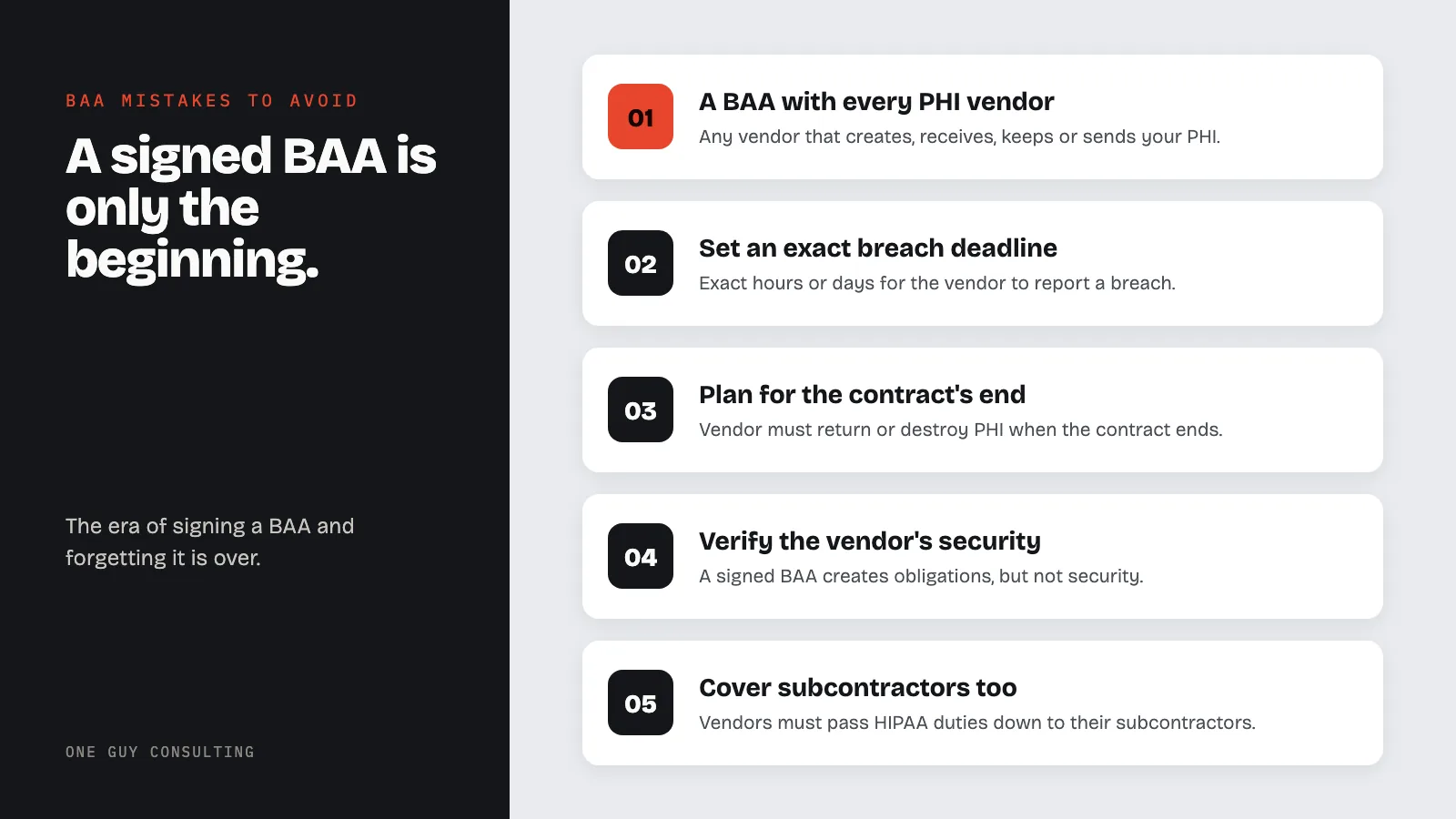
The enforcement trend is clear. OCR’s 21 actions in 2025, the proposed annual verification rule, and the Change Healthcare fallout all point in the same direction: the era of signing a BAA and forgetting about it is over. Vendor management is now an active, ongoing compliance obligation, and the organizations that treat it that way are the ones that won’t end up in the next enforcement headline.
Related Reading
- BAA vs. Confidentiality Agreement: Which one you actually need signed and when a standard NDA falls short
- The Change Healthcare Breach One Year Later: How the largest breach in history reshaped vendor risk management
- Your Vendor Got Hacked. Now What?: Step-by-step response plan when a business associate is compromised
- OCR Just Fined a Substance Abuse Clinic $103K: What Part 2 enforcement means for your BAA obligations
- $6.6 Million in HIPAA Fines in 2025: The enforcement cases that shaped the year
- The Small Practice HIPAA Compliance Checklist: Get your BAAs, risk analysis, and policies in order
Need help getting your BAAs and vendor relationships in order? One Guy Consulting offers affordable HIPAA compliance packages. Explore HIPAA compliance services | BAA management tool | business associate HIPAA compliance
Sources
Frequently Asked Questions
What is a Business Associate Agreement under HIPAA?
A Business Associate Agreement (BAA) is a required written contract between a covered entity and any vendor that creates, receives, maintains, or transmits PHI on the covered entity's behalf.
What are the most common Business Associate Agreement mistakes?
The most common mistakes include using outdated template language, failing to get BAAs signed before sharing PHI, not requiring vendors to obtain BAAs from their subcontractors, and accepting vendor-provided BAAs without legal review.
Does every vendor need a Business Associate Agreement?
Only vendors that actually create, receive, maintain, or transmit PHI require a BAA. Vendors who never touch PHI do not require a BAA.
What happens if I don't have a BAA with a vendor?
Operating without a required BAA is itself a HIPAA violation, even if no breach occurs. OCR has fined covered entities for missing BAAs as standalone violations.
Can I use a standard template for Business Associate Agreements?
A template provides a useful starting point, but it must include all elements required by 45 CFR 164.308(b), 164.314, and 164.504(e). Any BAA that omits required provisions is deficient.