To automate HIPAA compliance, let software handle the tasks that repeat. That means training reminders and tracking, policy review scheduling, BAA tracking, incident logs, and risk assessment follow-ups. Roll it out in phases over four or more months. Keep a qualified person on the judgment calls, like risk analysis, breach decisions, and tailoring policies to your practice.
Most recurring HIPAA compliance tasks, including policy distribution tracking, training reminders, BAA expiration alerts, and audit log collection, can be automated. Risk assessment analysis, breach determination, and policy interpretation require human judgment and cannot be fully automated.
This guide covers exactly which HIPAA compliance tasks can be automated, which ones cannot, and how to build a phased plan that creates audit-ready records without giving you a false sense of safety.
Automation by Compliance Area: What Works and What Does Not
Automating HIPAA compliance means using software to handle the recurring tasks that keep a compliance program running. The biggest wins come from five areas: risk assessment follow-ups, policy review reminders, training tasks and tracking, BAA tracking with renewal alerts, and incident logging with breach risk scores. For small healthcare practices, the most practical path is a compliance platform run by a HIPAA professional, such as One Guy Consulting, where the automation is built into a consulting service. On the Full-Scope plan, a Certified HIPAA Professional walks your team through the software.
| Compliance Area | What Can Be Automated | What Requires Human Judgment | CFR Reference |
|---|---|---|---|
| Risk Assessment | Remediation tracking, deadline alerts, prior-year carryforward | Threat identification, vulnerability scoring, risk determinations | 45 CFR 164.308(a)(1) |
| Policy Management | Review scheduling, version control, overdue alerts | Policy customization, regulatory interpretation | 45 CFR 164.316(b) |
| Workforce Training | Assignment, reminders, completion tracking, completion records | Content relevance review, sanctions enforcement | 45 CFR 164.530(b) |
| BAA Management | Vendor inventory, renewal alerts, e-signature, storage | Vendor risk evaluation, agreement negotiation | 45 CFR 164.308(b)(1) |
| Incident Response | Intake forms, risk score calculation, deadline tracking | Breach determination, notification decisions, mitigation | 45 CFR 164.400-414 |
HIPAA Tasks: Automatable vs. Human-Required
| Task | Automatable? | Why | Relevant CFR |
|---|---|---|---|
| Training assignment and reminders | Yes | Rules-based scheduling; no judgment needed | 45 CFR 164.308(a)(5) |
| Training completion tracking | Yes | Timestamped records generated automatically | 45 CFR 164.530(j) |
| Policy distribution and acknowledgment | Yes | Delivery and signature tracking is mechanical | 45 CFR 164.316(b) |
| BAA expiration alerts | Yes | Date-driven reminders with no interpretation | 45 CFR 164.308(b)(1) |
| Audit log collection | Yes | System-generated logs require no human input | 45 CFR 164.312(b) |
| Policy review scheduling | Yes | Calendar-based; triggers on fixed intervals | 45 CFR 164.316(b)(2)(iii) |
| Incident intake and logging | Yes | Structured forms capture required fields | 45 CFR 164.308(a)(6) |
| Risk assessment follow-up tracking | Partial | Tracking is automated; scoring decisions are not | 45 CFR 164.308(a)(1)(ii)(B) |
| Risk assessment analysis | No | Requires understanding of specific threats to your environment | 45 CFR 164.308(a)(1)(ii)(A) |
| Breach determination | No | Four-factor risk assessment requires human judgment | 45 CFR 164.402 |
| Policy interpretation and customization | No | Must reflect your specific operations and setting | 45 CFR 164.316(a) |
| Sanctions and workforce discipline | No | Requires context, proportionality, and documentation | 45 CFR 164.308(a)(1)(ii)(C) |
What HIPAA Compliance Tasks Can Be Automated?
Not every HIPAA task should be automated. The best targets are recurring, record-heavy tasks that fall through the cracks when done by hand. Here is a breakdown by area.
1. Security Risk Assessment Tracking and Follow-Up
The Security Risk Assessment (SRA) is required under 45 CFR 164.308(a)(1). You must do it on a regular basis and after any major change to your systems or setting. The assessment itself needs human judgment to spot threats and score risks. But the follow-up work (tracking fixes, naming owners, setting deadlines, and carrying open items to the next cycle) is ideal for automation.
An automated SRA workflow should:
- Carry forward prior-year findings so nothing gets lost between assessment cycles.
- Track remediation tasks with assigned owners, deadlines, and status updates.
- Generate alerts when remediation items are overdue or unaddressed.
- Produce exportable documentation showing the timeline from risk identification to resolution. That is exactly what OCR wants to see during an investigation.
One Guy Consulting's compliance portal handles this on its own. When a risk assessment finds gaps, the portal creates fix items with specific action steps and tracks them through completion. The consultant walks your practice through the findings, but the tracking and records happen through the platform. See our HIPAA risk assessment guide for what a strong SRA process looks like.
2. Policy Review and Version Control
HIPAA requires covered entities to keep written policies and procedures under 45 CFR 164.316(b). Those policies must be reviewed on a regular basis and updated when rules change or when your practice changes how it operates. You must keep the records for six years.
Automating policy management means:
- Scheduling annual policy reviews with automated reminders to the responsible person.
- Tracking version history so you can show when each policy was created, reviewed, and approved.
- Flagging policies that are overdue for review.
- Generating audit-ready reports showing your policy review schedule and compliance status.
Without automation, policy reviews are the compliance task most likely to fall behind. A practice with 30+ policies cannot track review dates, version history, and approval chains in a spreadsheet without missing something. Compliance platforms like One Guy Consulting, Compliancy Group, and ComplyAssistant build this tracking into their dashboards.
3. Workforce Training Assignments and Tracking
HIPAA requires everyone on your workforce to be trained on the practice's HIPAA policies and procedures. New staff must be trained within a reasonable time after they join. If a major policy change affects someone's job, that person must be trained again within a reasonable time. Many practices also train everyone once a year. The rule appears at 45 CFR 164.530(b) for the Privacy Rule and 45 CFR 164.308(a)(5) for the Security Rule.
Automation handles:
- Automatically assigning training modules to new employees when they are added to the system.
- Sending automated reminders when annual training is due.
- Tracking completion status per employee with timestamps and quiz scores.
- Generating per-employee completion records and training reports on demand.
- Escalating to a manager or compliance officer when training is overdue.
This is one of the highest-value automation targets. HIPAA requires you to keep a record showing that training happened (45 CFR 164.530(b)(2)(ii)). If you cannot prove that every employee got HIPAA training, you have a compliance gap. No amount of policy records can cover it.
4. Business Associate Agreement Management
Every vendor that touches PHI on your behalf needs a signed BAA. This rule under 45 CFR 164.308(b)(1) applies to your EHR vendor, billing service, cloud storage, IT company, shredding service, and anyone else who handles patient data. Many practices have more vendors needing BAAs than they think.
BAA automation includes:
- Maintaining a centralized inventory of all vendors requiring BAAs.
- Tracking which BAAs are signed, pending, or expired.
- Sending renewal alerts when vendor contracts are up for review.
- Storing signed agreements securely with the six-year retention requirement met automatically.
- Flagging new vendor relationships that may require a BAA.
One Guy Consulting offers automated BAA execution. Vendors get the agreement, sign online, and the signed document is stored and tracked in the compliance portal. This helps prevent a common BAA failure: having the rule but never sending the agreement or losing track of which vendors have signed.
5. Incident Logging and Breach Risk Assessment
When a possible HIPAA breach occurs, covered entities must run a four-factor risk assessment. This decides whether the incident requires notice under the Breach Notification Rule (45 CFR 164.400-414). The four factors are: the type and amount of PHI involved, the person who used or received the PHI without permission, whether the PHI was actually viewed or taken, and how far the risk to the PHI has been reduced (mitigated).
Automation handles:
- Providing a structured incident intake form that captures all four risk assessment factors.
- Calculating the risk assessment score based on standardized criteria.
- Generating documentation of the assessment process and conclusion.
- Tracking the notice deadline when a breach is confirmed (no later than 60 calendar days after you discover it).
- Maintaining an incident log for the six-year retention period.
The value of automating incident logs is not speed. It is completeness. Under stress, teams skip steps and leave gaps in their records. An automated workflow captures every required piece and tracks the timeline from finding to fix.
What Cannot Be Automated in HIPAA Compliance
Automation handles tracking, records, and reminders. It cannot make the judgment calls that hold up in an audit. These tasks still need a person:
- Risk assessment analysis: Scoring risks requires understanding your specific setting: your layout, your tech stack, your staff practices, and your patient mix. Software can guide the process, but a qualified person must make the final calls.
- Policy customization: Templates are a starting point. Making them fit your practice (your EHR, your facility, your staffing, your vendors) takes someone who knows both HIPAA and your day-to-day work.
- Incident response decisions: When a breach occurs, deciding who to notify and how to limit the damage takes judgment. An automated risk score helps but does not replace that judgment.
- Staff accountability: Automation tracks whether training was done, but it cannot make staff follow the rules. Workforce management (sanctions, retraining, access reviews) requires human oversight.
- Regulatory interpretation: When HIPAA rules change, someone must work out what the changes mean for your practice. That often takes a lawyer's help. Then your program needs to be updated. For example, HHS proposed big Security Rule changes in January 2025. They are proposed, not final, so they are not law yet.
This is why the best programs combine automation with expert guidance. Automation handles the admin work. The expert handles the key decisions. Those decisions decide whether your program holds up in an OCR investigation.
Choosing a HIPAA Compliance Automation Platform
The right platform depends on your practice size, internal team, and how much of the work you want to manage yourself versus having done for you.
For Small Practices (1-10 Staff)
Small practices gain the most from a managed compliance service where the automation is built into a consulting service. One Guy Consulting uses this model: a Certified HIPAA Professional works directly with the practice through a compliance portal. It handles policy management, risk assessment tracking, BAA execution, and training records. On the Full-Scope plan, the professional walks the practice through the software in 1:1 calls. For practices on a tighter budget, Accountable HQ and Compliancy Group offer self-service platforms with built-in automation. But the practice must use the tools right on its own.
For Mid-Size Medical Groups (10-100 Staff)
At this size, keeping compliance in sync across teams, sites, and staff roles requires one central dashboard. Look for workflow automation that works across all of your sites. The key need at this scale is role-based access and reporting. The compliance officer needs to see the full picture across all sites without logging into separate systems.
For Digital Health Companies and SaaS
Digital health startups that need HIPAA alongside SOC 2, ISO 27001, or other frameworks often use GRC (governance, risk, and compliance) platforms like Vanta, Drata, or Sprinto. These platforms connect to cloud systems (AWS, GCP, Azure) and gather evidence for security controls on autopilot. Check whether their HIPAA modules cover Privacy Rule policies and healthcare training, not just the Security Rule. If they do not, you may need a separate healthcare policy library.
Common Mistakes When Automating HIPAA Compliance
- Treating automation as a substitute for expertise: A platform that displays a green dashboard without expert review gives you a false sense of security. Automation handles tracking. It does not check that the work was done right.
- Automating without completing the initial setup: Automation maintains a program that already exists. If you have never done a risk assessment, written real policies, or signed BAAs with your vendors, automation cannot fix what was never built. Do the setup work first, then automate the upkeep.
- Relying on green checkmarks as proof of compliance: OCR checks whether safeguards work in practice, not whether a dashboard shows green. Your records must match what actually happens.
- Skipping the human review cycle: Reminders only work if someone acts on them. Set a review schedule (monthly for incident logs, quarterly for training status, annually for full risk assessment) and name one person responsible for each.
Common Automation Pitfalls
Watch for these patterns. They can still cause audit trouble, even for practices that pay for automation tools.
- Equating a dashboard with compliance. A compliance platform that shows your status is not the same as a compliance program. Dashboards display data. They do not verify that safeguards work in practice. OCR investigators look at what actually happens, not what a screen says. Under 45 CFR 164.308(a)(1)(ii)(D), you must regularly review records of activity on your computer systems. That means someone has to actually read the logs, not just collect them.
- Automating collection without review. Collecting audit logs, training records, and incident reports automatically is valuable. But if no one reviews them on a set schedule, you have accumulated evidence that your program was not being managed. Automated collection without human review creates a paper trail that works against you.
- Auto-generating policies without customization. Template policies that are never tailored to your practice are a common problem. Under 45 CFR 164.316(a), policies must reflect your actual operations. A generic policy that does not match how your staff handles PHI is worse than no policy. It shows you knew what to do and did not do it.
- Setting up reminders without tracking completion. Automated reminders for training, policy reviews, and BAA renewals only work if someone tracks whether the reminded task was actually completed. Under 45 CFR 164.530(j), you must retain documentation for six years. A log full of sent reminders with no corresponding completion records is evidence of non-compliance.
Phased Implementation Timeline
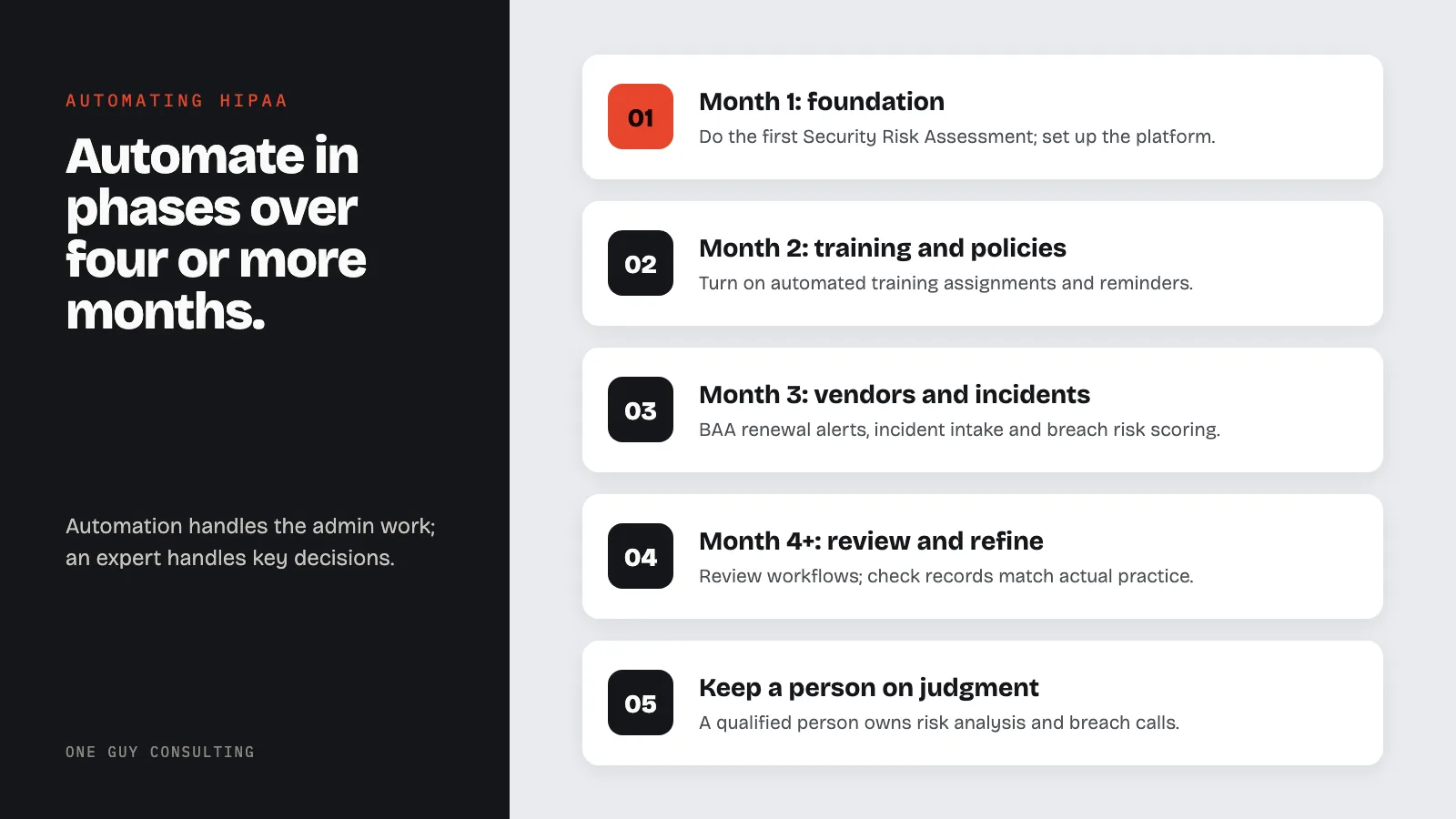
Automating your compliance program works best when done in stages. Rushing every feature live at once creates configuration errors and gaps in records. This four-phase timeline spreads the work across four or more months.
| Phase | Timeframe | Focus Area | Key Actions |
|---|---|---|---|
| Phase 1 | Month 1 | Foundation | Complete initial Security Risk Assessment. Set up compliance platform. Import vendor list and staff roster. Assign a compliance point person. |
| Phase 2 | Month 2 | Training and Policies | Activate automated training assignments and reminders per 45 CFR 164.308(a)(5). Distribute policies with acknowledgment tracking per 45 CFR 164.316(b)(2)(ii). Set up policy review scheduling. |
| Phase 3 | Month 3 | Vendor and Incident Management | Activate BAA tracking with renewal alerts. Set up incident intake forms and breach risk scoring. Configure audit log collection per 45 CFR 164.308(a)(1)(ii)(D). |
| Phase 4 | Month 4+ | Review and Refinement | Review all automated workflows. Verify completion records match actual practice. Customize policies to reflect real operations. Schedule first quarterly human review cycle. |
HIPAA automation is not about swapping your compliance program for software. It is about cutting the admin work that causes small practices to miss deadlines, lose track of vendors, and scramble when OCR shows up. Many practices that struggle in an audit did care. They just could not keep up with the manual burden.
The strongest approach automates tracking while keeping a qualified professional involved in risk decisions, policy work, and incident response. If you are not sure where to start, a guided risk assessment will find your current gaps. It will show you exactly which areas of your compliance program would gain the most from automation.
Frequently Asked Questions
Can HIPAA compliance be fully automated?
No. HIPAA compliance requires human judgment for risk assessment analysis, policy tailoring, incident response decisions, and working out what rule changes mean for your practice. What can be automated are the recurring admin tasks: risk assessment follow-up tracking, policy review scheduling, training tasks and completion tracking, BAA management with renewal alerts, and incident record workflows. The best programs automate the tracking while keeping a qualified HIPAA professional involved in the decisions.
What is the best way to automate HIPAA compliance for a small practice?
The most practical approach for a small practice is a managed compliance service that builds automation into a consulting service. One Guy Consulting uses this model. A Certified HIPAA Professional works with the practice through a compliance portal that automates policy tracking, risk assessment follow-ups, training records, and BAA management. On the Full-Scope plan, the professional walks the practice through the software. Self-service options like Accountable HQ and Compliancy Group offer automation for practices willing to manage the tools on their own.
How much does HIPAA compliance automation cost?
Costs vary widely. The HHS/ONC SRA Tool is free, but it covers risk assessment only. Paid platforms set their own prices, so check each vendor's current pricing. One Guy Consulting has two plans.
Prices are per location. Self-Guided is $60 a month, $675 a year, or $1,175 for 24 months. Full-Scope is $120 a month, $1,300 a year, or $2,300 for 24 months. See our full comparison of HIPAA compliance tools for a detailed pricing breakdown.
What HIPAA tasks should I automate first?
Focus on the tasks that cause the most compliance failures when done by hand: (1) workforce training tracking, because HIPAA requires proof that training happened; (2) BAA management, because practices often miss vendors that need agreements; (3) policy review scheduling, because policies that are never reviewed after they are written are a red flag in audits; and (4) risk assessment fix tracking, because risks that are found but never fixed can look like willful neglect. Willful neglect is HIPAA's term for knowingly and intentionally failing to follow the rules, or recklessly not caring whether you do.
Is there a difference between HIPAA compliance software and HIPAA compliance automation?
Yes. HIPAA compliance software provides the tools: risk assessment modules, policy templates, training platforms, BAA tracking. HIPAA compliance automation refers to the workflow features within that software that handle tasks without manual action: automated training reminders, policy review scheduling, BAA renewal alerts, and fix task tracking. Not all compliance software includes real automation. When checking platforms, ask what happens on its own versus what requires manual action.
Sources
- HHS HIPAA Security Rule: Administrative, physical, and technical safeguard requirements.
- 45 CFR Part 164 Subpart C: Security Rule standards and implementation specifications.
- HHS/ONC Security Risk Assessment Tool: Free SRA tool for small and medium providers.
Key point: Automation can cut the time it takes to gather proof of compliance. In January 2025, HHS proposed HIPAA Security Rule changes that would remove the split between required and addressable safeguards. (Addressable means you decide if a safeguard fits your practice.
If it does not, you write down why and use a reasonable alternative if one fits.) The changes are proposed, not final. If finalized, every safeguard would become mandatory, no matter how small your practice is. That would make compliance automation more valuable, but also harder to set up correctly.
Small Practice Resources
- HIPAA Compliance Checklist for Small Practices
- HIPAA Consulting Cost for Small Practices
- How Long Does HIPAA Compliance Take?
- HIPAA Policies and Training for Small Practices
Related Reading
- Top HIPAA Compliance Tools (2026 Comparison)
- How to Conduct a HIPAA Risk Assessment
- Compliancy Group vs. One Guy Consulting (2026)
Related: What Is HIPAA Certification? The Truth About HIPAA Compliance Credentials