If a device with patient data is lost or stolen, contain it: report it, remote wipe it if possible, and cut off its logins. Then check if it was encrypted to NIST standards with the key kept safe. If so, no breach notice is needed. If not, do the four-factor risk assessment, and notify if it is a breach.
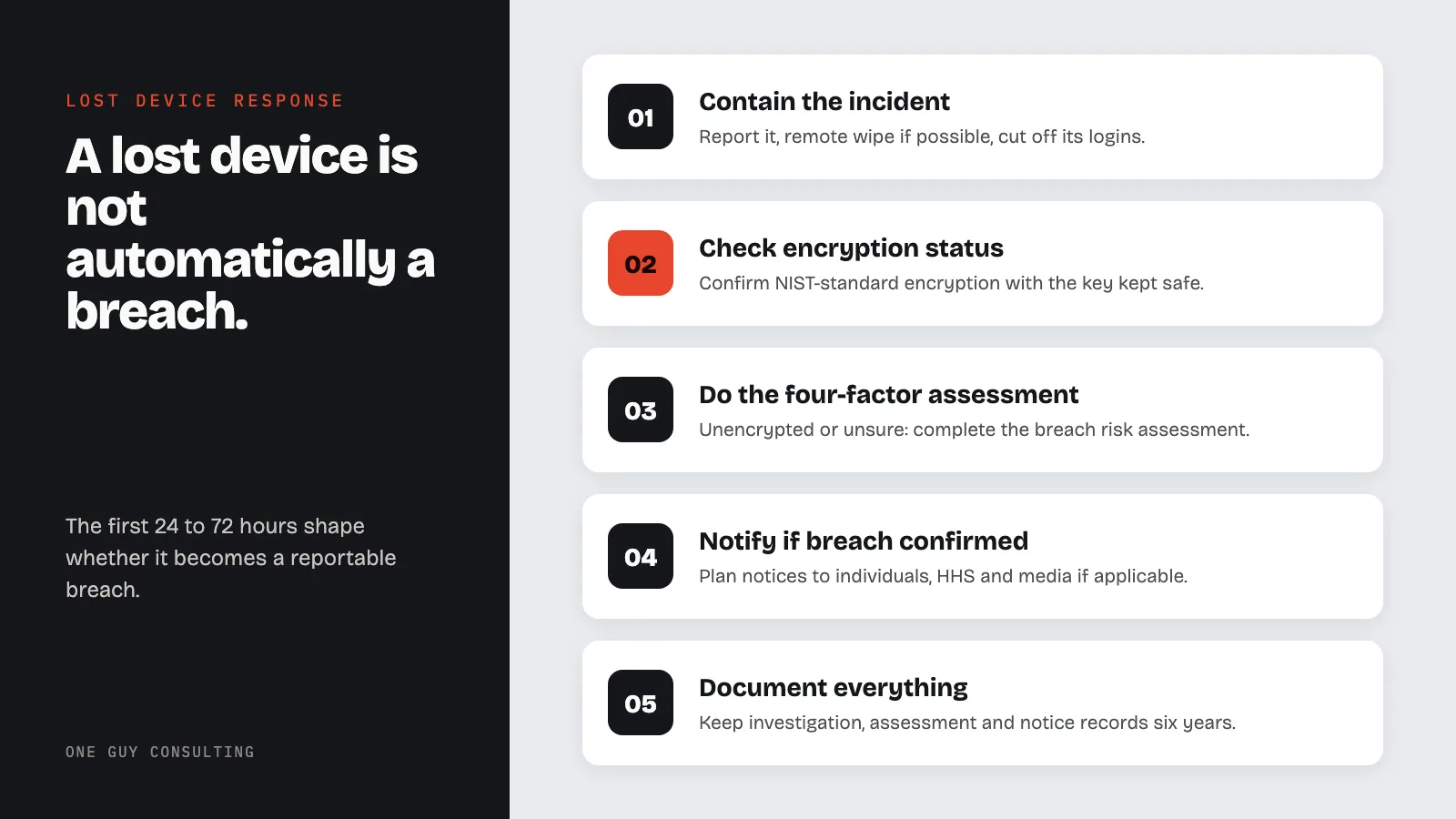
Lost or Stolen Device? HIPAA Incident Response Steps
Key Definitions
- HIPAA Breach: An impermissible acquisition, access, use, or disclosure of unsecured protected health information that compromises its security or privacy, as defined under 45 CFR 164.402.
- Risk Assessment (Breach Context): The four-factor analysis required under 45 CFR 164.402(2) to determine whether an impermissible use or disclosure of unsecured PHI constitutes a reportable breach. This is distinct from the Security Rule risk analysis required under 45 CFR 164.308(a)(1)(ii)(A).
- Encryption Safe Harbor: If PHI is encrypted to NIST standards and the key is kept safe, HHS treats it as "secured." This comes from the definition of "unsecured protected health information" in 45 CFR 164.402 and HHS encryption guidance. If secured PHI is lost or stolen, you do not have to send breach notices.
- PHI (Protected Health Information): Any individually identifiable health information held or transmitted by a covered entity or business associate, in any form: electronic, paper, or oral. Defined at 45 CFR 160.103.
- Covered Entity: A health plan, healthcare clearinghouse, or healthcare provider that transmits health information electronically in connection with certain transactions. Defined at 45 CFR 160.103.
- Business Associate: A person or entity that performs functions or activities on behalf of a covered entity that involve access to PHI, or that provides services to a covered entity where the provision of the service involves the disclosure of PHI. Defined at 45 CFR 160.103.
If a laptop, phone, or USB drive containing patient information just went missing, you have a narrow window to respond correctly. What you do in the first 24 to 72 hours shapes whether this stays a manageable internal incident or becomes a reportable breach with notification obligations, HHS involvement, and potentially significant fines. This guide walks you through the steps in order, explains the encryption safe harbor that may eliminate your reporting obligation entirely, and covers what you need to document along the way.
One important note before diving in: a lost or stolen device is not automatically a HIPAA breach. Whether it becomes one depends on a specific risk assessment your team must complete. That assessment, and how you document it, is the difference between an incident that stays in your files and one you must report to HHS. Breaches affecting 500 or more people also go on HHS's public breach portal.
HIPAA Incident Response for a Lost or Stolen Device
Immediate Actions (0-24 Hours)
- Report the missing device to your Privacy or Security Officer
- Initiate remote wipe via MDM if available
- Revoke user credentials for EHR, email, VPN, and cloud systems
- Disable remote access tokens and suspend SIM if applicable
- File a police report if theft is suspected
- Begin documenting the incident with timestamps
Follow-Up Actions (24-72 Hours)
- Confirm encryption status of the lost device with documentation
- If unencrypted or encryption unconfirmed: complete the four-factor breach risk assessment per 45 CFR 164.402(2)
- Determine the scope of PHI involved and number of individuals affected
- If breach confirmed: begin notification planning (individual, HHS, and media if applicable) per 45 CFR 164.404-408
- Assemble full documentation package for retention (minimum six years per 45 CFR 164.530(j))
- Start planning fixes so it does not happen again, per 45 CFR 164.308(a)(1)(ii)(B) (risk management)
Step 1: Contain the Incident Within the First 24 Hours
The moment a device is reported missing, the clock starts. Your first priority is containment: limiting any further exposure of patient data before you know what you are dealing with.
Start a remote wipe right away if you can. Also check that iCloud backups are turned off or the iCloud account is secured. Mobile Device Management (MDM) platforms like Microsoft Intune, Jamf, or similar tools allow administrators to remotely wipe a device as soon as it is reported missing. If you have this capability, use it. Do not wait to see if the device turns up. Document the wipe command, the timestamp, and who authorized it.
If remote wipe is not available (which is unfortunately common at smaller practices), note that absence. It matters for your risk assessment and for your prevention plan going forward.
Beyond remote wipe, take these steps immediately:
- Revoke the user's credentials for any systems accessible from the lost device, including EHR, email, VPN, and cloud storage
- Disable or suspend any remote access certificates or tokens associated with the device
- If the device was a shared or practice-owned phone, contact your carrier to suspend the SIM
- Document everything with timestamps: who reported the loss, when, what device, what the device contained, and what containment steps were taken
Then report the loss to law enforcement if there is any indication of theft. A police report is not required by HIPAA, but it is a practical step that demonstrates good faith and may be relevant to insurance claims or later investigations.
Step 2: Determine Whether the Device Was Encrypted
This is the most important question you will answer in the entire incident response. Under 45 CFR 164.402, PHI is considered "unsecured" if it has not been rendered unusable, unreadable, or indecipherable to unauthorized individuals. HHS has issued guidance specifying that valid encryption (meeting NIST standards) satisfies this requirement.
If the device was encrypted with a current NIST-compliant standard (for example, AES full-disk encryption) and the decryption key was not stored on or with the device, the information on that device is secured PHI. A loss or theft of secured PHI is not a reportable breach under the Breach Notification Rule.
This is called the encryption safe harbor, and it is one of the most important protections in HIPAA's breach rules.
To invoke the safe harbor, you need to be able to demonstrate:
- All PHI on the device was encrypted when it was lost (full-disk encryption shows this best; encrypting only a few folders can leave other PHI exposed)
- The encryption standard meets or exceeds NIST SP 800-111 or equivalent guidance
- The encryption key was not stored on the device or accessible without authentication
- You have documentation (policy, MDM enrollment records, device configuration logs) confirming encryption was active
If you cannot confirm encryption was active and meeting these standards, assume the device was unencrypted for purposes of your risk assessment. Organizations often discover during an incident that their policies said devices should be encrypted, but enforcement was inconsistent. A policy requiring encryption that was not actually implemented does not trigger the safe harbor.
For USB drives, the situation is almost always worse. Most USB drives in clinical settings are not encrypted, and they often contain more sensitive data than anyone realizes: copied patient files, billing exports, or reports saved locally for convenience. USB drives should appear in your device inventory, be encrypted by policy, and ideally be restricted by technical controls. If the lost drive was not encrypted, treat it as an unsecured PHI exposure and proceed to the risk assessment.
Step 3: Conduct the Four-Factor Breach Risk Assessment
If the device was not encrypted, or if you cannot confirm it was, you must conduct a formal risk assessment to determine whether the incident constitutes a reportable breach under 45 CFR 164.402(2). HIPAA presumes any impermissible acquisition, access, use, or disclosure of unsecured PHI is a breach unless you can demonstrate a low probability of PHI compromise.
The four-factor risk assessment evaluates:
- Nature and extent of the PHI involved: What types of identifiers were on the device and how likely is re-identification?
- Who accessed or received the PHI: Was the unauthorized recipient identified, and what is their capacity to use the information?
- Whether PHI was actually acquired or viewed: Is there evidence (logs, forensics, telemetry) that the data was accessed?
- Extent of risk mitigation: What steps were taken to reduce the risk after the incident (remote wipe, credential revocation, law enforcement)?
If the analysis of all four factors demonstrates a low probability that PHI was compromised, the incident is not a reportable breach. If you cannot reach that conclusion, the Breach Notification Rule (45 CFR 164.400-414) requires notification to affected individuals, HHS, and potentially the media.
Each factor is explained in detail below.
Factor 1: The nature and extent of the PHI involved, including the types of identifiers and the likelihood of re-identification. A device containing full patient records (name, date of birth, diagnosis, Social Security number, insurance information) presents a much higher risk than a device containing only appointment schedules with no clinical information. Consider how many patients are affected, what categories of PHI were present, and whether the data could enable identity theft or fraud.
Factor 2: The unauthorized person who used the PHI or to whom the disclosure was made. A device left in a taxi presents a different risk profile than one stolen by someone with apparent knowledge of what it contained. In many cases, this factor is unknown: you cannot verify who found or took the device. When the identity of the recipient is unknown, this factor generally weighs toward a higher probability of compromise rather than lower.
Factor 3: Whether the PHI was actually acquired or viewed. This is difficult to establish without device recovery, forensic analysis, or system logs. Remote access logs, device telemetry, or carrier data may provide some evidence. If the device was wiped remotely and telemetry confirmed no remote access occurred after the loss, that is relevant evidence. However, you cannot simply assert that PHI was not accessed without supporting evidence.
Factor 4: The extent to which the risk to the PHI has been mitigated. A successful remote wipe, especially one confirmed before any unauthorized access could have occurred, is meaningful mitigation. Credential revocation, carrier suspension, and prompt reporting to law enforcement all contribute to the mitigation picture.
Document all four factors in writing. Your risk assessment is not a form you fill out. It is a reasoned analysis explaining how you weighed the evidence and reached your conclusion. If the analysis concludes there is a low probability of PHI compromise, you are not required to notify patients or HHS. If the analysis cannot reach that conclusion, you have a reportable breach.
For more on how risk assessments feed into your overall HIPAA compliance posture, see our guide on how to conduct a HIPAA risk assessment.
Step 4: Determine Your Notification Obligations
If the four-factor analysis concludes this is a reportable breach, you have notification obligations under 45 CFR Part 164, Subpart D. The deadlines are firm and the failure to meet them has resulted in enforcement actions independent of the underlying breach.
Individual notification must be sent to each affected patient as soon as you reasonably can (the rule says "without unreasonable delay"). The latest you can send it is 60 calendar days after you discovered the breach (45 CFR 164.404(b)). "Discovery" under HIPAA is the date you first knew, or by exercising reasonable diligence should have known, that a breach occurred. For a lost device, that is typically the day the device was reported missing, not the day the risk assessment concluded.
Notifications must be sent by first-class mail to the patient's last known address, or by email if the patient has agreed to receive communications electronically. The notification must include:
- A brief description of the breach, including what happened, the date of the breach, and the date of discovery
- A description of the types of PHI involved (e.g., name, date of birth, medical record numbers, Social Security numbers)
- Steps affected individuals should take to protect themselves, such as monitoring credit reports or placing a fraud alert
- A brief description of what your organization is doing to investigate the breach, mitigate harm, and prevent recurrence
- Contact information for individuals to ask questions, including a toll-free phone number, email address, website, or mailing address
HHS notification depends on the number of individuals affected:
- If the breach affects 500 or more individuals, report to HHS at the same time you notify patients, no later than 60 days after discovery, via the HHS Breach Reporting Portal. Breaches of this size are also published on HHS's public breach portal (sometimes called the "Wall of Shame"), which is publicly searchable.
- If the breach affects fewer than 500 individuals, log it internally. Then report it to HHS within 60 days after the end of the calendar year you found it in (45 CFR 164.408(c)). That deadline is March 1, or February 29 in a leap year. Our guide on the March 1 small breach reporting deadline covers this requirement in detail.
Media notification applies when the breach affects more than 500 residents of a single state or jurisdiction (45 CFR 164.406). In that case, you must provide notice to prominent media outlets serving the affected area, also without unreasonable delay and no later than 60 days after discovery. Do not assume one device is too small to reach that line. The stolen Lifespan laptop described below held records for 20,431 patients.
Step 5: Document Everything in Real Time
HIPAA requires covered entities to maintain documentation of their breach investigations, risk assessments, and notification activities for at least six years (45 CFR 164.530(j)). That documentation serves two purposes: it demonstrates that you followed the process correctly, and it is the primary evidence available to investigators if OCR ever audits or investigates the incident.
A practical documentation package for a lost device incident should include:
- Incident report: who reported the loss, when, what device, circumstances of loss
- Containment log: remote wipe attempt (successful or not), credential revocation, timestamps, who authorized each action
- Device inventory record showing what PHI the device was authorized to store and access
- Encryption confirmation or documentation of the absence of encryption
- Written four-factor risk assessment with your reasoning and conclusion
- If breach: copies of all patient notifications, mailing logs, or email delivery confirmations
- If breach: confirmation of HHS notification or entry in the annual breach log
- Any law enforcement reports filed
- Remediation steps taken to prevent recurrence
Documenting during the incident rather than reconstructing it afterward produces more accurate records. If your incident response takes three weeks and OCR asks you about it three years later, contemporaneous documentation is what will protect you.
What Real Enforcement Looks Like
The enforcement record on lost and stolen devices is extensive. Many HHS settlements started with a lost or stolen device. The amounts are large.
Lifespan Health System paid $1,040,000 to settle with HHS in 2020 after a workforce member's unencrypted laptop was stolen from their car. The laptop contained the PHI of 20,431 patients, including names, medical record numbers, demographic information, and medication data. HHS found that Lifespan had not encrypted ePHI on its laptops. This was true even after Lifespan decided encryption was reasonable and appropriate for it. HHS also found it lacked device and media controls (the policies and procedures for tracking and protecting devices that hold ePHI). The corrective action plan ran for two years.
Catholic Health Care Services of the Archdiocese of Philadelphia, a business associate that provided IT services to nursing homes, paid $650,000 to settle with HHS in 2016 after a workforce member's iPhone was stolen. The phone held PHI of 412 nursing home residents, including Social Security numbers, diagnosis and treatment details, and medication information. It was not encrypted and not password protected. HHS found the organization had no policies on taking mobile devices out of the facility or on responding to a security incident. It also had no risk analysis or risk management plan. The case stands out because 412 people is well below the 500-person line often linked with major enforcement.
University of Rochester Medical Center paid $3,000,000 to settle with HHS in 2019. It had two separate device incidents: a lost unencrypted flash drive and a stolen unencrypted laptop. OCR had investigated a similar lost, unencrypted flash drive at URMC in 2010. URMC had also named its own lack of encryption as a high risk. It kept using unencrypted mobile devices anyway. Knowing about a risk and not fixing it makes things much worse when that exact risk happens.
The pattern in these enforcement actions is consistent: the settlement is not mainly about the device being lost. It is about the absence of basic safeguards (encryption, device controls, mobile device policies) that would have either prevented the exposure or triggered the encryption safe harbor and eliminated the reporting obligation entirely.
Laptops, Phones, and USB Drives: Different Risk Profiles
Not all devices carry the same risk, and your response priorities should reflect that.
Laptops show up again and again in the enforcement record. They typically contain full EHR access through cached credentials, locally stored files, downloaded reports, email attachments, and browser-cached data. Encryption is the main protection. Many Windows and macOS computers include a built-in full-disk encryption tool (BitLocker or FileVault). Unencrypted laptops, especially ones staff use outside the office, are a gap in both the Lifespan and URMC cases above.
Smartphones and tablets present a more variable risk depending on configuration. A device enrolled in an MDM with remote wipe capability, a strong passcode, and no locally stored PHI presents manageable risk. A personal phone used to access a practice's EHR through a browser, with no MDM enrollment and no organizational control, presents significant risk that many organizations have not fully evaluated. HIPAA does not prohibit BYOD (bring your own device) arrangements, but it requires that the risks of those arrangements be assessed and addressed.
USB drives are consistently the most overlooked device category. They are easy to lose, rarely encrypted, and often contain data that was copied without formal authorization: a clinician downloading a patient list for convenience, a billing staff member exporting to a spreadsheet. A practical approach is to restrict USB port access through Group Policy or MDM, require encrypted drives for any permitted use, and include USB drives in device inventory and acceptable use policies.
Prevention: What This Incident Should Trigger
Every lost device incident is an opportunity to close the gaps that made it possible. Once the immediate response is complete, use the incident to drive three specific improvements:
Device inventory and encryption audit. You cannot protect what you have not inventoried. Maintain a current record of every device that accesses, stores, or transmits ePHI, including personal devices used for work purposes. For each device, confirm encryption status. If you find unencrypted devices, create a remediation timeline with accountability.
Today, encryption of ePHI is "addressable" under 45 CFR 164.312(a)(2)(iv). Addressable means you must use it if it is reasonable and appropriate for your practice. If it is not, you write down why and use an equal alternative if one is reasonable. In January 2025, HHS proposed a change that would make encryption required. That change is not final yet.
MDM deployment. If the incident involved a device with no remote wipe capability, MDM deployment should be on the remediation list. MDM platforms allow your IT team or IT vendor to enforce device encryption, require passcodes, track device location, and execute remote wipes from a central console. The per-device cost is modest. The cost of losing an unencrypted device is not.
Policy update and workforce training. Policies that were not enforced (encryption requirements that were not verified, MDM enrollment that was optional, BYOD arrangements that were undocumented) should be updated to reflect actual implementation requirements. A training update specific to the incident helps reinforce that device handling is a compliance obligation, not a preference.
For a broader look at what encryption requirements apply to your devices, see our guide on HIPAA encryption requirements for 2026.
When a Business Associate's Device Is Lost
If the lost or stolen device belongs to a business associate (a billing company, IT vendor, transcription service), your response process changes. Under 45 CFR 164.410, the business associate must tell you, the covered entity, without unreasonable delay. The latest it can tell you is 60 days after it discovers the breach, or sooner if your Business Associate Agreement says so. Notifying patients and HHS is still your job as the covered entity.
Your BAA should already require the business associate to notify you promptly of any breach or security incident involving your patients' PHI. When you receive that notice, you still need to evaluate the scope of PHI involved and your own notification obligations to patients and HHS.
If a business associate loses a device and does not notify you, or you discover the incident independently, that is a BAA compliance issue in addition to the breach itself. Document the notification timeline and address the BAA violation as part of your remediation. Our guide on Business Associate Agreement requirements and compliance covers what your BAA should require in breach scenarios.
Security Incident vs. Breach: Key Differences
| Dimension | Security Incident | Reportable Breach |
|---|---|---|
| Definition | Any attempted or successful unauthorized access, use, disclosure, modification, or destruction of information (45 CFR 164.304) | Impermissible acquisition, access, use, or disclosure of unsecured PHI (45 CFR 164.402) |
| PHI involvement | May or may not involve PHI | Must involve unsecured PHI |
| Encryption effect | Still a security incident even if encrypted | Encrypted PHI is "secured" and exempt from breach notification |
| Risk assessment required | Must be tracked and documented | Requires four-factor risk assessment per 45 CFR 164.402(2) |
| Notification required | No external notification required | Notification to individuals, HHS, and potentially media per 45 CFR 164.404-408 |
| HHS reporting | Not reported to HHS | Reported within 60 days of discovery (500+ individuals) or within 60 days after the end of the calendar year (fewer than 500) |
| Lost encrypted laptop example | Yes, still a security incident | No, the encryption safe harbor applies |
| Lost unencrypted laptop with PHI | Yes | Presumed yes unless four-factor analysis shows low probability of compromise |
Common Misconceptions
- "We recovered the device within 24 hours, so we do not have to report." Recovery time does not eliminate reporting obligations. The breach occurred at the moment of the impermissible disclosure. If the device was unencrypted and contained PHI, you must still complete the four-factor risk assessment. Recovery is a mitigating factor under Factor 4, but it does not automatically make the incident non-reportable.
- "The device was password-protected, so it was secure." A password alone is not encryption. HIPAA's safe harbor requires data to be rendered unusable, unreadable, or indecipherable through an encryption method consistent with NIST standards (NIST SP 800-111). Password protection on a laptop login screen does not encrypt the data on the hard drive and does not qualify for the safe harbor.
- "Nobody would know how to access the medical records on this device." The breach presumption under HIPAA does not require proof that PHI was actually viewed. HIPAA presumes a breach occurred when unsecured PHI is impermissibly disclosed, and the burden falls on the organization to demonstrate a low probability of compromise through the four-factor analysis.
- "This was just a phone; it did not have patient data on it." If the phone had access to email, EHR, cloud storage, or any system containing PHI, those systems may be considered in scope. Cached data, downloaded attachments, and browser history can all contain PHI. The risk assessment must consider what the device could access, not just what was deliberately stored on it.
- "We only need to report if more than 500 people are affected." All breaches of unsecured PHI must be reported to HHS, regardless of size. Breaches affecting fewer than 500 individuals are reported to HHS within 60 days after the end of the calendar year. Patients must be notified for every breach, whatever its size. That notice is due without unreasonable delay, and no later than 60 days after discovery.
FAQs
If my lost device was encrypted, do I still have to do anything under HIPAA?
The encryption safe harbor eliminates the reporting obligation: you do not have to notify patients, HHS, or media if the device was encrypted to NIST standards and the key was not compromised along with the device. However, you should still document the incident and the basis for invoking the safe harbor. That documentation demonstrates compliance if the incident is ever reviewed. You should also complete your internal containment steps: credential revocation, remote wipe if available, and incident log entry.
What if I cannot confirm whether the device was encrypted?
If you cannot confirm encryption was active and meeting NIST standards at the time of the loss, you cannot invoke the safe harbor. Treat the device as unencrypted for purposes of the risk assessment. This is a common situation at organizations where encryption policies exist but enforcement was inconsistent or documentation was not maintained. The absence of confirmation is treated as the absence of encryption.
How do I count the number of patients affected when I am not sure what was on the device?
Work from what you know about the device's authorized access and use. If a laptop was used to access your EHR and had no local file storage restrictions, a conservative estimate may include all patients whose records were accessible from that device. If the device contained specific exports or files, work from the actual file contents if recoverable. When in doubt, err on the side of a broader estimate rather than a narrower one. Understating the scope of a breach can create additional problems if OCR investigates and finds the actual number was higher.
Our 60-day deadline for patient notification is coming up and we have not finished the investigation. What do we do?
The 60-day clock starts when you discover the breach, not when your investigation ends. And 60 days is the latest you can notify, not the target: the rule says to notify without unreasonable delay. If your investigation is taking longer than anticipated, you may need to send patient notifications before the investigation is fully resolved, describing what you know at the time of notification and updating patients if material new information emerges. Missing the 60-day deadline is a separate violation under the Breach Notification Rule and has been the basis for enforcement actions independent of the underlying breach.
A workforce member's personal phone was used to access the EHR and was stolen. Are we responsible?
In most cases, yes. If a workforce member used a personal device to access ePHI with your organization's knowledge or permission (including through a browser-based EHR portal) and that device was stolen, the PHI on or accessible from that device is your organization's responsibility. Whether the device was authorized or whether your BYOD policy was followed affects your internal sanctions and remediation, but it does not eliminate the compliance obligation. This is why BYOD policies need to address MDM enrollment, acceptable use restrictions, and incident reporting procedures before the first personal device is ever used for work.
What is the difference between a security incident and a breach under HIPAA?
Under HIPAA, a security incident is any attempted or successful unauthorized access, use, disclosure, modification, or destruction of information or interference with system operations in an information system (45 CFR 164.304). A breach is when unsecured PHI is acquired, accessed, used, or disclosed in a way the rule does not allow, and that compromises its security or privacy (45 CFR 164.402). Any such event is presumed to be a breach.
The exception is when a four-factor risk assessment shows a low chance the PHI was compromised. Many security incidents are not reportable breaches. A lost encrypted device is a security incident that does not constitute a reportable breach. A lost unencrypted device with PHI is both a security incident and a likely reportable breach.
Do we have to report a lost device to OCR if we determined it was not a breach?
No. Reporting to HHS is triggered by a reportable breach: an impermissible disclosure of unsecured PHI that meets the threshold for notification. If your four-factor risk assessment concludes there is a low probability of PHI compromise and you document that conclusion, you are not required to report to HHS. You should retain the documentation for at least six years in case the conclusion is ever questioned.
A lost or stolen device does not have to become a compliance crisis. The organizations that navigate these incidents well have two things in place before the device ever goes missing: encryption that triggers the safe harbor, and a documented incident response process that gets activated the moment loss is reported. The organizations in the cases above lacked these basics. They found the gap at the worst possible moment.
One Guy Consulting helps healthcare organizations build HIPAA compliance programs that hold up under real-world conditions, including device incidents, workforce changes, and vendor management. The Full-Scope plan includes an incident management system, policy and procedure templates, and a Security Risk Assessment tool. It also includes incident response guidance as needed. It is built for the way small and mid-sized practices actually operate. Book a call to see how it works.
This content is for educational and informational purposes only and should not be construed as legal advice. Organizations should consult qualified legal counsel for legal interpretations of HIPAA requirements applicable to their specific circumstances.
Sources
- HHS: HIPAA Breach Notification Rule
- 45 CFR Part 164, Subpart D: Notification in the Case of Breach of Unsecured Protected Health Information
- HHS: HIPAA Security Rule Guidance
- HHS: Guidance Specifying the Technologies and Methodologies That Render PHI Unusable, Unreadable, or Indecipherable (Encryption Guidance)
- HHS OCR Breach Reporting Portal
- HHS: Lifespan Health System $1,040,000 Settlement (July 2020)
- HHS: Catholic Health Care Services $650,000 Settlement (June 2016)
- HHS: University of Rochester Medical Center $3,000,000 Settlement (November 2019)
- NIST SP 800-111: Guide to Storage Encryption Technologies for End User Devices
- HHS HIPAA Enforcement Highlights
Key stat: Lost and stolen devices remain one of the most preventable categories of HIPAA breaches. If the device is encrypted to NIST standards (for example, AES-128 or AES-256) and the key is not compromised, the PHI counts as secured under 45 CFR 164.402. Then you do not have to send breach notices to patients, HHS, or the media. Without encryption, the same loss requires a four-factor risk assessment. Unless it shows a low chance the PHI was compromised, you must send breach notices. Civil money penalties (fines), as adjusted for inflation in 2025, can reach $2,190,294 per calendar year for identical violations (45 CFR 102.3).
Regulation Text
- 45 CFR 164.310(d): Device and Media Controls
- 45 CFR 164.402: Breach Definition and Encryption Safe Harbor
- HHS Breach Notification Rule Guidance
Related Reading:
- HIPAA Breach Notification Rule Compliance
- How to Respond to a HIPAA Data Breach
- HIPAA Encryption Requirements for 2026
- HIPAA Compliance Checklist for Small Practices
- Healthcare Cybersecurity Framework
- Ransomware Protection for Healthcare
- Data Breach Prevention Strategy
- Your Vendor Got Hacked: Now What?
Related reading: The HIPAA Copier Hard Drive Problem: What Leaves at Lease End