Our HIPAA compliance process starts with a free product tour with Chuck. Next, you name a Compliance Officer and answer a 63-question security risk assessment. Then you work the gap analysis and remediation plans it creates. After that come policies, staff training, vendor contracts (BAAs), yearly site audits and an incident management test. Setup takes weeks, not months.
Our process for working toward HIPAA compliance is a carefully designed roadmap which balances ease of customer use with an approachable way of reaching the goal line.
You will begin your journey towards HIPAA compliance by receiving a full-fledged tour of the entire platform with our owner, Chuck Weiselberg. On the product tour call, he will learn a bit about your business. Then he will walk you through how the process fits it.
This call is also encouraged for all prospective customers in order to ask your most in-depth compliance questions to an industry expert before paying anything. I am not a developer by trade. I'm a 'HIPAA-Guy', so you can always count on a clear and concise explanation to any inquiry you have.
Our HIPAA Compliance Process at a Glance
Here is the full Full-Scope process in order, before we walk through each step in detail:
- Free product tour with owner Chuck Weiselberg to map your compliance plan.
- Assign a Compliance Officer, required by 45 CFR 164.308(a)(2), before any other step unlocks.
- Complete the Security Risk Assessment (SRA), a 63-question guided audit.
- Review your gap analysis, generated automatically from the SRA results.
- Work your auto-generated remediation plans.
- Draft and publish policies and procedures, starting from the platform's policy templates.
- Invite staff and assign training (HIPAA 101 and Cybersecurity Awareness) plus policy attestation.
- Manage vendors: create profiles, execute BAAs, and send vendor risk questionnaires.
- Complete the annual audits: data device inventory, IT risk analysis, and physical site audit.
- Test incident management, then close any remaining remediation plans.
Everything below explains each of these steps in plain English.
Beginning Our Process
It is worth noting that the process to be laid out in the remainder of this article is explaining our 'Full-Scope' tier of service.
If I am fortunate enough to have earned your trust, we'll move forward. Your first task is pretty easy; DON'T TOUCH ANYTHING! It will truthfully make your life easier to see a person familiar with the platform navigate you through once before trying yourself. Instead of sitting down and ending up out of sorts when you're unsure of the next step, join me for a quick and painless tour of the platform that you will thank yourself for scheduling later on.
First Steps of the Process
One Guy Consulting's process starts your compliance plan with a security risk assessment.
BUT!!!!!!
Little did you expect us to cave that early or easily... There is a very important step that precedes the security risk assessment that is unique to our platform; Assigning someone to the role of Compliance Officer.
Complete Your Organization Info First
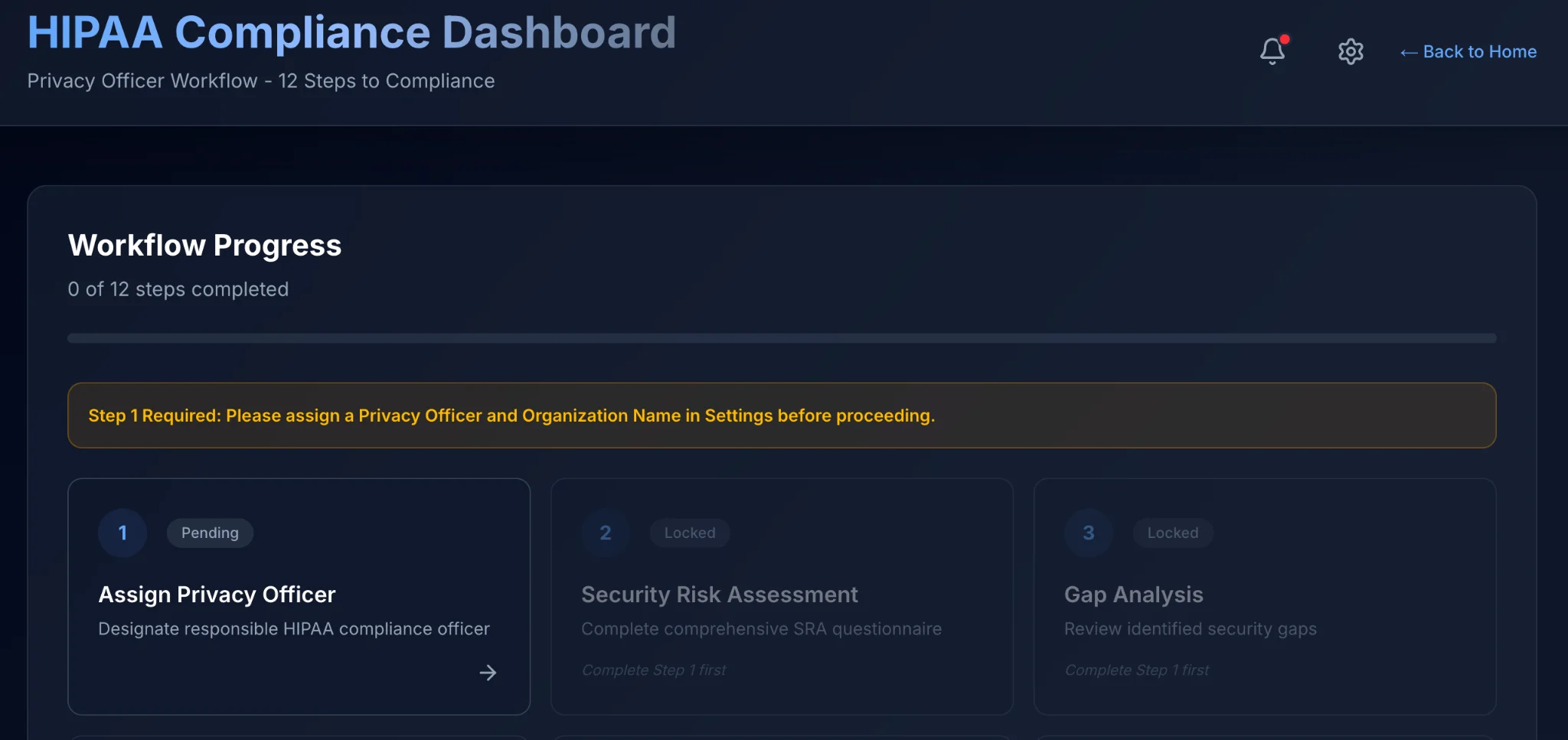
As seen above, your organization gets locked from progressing to future steps until you name someone Compliance Officer. As per 45 CFR 164.308(a)(2), the organization must "Identify the security official who is responsible for the development and implementation of the policies and procedures required by this subpart for the covered entity or business associate."
To name someone Compliance Officer, go to:
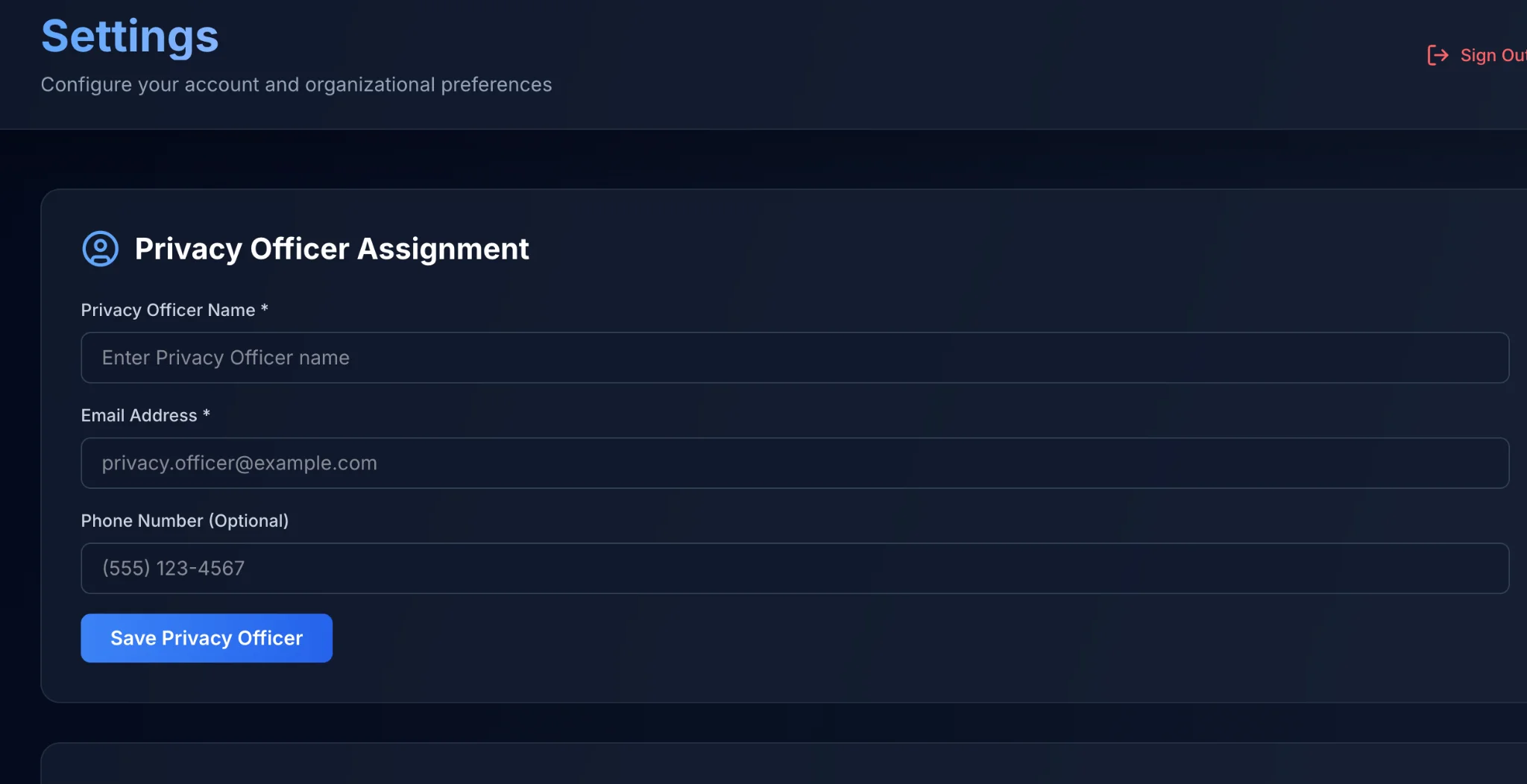
Either click 'Settings' on the far-left navbar, or click the step 1 bubble in the dashboard steps to access the Settings menu.
You'll notice the first mandatory fields sit beneath big lettering that states, "Privacy Officer Assignment".
Fill in the following accordingly in the Settings page:
- Privacy Officer Name
- Email Address
- Phone Number (Optional)
When completed, hit the blue button that is labeled 'Save Privacy Officer'.
Awesome! You have named the Privacy Officer, but do not navigate away from the Settings page just yet!
There are two hidden gems if you scroll down the main settings page that I'd like to point out quickly. First, since One Guy Consulting has built in e-signature capabilities that automate the vendor agreement portion of the process, you'll want to provide your signature (or type it in) in the next part of the page down from Privacy Officer Assignment.
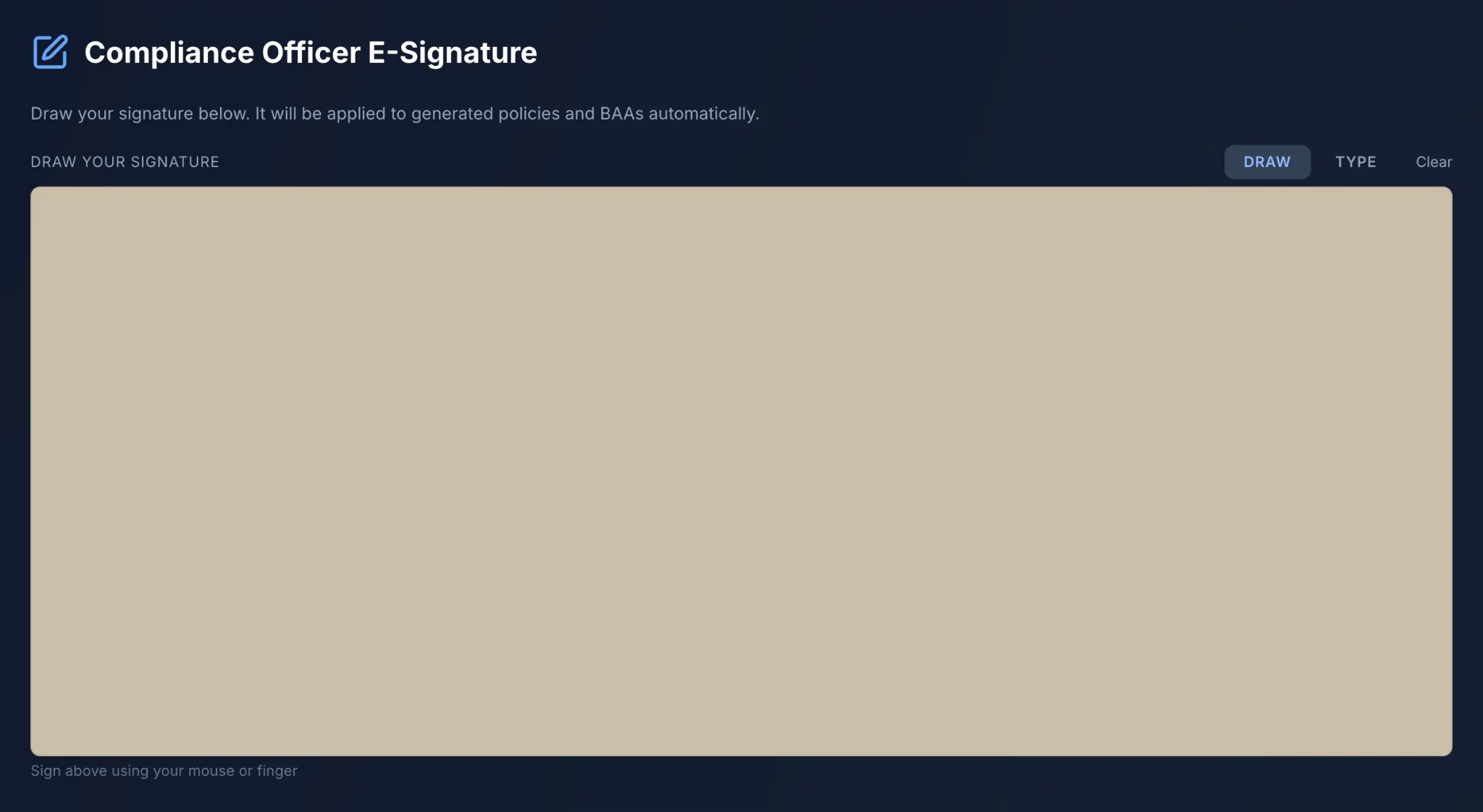
The e-signature portion of the page is pictured above for reference
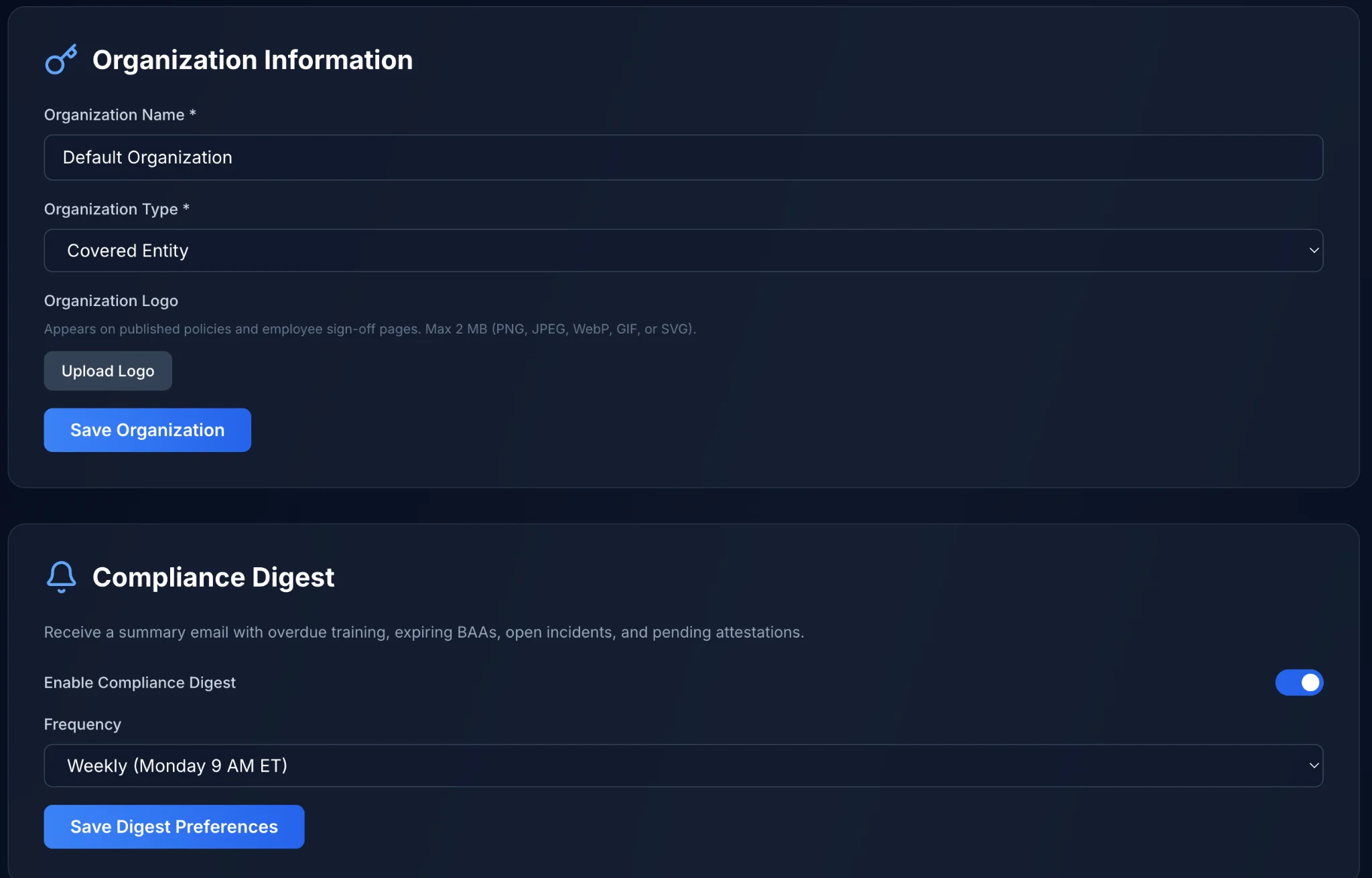
Required Settings: Organization Information
The final two settings sections are pictured above. If you only complete one, make sure it is 'Organization Information'. These are mandatory fields and will go onto documentation automatically where needed.
Do make sure to fill in the name of your organization under where it says organization name. Also, make sure you've marked the organization type by selecting whether you are a Covered Entity or Business Associate. You can upload your logo so that it appends to your contracts and policies.
When done inputting information be sure to hit Save Organization. That blue button will save your progress.
Compliance Digest
Is an automated email that you can have sent to you at a time of your choosing. That will explain the progress of your organization as a whole in a one page document delivered consistently until you ask it to stop. This is also optional and can be skipped if you do not want the feature enabled.
After You Unlock the Other Steps
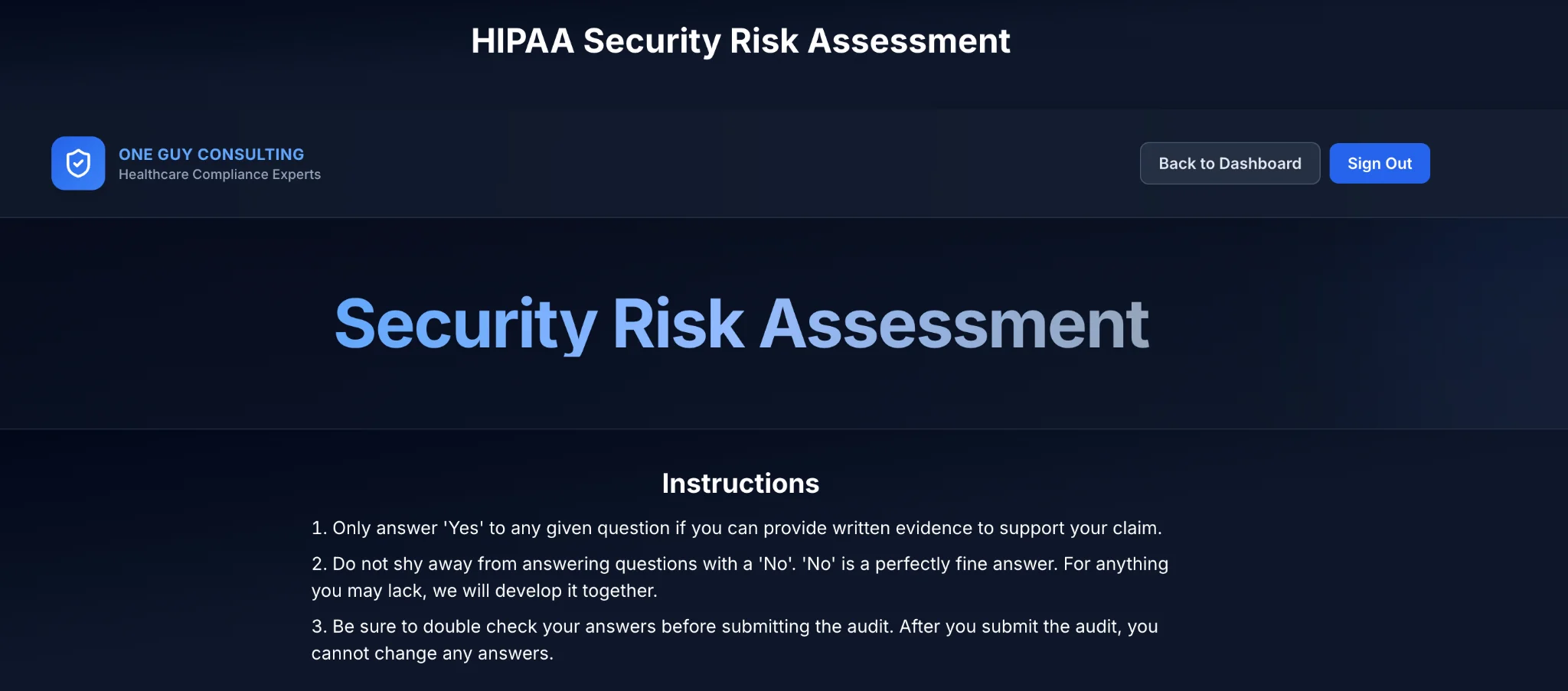
You will want to follow the dashboard tasks numerically. Number 2 is your Security Risk Assessment. The rendition of a security risk assessment that One Guy Consulting is presently serving to our customers happens to be 63 questions long. When you first glance at the jargon that is legal speak meets healthcare regulation don't be intimidated. Instead, take the questions very much at face value.
Don't ever hesitate to answer a question as a 'No'. No's are actually good things because, despite generating gaps which may seem scary, they provide a map that shows us exactly what needs fixing instead of leaving us toiling for hours, jittering your mouse over the yes button for 30 seconds then frantically moving it over to the no button for thirty seconds, unable to make a decision. Before you know it, it will be Christmas, and you're still on question 4.
Generally, if you have to give any sincere thought as to whether you have the item in question in place it's likely that you do not. For items that you are marking 'Yes' inside of the security risk assessment, make sure 100% that that answer is correct. Before moving on to the next question please leave a brief comment as to why you think that answer is a yes within the provided field.
Last if you do not get what a question is driving at, please mark it as a 'No'. It's the more beneficial answer.
 =
👍
=
👍
When You Reach the End of the Audit
You will notice a complete assessment button. Please mark the assessment complete when you reach the bottom. Don't waste time second guessing yourself, but please know that once you submit the security risk assessment it does lock your answers in. So, be sure to make any last minute changes before locking said answers in.

Once done you do have the ability to download the SRA with your answers embedded (for your records. Though it will be stored already for your convenience within the platform) it is available in markdown or PDF formats.
Reviewing Your Gap Analysis
The beauty of the One Guy Consulting HIPAA Compliance platform is its level of automation often overlooked by competitors in this same space. This is the 21st century. We do not need to individually map each regulation and gap to document how the remediation plan is eventually developed. Instead, the gap analysis is available immediately upon completion of the SRA. The system quickly scores your audit and your gap analysis is available at the same moment. It is available for download in markdown and .pdf formats.
Where Automation Speeds Things Up
After tediously mapping each regulation specification to the gap it is associated with (on paper, with a pen! How pedestrian....), you used to need to shove 6 binders to make room on your desk for the next 6. All of which would be required to write up the remediation plans necessary for healing the gaps previously found. It was brutal!
So, I went ahead and automated your remediation plans as well.
At the same time as when you complete the SRA and receive your gap analysis further work chugs along behind the scenes. There's no reason to leave the creation of remediation plans in human hands any longer. Instead, the system is able to infer what remediation plans would be necessary and most beneficial, drafting them on the spot for you. Rather than wasting time setting up a whole bunch of pieces you don't understand yet, we are able to zip through the parts of your plan which have always been, more or less, bureaucratic busy work.
Built to Move Quick

And just like that, you're already drafting policies, sitting on top of a proverbial pile of paperwork that shows your due diligence efforts of late, which you can show an auditor when one asks for it.
There's some other cool automation that I would be remiss in not informing you about. It's a big deal. When I thought it up, I said, "Is that even legal?"
The honest answer: generating a policy is not the same as adopting one. The system drafts it. Your Privacy Officer reviews, edits, and approves it before it becomes your policy.
That is quite the timesaver, just like previous automations seen implemented in the SRA results, gap analysis, remediation plans: the policies are automated!

Again, thanks to AI and inference, One Guy Consulting can draft your HIPAA policies for you, starting from the platform's policy templates. No registering for Law school just to keep your practice open. My solution can draft the written policies needed to close the related remediation plans. And, guess what ... Where applicable, the remediation plans are automated even further. To the point where they can automatically close once the system has detected the tasks related had been completed.
Now, you definitely cannot automate everything in your HIPAA compliance plan,
but you can come real close. You also may not want the automation to stretch that far and be involved in your policy creation. This is totally fine since the automation is optional, you can access essentially the same template for your edits and review, and if you have policies you prefer from elsewhere, you are welcome to upload those into our platform for the sake of maintaining a 'single source of truth' for all your HIPAA compliance records.
Either way, when you wrap up with the drafting of your policies and procedures, it is time to invite your staff to the platform. Following their invitation, you will go on to publish the final version of your policies and procedures. Publishing the policies and procedures is merely a fancy way to say that you are making them available for the staff to attest to. Staff who have registered for the portal prior to your publication of the policies can always complete the other parts of their annual training independently. The two important trainings that coincide with policy attestation are titled HIPAA 101 and CyberSecurity Awareness training. By completing HIPAA 101, CyberSecurity Awareness training, and attesting to policies and procedures your staff is done until the platform's next yearly training.
As Privacy Officer you maintain a birdseye view on staff training progress. When someone falls behind you can even provide them a polite email nudge asking them to complete training when they are able.
Once staff have sunk their teeth into training, you can feel welcome to polish off the few administrative tasks which remain for a Privacy Officer at this juncture of creating their HIPAA compliance plan.
What Is Left at This Point?
It may look like a lot when typed out, but if all has gone 'according to plan' (pun totally intended), here's your remaining to-do list:
- Create Vendor Profiles
- Execute BAA's, or upload existent ones
- Audit vendors for risk by emailing them an audit via the vendor profile
- Complete data device inventory audit
- Answer the IT risk analysis questionnaire (way easier than it sounds)
- Finish the Physical Site Audit (walk around the office, jiggle a few door handles, jot some notes and that task is done until the platform's next yearly cycle)
- Test the Incident Management System by submitting a bogus report
- Close any remaining remediation plans
Let's go over the steps we will take to polish off this remainder of your compliance plan. We're so close!
Vendor Management
For the sake of argument let's just define what a business associate is once again now that we have reached the vendor management portion of the process. A business associate is an outside person or company that creates, receives, keeps or sends protected health information (PHI) for you. A billing company is one example. Their work puts them in contact with your patients' information. That is why you need a business associate agreement (BAA), a contract between you and that vendor. The BAA requires the vendor to use proper safeguards to keep PHI safe and private (45 CFR 164.504(e)).
More Automation Expedites Our Process Further
After building any vendors' profile (so long as you included the email of the vendor) you have the ability to execute the necessary business associate agreement directly from it. If you remembered to set up your electronic signature under settings at the very beginning of the process, when you named yourself the compliance officer, all you need to do is hit send after e-signing the agreement which populates in a vendor profile to ship that agreement to your BA. Once the BA receives the BAA, they too can e-sign. When done e-signing, the document saves within the profile, stores both signatures and you are good to go!
Vendor Risk Analysis
Built into any vendor profile is the capability to email your BA's a questionnaire that checks out just how compliant they are + how solid their security posture is. Similar to the BAA, when the third-party completes this task, the questionnaire will save within the profile where it is nice and safe should you ever need to produce it in the future.
Data Device Inventory Audit
The platform asks you to do this once a year. You need to know where your electronic protected health information (ePHI, meaning patient health information kept in digital form) is stored, sent or touched. Today's HIPAA Security Rule sets no yearly schedule for this. A 2025 proposed update to the Security Rule would require an asset inventory, which is a list of your technology. That change is only a proposal, not law.
Account for every device in your organization that can touch protected health information. You don't need to go into crazy detail, but you do need to list the device type, where the device can be located a majority of the time, an estimation of how many people's records could be touched via xyz device on any given day. You don't HAVE to list the person responsible for the device, but it is usually a good idea to do so. Last, please use the notes field to your liking and if needed.
IT Risk Analysis Questionnaire
Much like the vendor risk analysis which was sent to your third party business associates, you have one to complete as well. It will provide an auditor with a good snapshot of your security posture. It is a regularly recurring requirement.
Physical Site Audit
A Physical Site Audit is intended to serve as a periodic check on how secure PHI is kept secure in a very literal sense within your facility. Questions include ones along the lines of, 'Do you have locks on your doors?' and 'Is there an alarm for the building in case of break-in?' Once you confirm your physical protections for 'in-person' PHI within the audit you are down to ONLY TWO REMAINING SETUP TASKS! (Worth saying plainly: finishing setup is not the same as being "compliant." HIPAA compliance is ongoing, but you will have the documentation, policies, and processes an auditor expects to see.)

Testing Incident Management
This is something which should not take you more than 5 minutes to test. It does require a tad bit of explanation to get it done.
Please maneuver to Incident Management in the navbar to the left. Once there, select Report. At the very top you will notice that you have the ability to submit this incident as an anonymous user. That is deliberate. HIPAA prohibits retaliation against workforce members who report concerns (45 CFR § 164.530(g)), and anonymous internal reporting is a common way organizations make it safe for staff to actually speak up. Your team can report a disclosure without putting their name on it.
After the submission of an incident, the Privacy Officer will immediately receive a copy of said report for further follow-up, remediation and investigation in their email. Once we confirm that the mock incident was submitted painlessly to the portal, and the Privacy Officer gets notified about it in the post-submission email, testing is complete.
The End of the Process
If you have any remediation plans that are still pending please make sure to wrap up anything that is not addressed within it so that you can close the remediation plan and effectively be done with day-to-day compliance work until it comes time for you to address the platform's yearly tasks, one year from when you originally took the security risk assessment.
HIPAA Compliance Is a Dynamic Process
Consider it this way, you just implemented a culture into your organization. A culture of compliance because it is not just about technical, physical and administrative safeguards. It's about attitude. It's about caring and wanting to respect someone's right to privacy. The hope is that, with proper training, documentation and technical tasks put on a timer, you won't need to manage compliance anymore. In dribs and drabs, some things may require the Compliance Officer's attention in order to remain HIPAA compliant, but, for the most part, you will be able to address issues in advance rather than scrambling to clean up after the fact.
That's the difference between a compliance program and a compliance culture. One lives in a binder. The other lives in how your team thinks, acts and responds when no one is watching. Build the culture, maintain the rhythm, and compliance stops being a burden. It just becomes how you operate.
Would you like to take a closer look at our HIPAA compliance process, instead of only reading about it? Well, lucky for you, I can make this a reality, since our product tours are free of charge and obligation. Book one right now! .... Go! what're you waiting for?!?!
Frequently Asked Questions
How long does the HIPAA compliance process take?
Initial setup takes weeks, not months, when you follow the platform's step-by-step process. You answer the security risk assessment questions. The platform then builds your gap analysis and remediation plans for you. After setup, keeping up with compliance is a yearly routine that takes much less effort.
Do I need technical expertise to use a HIPAA compliance platform?
No. The platform is designed for Privacy Officers and practice managers, not IT professionals. The dashboard walks you through each step in plain English, and the automation handles the heavy lifting behind the scenes. If you can fill out an online form, you can complete your compliance plan.
What is a HIPAA security risk assessment?
A security risk assessment (SRA) is a federally required evaluation of how your organization protects electronic protected health information (ePHI). It identifies vulnerabilities in your technical, physical, and administrative safeguards. Our SRA consists of 63 questions that assess your current security posture and automatically generate your gap analysis and remediation plans from the results.
Can I use my own policies instead of the automated ones?
Absolutely. The automated policy generation is optional. You can edit the generated templates, write your own from scratch, or upload existing policies you already have in place. The platform serves as a single source of truth for all your HIPAA compliance records regardless of where the policies originated.
What happens after the first year of HIPAA compliance?
HIPAA compliance is ongoing. HIPAA does not set one yearly date for these tasks. It asks you to review your security measures and written policies, and update them when needed (45 CFR 164.306(e) and 164.316(b)(2)(iii)). The platform runs on a yearly cycle: each year you retake the security risk assessment, retrain your staff on HIPAA 101 and CyberSecurity Awareness, review and update your policies, and complete the physical site audit again. The platform tracks these yearly tasks and the Compliance Digest email keeps you informed of your organization's progress throughout the year.
Related Reading
- What Is the Main Purpose of a HIPAA Risk Assessment?
- HIPAA Gap Analysis: Process, Findings & Remediation
- The 3 HIPAA Safeguards Explained Simply
- HIPAA Policies and Training for Small Practices
- Business Associate Agreements: What They Are and Why You Need One
- HIPAA Incident Management: A Complete Guide
This content is for educational and informational purposes only and should not be construed as legal advice.