Yes, HubSpot can be HIPAA compliant, but only on Enterprise plans. A Super Admin must turn on Sensitive Data and check the HIPAA boxes. They must also accept HubSpot's Business Associate Agreement (BAA), a contract to protect patient data. Even then, protected health information (PHI) can go only in sensitive properties and the features HubSpot lists.
In June 2023, OCR announced a $75,000 settlement with iHealth Solutions, a business associate, over the disclosure of protected health information on an unsecured server. The lesson is not about the amount. It is that a vendor holding PHI (protected health information) for a covered entity (a provider, health plan, or clearinghouse that HIPAA covers) is a business associate whether or not anyone thought of it that way, and a CRM that stores patients is the textbook example.
Is HubSpot HIPAA compliant? Yes, on Enterprise editions, after a Super Admin turns on Sensitive Data, selects the HIPAA options, and accepts HubSpot's Business Associate Agreement. HubSpot's Product and Services Catalog says "customers with an Enterprise edition subscription may enable Sensitive Data in their HubSpot account, subject to the HubSpot Sensitive Data Terms," and those terms carry the BAA (Business Associate Agreement) as Annex I. The catch, and it is a real one, is that PHI is then permitted only in the features HubSpot lists as Sensitive Data Covered Services. This guide covers the edition requirement, the switch, the BAA's terms, where PHI may and may not go, and the setup.
Is HubSpot HIPAA Compliant: Enterprise, Sensitive Data, and the BAA
When HubSpot Signs a BAA
Yes, by acceptance inside the product. HubSpot's knowledge base describes the flow: a Super Admin goes to Settings, then Security, then the Sensitive Data tab, toggles Sensitive Data Protection on, and selects data categories. "To store HIPAA-covered data, you must select both the Health/Medical Data checkbox and the We are a HIPAA-covered entity or business associate checkbox." The next step is to "Read the Sensitive Data Terms and if applicable, the Business Associate Agreement" and accept. HubSpot explains why the checkbox matters: "By identifying as a HIPAA Covered Entity or Business Associate, HubSpot can track the application of the Business Associate Agreement (BAA) and fulfill regulatory obligations."
The BAA itself, in the Sensitive Data Terms (last modified April 14, 2026), applies "only to the extent Customer is a 'covered entity' or 'business associate' ... where Customer is sharing Protected Health Information with HubSpot," and it limits PHI to information "received and maintained by HubSpot from or on behalf of Customer through the HubSpot Services." Its terms line up with what 45 CFR 164.504(e)(2) requires of a business associate contract: use and disclosure limits, safeguards and Security Rule compliance for electronic PHI, subcontractor flow-down, support for access, amendment, and accounting requests, and return or destruction at termination. It commits HubSpot to report a breach "no later than ten (10) business days after discovery." What a compliant BAA must contain, clause by clause, is in the business associate agreement guide.
The HIPAA-Eligible HubSpot Plans
HubSpot's article on storing Sensitive Data lists the eligible subscriptions as the Enterprise tier of Marketing Hub, Sales Hub, Service Hub, Data Hub, Content Hub, Smart CRM, and Revenue Hub. Starter and Professional editions cannot enable it. HubSpot also notes that "Sensitive Data for PHI subject to HIPAA is not available in all areas," so confirm availability for your region before building anything.
| Edition | Sensitive Data and BAA | Notes |
|---|---|---|
| Free tools, Starter, Professional | No | Cannot hold PHI in any field |
| Enterprise (any Hub, Smart CRM) | Yes, after a Super Admin enables Sensitive Data and accepts the BAA | PHI allowed only in flagged properties and listed Covered Services |
Two warnings from HubSpot's own page: the data categories you pick are permanent ("once you've turned on Sensitive Data, it's not possible to remove the selected categories"), and a property marked sensitive can never be switched back. You can only turn Sensitive Data off through an opt-in beta (an early test version you choose to join). Before you can, you must delete every PHI and Highly Sensitive property. Plan the data model before flipping the switch.
Where PHI May Live in HubSpot
This is the part that makes HubSpot different from an EHR. PHI is not simply "in HubSpot." It is allowed in custom properties flagged as Sensitive Data or Highly Sensitive Data, with an additional checkbox: "If the property will store HIPAA-protected health data, select the Yes, this data contains Protected Health Information (PHI) checkbox." Flagged properties get application-layer encryption on top of HubSpot's default encryption, and Highly Sensitive values require a click to decrypt.
The catalog lists the Covered Services that support those properties across Smart CRM, Marketing Hub, Sales Hub, Content Hub, and Data Hub: custom properties with sensitive flags (creation, import, export, manual update), the properties, import, and object APIs, CRM activities (notes, calls, tasks, one-to-one email, meetings), CRM attachments, forms and the forms API, call recordings and conversation intelligence, integrations, and Breeze Assistant features. Then the exclusions: "Sensitive Data properties are unavailable in certain tools, including personalization tokens, sandboxes, chatbots and playbooks," and Highly Sensitive properties are "restricted further." The Sensitive Data Terms add that "Prohibited Sensitive Data is not permitted in any Subscription Services features, including Covered Services," and that using the platform "for directly processing payments is strictly prohibited."
Read that as a map. The one-to-one sales email is a Covered Service. The marketing email with a personalization token pulling a diagnosis field is not, because the token cannot read the field. That limitation is a feature: it keeps a condition-tagged patient list out of the campaign tools, which is where most marketing HIPAA problems begin.
The Marketing Rule Still Applies
Even with PHI stored correctly, using it to sell is a Privacy Rule event. 45 CFR 164.508(a)(3)(i) says "a covered entity must obtain an authorization for any use or disclosure of protected health information for marketing," with exceptions only for face-to-face communications and gifts of nominal value. Messages about the practice's own services, and treatment messages, do not count as marketing under 164.501. That changes if a third party pays the practice to send them.
Refill reminders are different. They still do not count as marketing when a third party pays for them, as long as the payment is reasonably related to (roughly in line with) what it costs the practice to send them. A campaign segmented by procedure and sponsored by a device maker needs signed authorizations with the elements in the authorization form guide. HubSpot's BAA cannot supply those.
What the HubSpot BAA Does Not Cover
- PHI typed into unflagged fields. A diagnosis in the standard "notes about this contact" box is PHI outside the Covered Services.
- Personalization tokens, chatbots, playbooks, and sandboxes. Excluded by HubSpot's own list.
- Third-party integrations. HubSpot's terms say data processed by third-party products is "hosted in accordance with policies maintained by those third-parties." Each one needs its own BAA.
- Payments. Prohibited outright for direct processing.
- Users and permissions. Property-level access is a setting you make. HubSpot's page even lists suggested next steps after you turn it on. Use them.
How to Set Up HubSpot for HIPAA
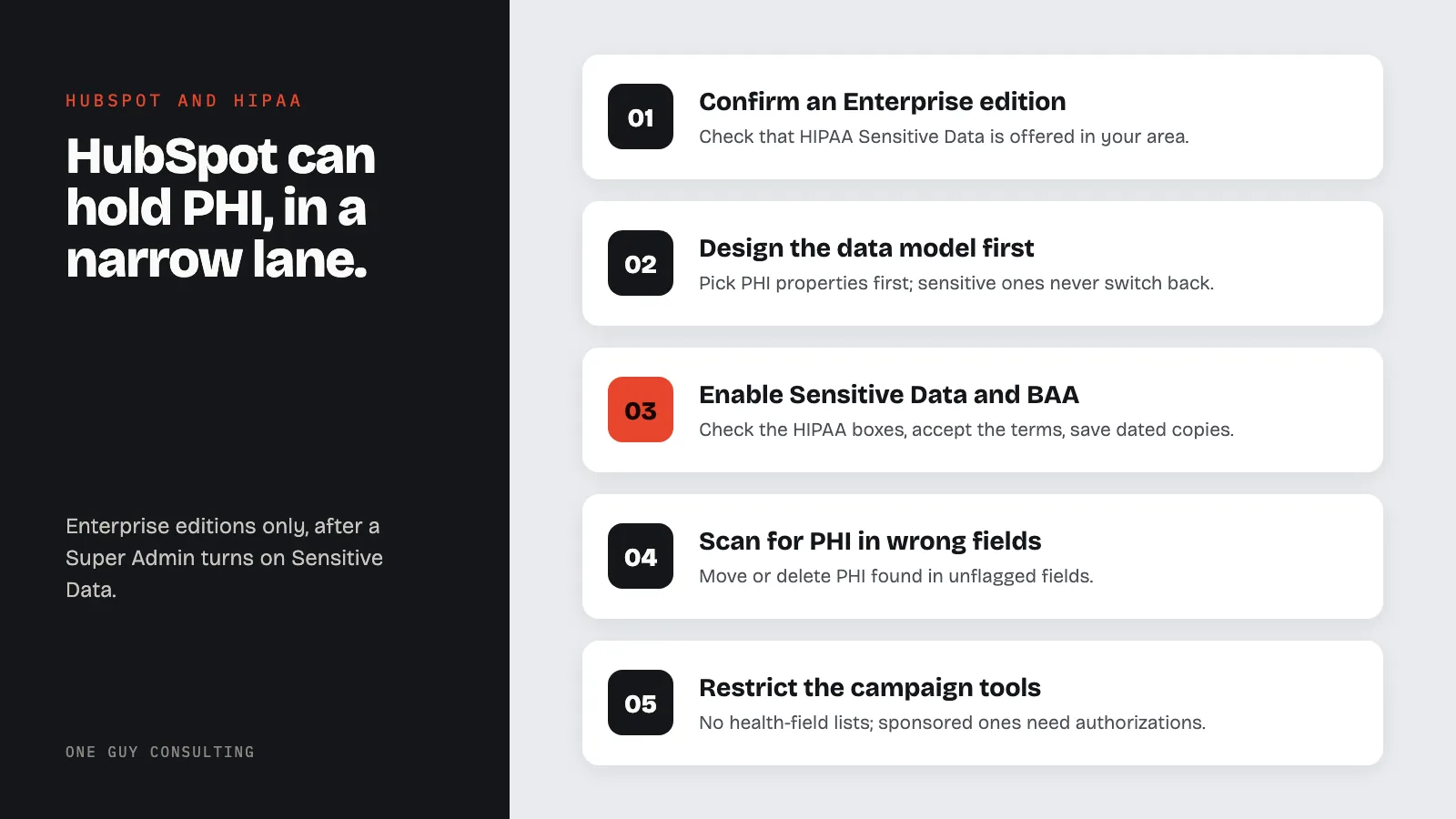
- Confirm an Enterprise edition and that HIPAA Sensitive Data is available in your area.
- Design the data model first. Decide which properties will hold PHI, since a sensitive property can never be switched back. Turning Sensitive Data off later means deleting every PHI property first.
- Have a Super Admin enable Sensitive Data, select Health/Medical Data and the HIPAA-covered-entity checkbox, read and accept the Sensitive Data Terms and the BAA, and save a dated copy of both.
- Create PHI properties with the PHI checkbox and set property-level access so only the roles that need them can view or edit.
- Run HubSpot's scan for unsecured sensitive information, which the knowledge base offers, and move or delete PHI found in unflagged fields.
- Restrict the campaign tools. Write the rule that no list, workflow, or email segment may be built on a health property, and that sponsored campaigns require authorizations.
- Vet every integration. No BAA, no PHI.
- Give each person their own login and confirm who they are. 45 CFR 164.312(a)(2)(i) requires a unique user ID for each person. 45 CFR 164.312(d) requires a way to confirm each person is who they say they are. Two-factor authentication (a second check, such as a code on your phone, on top of the password) is a common way to do that. Add HubSpot deprovisioning to the termination checklist. The broader model is in the ePHI access control guide.
- Apply minimum necessary to imports and exports. 45 CFR 164.502(b)(1) applies to the CSV as much as to the chart; see the minimum necessary guide.
- Add HubSpot to the risk analysis as a system that stores ePHI, per 45 CFR 164.308(a)(1)(ii)(A).
Common HubSpot HIPAA Mistakes
Enterprise without the switch. The subscription enables the option. The Super Admin enables the coverage.
PHI in the wrong field. Staff type where the cursor lands. Training and the scan are the controls.
Condition-based marketing lists. Blocked by the token restriction for flagged properties, but not for the unflagged field someone used instead.
Forgetting the SMS and chat channels. Texting patients from a CRM raises the texting rules regardless of the BAA.
Alternatives for Patient Relationship Management
| Option | BAA path | Notes |
|---|---|---|
| HubSpot | BAA in the Sensitive Data Terms, Enterprise only | PHI limited to flagged properties and listed Covered Services |
| Salesforce | Business Associate Addendum through the account representative | Per-service coverage; customer must encrypt stored and transmitted PHI |
| EHR patient engagement module | Usually inside the EHR vendor's BAA | Less flexible, less to configure |
HubSpot has built a narrow, well-marked lane for PHI and a fence around everything else. Practices that stay in the lane have a defensible CRM. Practices that treat the whole platform as covered because the BAA exists have a marketing database full of patients and a contract that says the fence was there the whole time.
FAQ
Does HubSpot sign a HIPAA Business Associate Agreement?
Yes. HubSpot's BAA is Annex I of its Sensitive Data Terms. A Super Admin on an Enterprise edition accepts it while enabling Sensitive Data, after selecting the Health/Medical Data and HIPAA-covered-entity checkboxes.
Which HubSpot plans can store PHI?
Only Enterprise editions of Marketing Hub, Sales Hub, Service Hub, Data Hub, Content Hub, Smart CRM, and Revenue Hub, per HubSpot's knowledge base. HubSpot also says HIPAA Sensitive Data is not available in all areas.
Can I put PHI anywhere in HubSpot once the BAA is accepted?
No. PHI is permitted only in custom properties flagged as Sensitive or Highly Sensitive Data, within the Covered Services HubSpot lists. Personalization tokens, sandboxes, chatbots, and playbooks cannot use those properties.
Can I send marketing email to patients from HubSpot?
Flagged PHI properties cannot be used in personalization tokens, which keeps condition data out of campaigns. Any marketing use of PHI also requires a patient authorization under 45 CFR 164.508(a)(3) unless it fits an exception, such as communications about the practice's own services that no third party pays for.
Can Sensitive Data be turned off later?
Only with effort. HubSpot now offers an opt-in beta (an early test version you choose to join) that turns Sensitive Data off. First you must delete every PHI and Highly Sensitive property. The data categories you picked can never be removed. A sensitive property can never be switched back to normal. Design the data model before enabling.
A CRM that holds patients is a HIPAA system, whatever the marketing team calls it. One Guy Consulting's Full-Scope plan includes vendor management with digital BAAs, plus policy and procedure templates. It also includes 4 hours a month of 1:1 implementation calls with Chuck. He answers your vendor questions as you add HubSpot to your vendor profile. Start with a free 30-minute intro call. No obligation, no pressure.
Sources
- HubSpot Legal: Sensitive Data Terms, including Annex I Business Associate Agreement (vendor page)
- HubSpot Knowledge Base: Store Sensitive Data in HubSpot (vendor page)
- HubSpot Legal: Product and Services Catalog, Sensitive Data in HubSpot section (vendor page)
- 45 CFR 164.504 (business associate contract requirements at (e))
- 45 CFR 164.502 (uses and disclosures; minimum necessary at (b))
- 45 CFR 164.312 (technical safeguards)
Related Reading
- HIPAA compliance for healthcare marketing agencies
- Business Associate Agreement (BAA): HIPAA requirements and guide
- HIPAA email compliance guide
- 7 business associate agreement mistakes to avoid
- HIPAA authorization requirements: form elements and rules
Related reading: Is Jotform HIPAA Compliant? Yes on Gold and Enterprise, With a BAA